AlternativesUpdated
Best Bubble Alternatives in 2026
Bubble builds web and phone apps in a visual editor, with the database, user accounts and workflows built in, and meters the server work an app does in workload units. A live app starts on Starter at $39 a month, and it runs only on Bubble. Here is how seven alternatives compare for someone leaving it.
The Rebuild my site box from Fabricate's home page. It opens Fabricate with your rebuild written out, and nothing is built until you press Build there.
Key takeaways
- Bubble builds web and phone apps in a visual editor with the database and accounts built in, but an app runs only on Bubble; the data leaves as CSV.
- Building on Bubble is free; a live app starts on Starter at $39 a month, and every plan meters server work in workload units.
- Fabricate writes the app as React and TypeScript from a description. On Pro and Max, see, edit and download the code, or send it to GitHub.
- FlutterFlow is the visual builder nearest to Bubble that exports code; Adalo suits phone apps, and Glide and Softr internal tools.
Why Are Users Seeking Bubble Alternatives?
Bubble's editor keeps the database, accounts and logic in one place, so the reasons people leave are mostly about where the app can run, how usage is billed and what a live app costs. Some name the alternative that fits them.
The App Stays on Bubble
Bubble's manual says an app runs only on Bubble. The data can leave as CSV, but the app itself cannot, so moving means rebuilding it.
Fits: FabricateServer Work Is Metered
Every plan includes workload units, the measure of the server work an app does: 175K a month on Starter. Past that, you buy a workload tier or pay overages, unless you turn overages off.
A Live App Starts on Starter
The free plan builds a development version only. A live website and your own domain start on Starter, at $39 a month, or $32 a month billed yearly.
Code a Developer Can Take Over
Another visual builder, FlutterFlow, lets you download the Flutter code from its Basic plan, so a developer can carry on outside it.
Fits: FlutterFlow
Compare at a glance
Fabricate beside Bubble, feature by feature.
- How an App Is Made
- Fabricate
- Described in plain words
- Bubble
- Laid out in a visual editor
- Where It Can Run
- Fabricate
- On Fabricate, or exported to your own Cloudflare account on Pro and Max
- Bubble
- Only on Bubble
- Usage Billing
- Fabricate
- Credits for AI work; serving is in the plan
- Bubble
- Workload units, with overages
- Sign-in and Data
- Fabricate
- Written into the app's code
- Bubble
- Built into the editor
- Taking Payments
- Fabricate
- Stripe Checkout, from Pro up
- Bubble
- The Stripe plugin
- A Live App From
- Fabricate
- Every plan, Free included
- Bubble
- Starter, $39 a month
- Plans After Free
- Fabricate
- Pro at $25, Max at $100
- Bubble
- Starter $39, Growth $134, Team $399
Fabricate
We make thisBest for: Leaving Bubble with code you can keep
Where Bubble keeps the app in its own editor and format, Fabricate writes it as React and TypeScript from a description, with the database, sign-in and server routes in the app's own code. On Pro and Max, see, edit and download the code, or send it to GitHub, so a developer can carry on with it outside Fabricate. Serving the published app is part of the plan. Building and publishing start free.
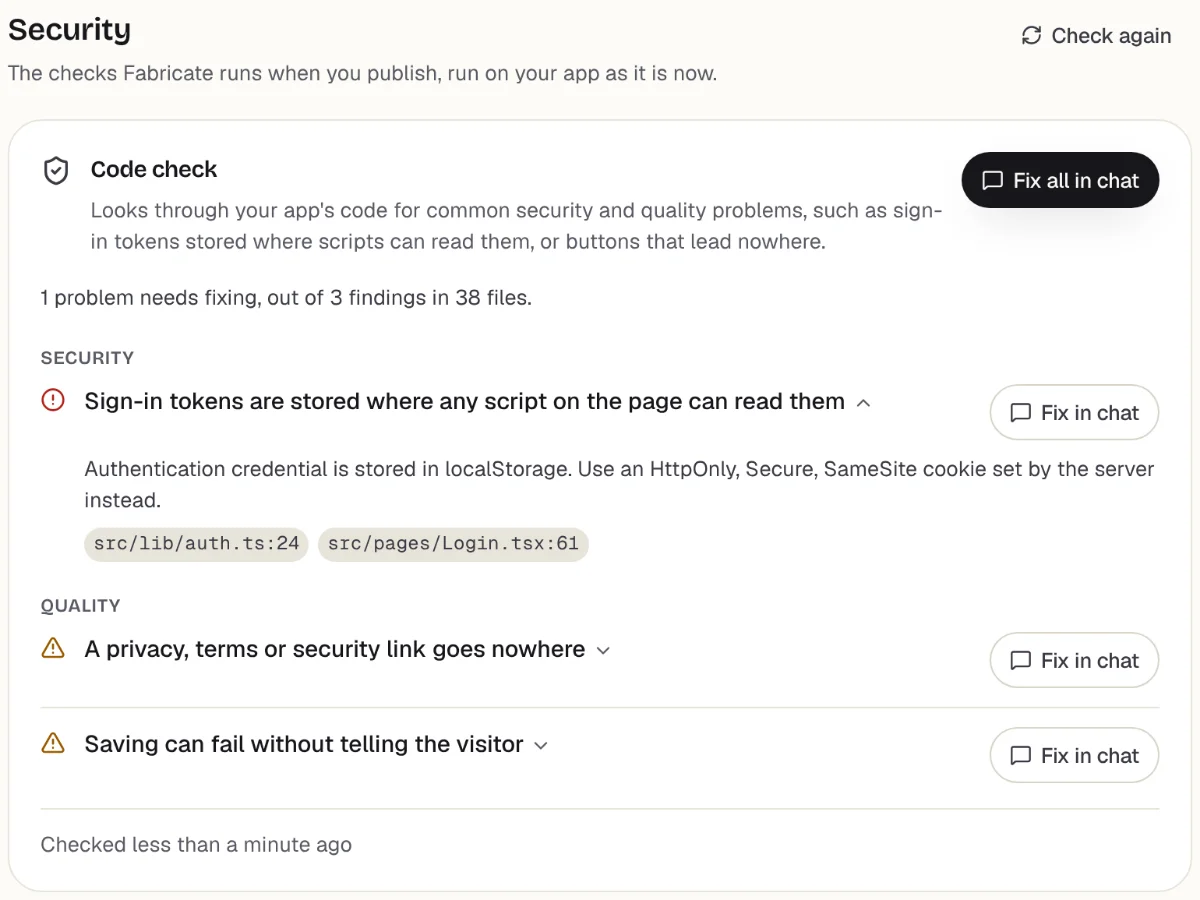
 Checks before you publish
What it does well
- React and TypeScript, not a Bubble app
- Described in words, not laid out
- No workload units to track
- Code to download on Pro and Max
- Paid plans from
- $25 a month
- 350 credits a month on Pro
- Free plan
- 60 credits
- A month, to build and publish
- A live app
- Every plan
- Publishing is on every plan
How to Move a Bubble App to Fabricate
- 1
Keep a copy of the data
Bubble lets you export each data type as CSV. Do that first, so every record exists outside Bubble before you rebuild.
- 2
Rebuild it from its address
Paste the app's bubbleapps.io address or your own domain into Rebuild my site at the top of this page, or describe the app, its data types and who signs in.
- 3
Describe each workflow
Say in a sentence what should happen, such as what follows when a form is sent, and Fabricate writes it as server code in the app.
- 4
Move your domain over
Publish once the browser check passes, and on Pro and Max point the domain that served the Bubble app at the new one.
Chat

Your app

The other Bubble alternatives
What each one does well, and the kind of project it suits best.
- Number 2
FlutterFlow
Best for: Visual builders who want the code
FlutterFlow is the visual builder closest to Bubble's way of working, but it writes Flutter code you can download from Basic, at $39 a month, and deploys to the App Store, Google Play and the web. The database is Firebase, Supabase or your own API rather than built in.
- Visual building, as in Bubble
- Flutter code to download from Basic
- Store apps and the web
When to pick FlutterFlow
If you like laying out screens as you do in Bubble but want code a developer can take over, FlutterFlow exports it and publishes to both app stores.
From $39 a monthFlutterFlow alternativesSources: flutterflow.io/pricing (opens in a new tab), checked ; flutterflow.io (opens in a new tab), checked
- Number 3
Adalo
Best for: Phone apps first, web second
Adalo is made for phone apps: its AI, Ada, builds native iOS and Android apps and web apps from a sentence, on a hosted Postgres database. Publishing starts on Builder, at $65 a month, with 2 published apps.
- Made for phone apps
- Ada starts from a sentence
- A hosted Postgres database
When to pick Adalo
If the app is mostly for phones, Adalo builds it from a sentence and publishes it to the App Store and Google Play from Builder.
From $65 a monthAdalo alternativesSources: adalo.com (opens in a new tab), checked ; adalo.com/pricing (opens in a new tab), checked
- Number 4
Glide
Best for: Internal apps from a spreadsheet
Glide builds apps for your own team rather than the public: its AI agent starts from a prompt, a spreadsheet, a document or an image, on one database per project. The free plan builds but publishes nothing; Basic, at $25 a month, publishes 2 apps, against $39 for Bubble's Starter.
- Starts from a spreadsheet you have
- Built for apps your team uses
- Basic at $25 publishes 2 apps
When to pick Glide
If the Bubble app was really an internal tool on top of a spreadsheet, Glide starts from the sheet and costs less to publish than Bubble.
From $25 a monthGlide alternativesSources: glideapps.com/pricing (opens in a new tab), checked ; Glide docs: what is GlideOS? (opens in a new tab), checked ; Glide docs: data (opens in a new tab), checked
- Number 5
Softr
Best for: Client portals on data you keep elsewhere
Softr builds client portals and internal tools from a description or in its editor, on its own databases or on Airtable and Google Sheets, with user roles and workflows built in. Basic is $25 a month for 10 app users and Pro $119 for 60, so the price follows how many people sign in.
- Portals on Airtable or Sheets
- User roles out of the box
- Priced by app users
When to pick Softr
If your Bubble app is a portal for clients or staff and the data already lives in Airtable or Google Sheets, Softr sits on it directly.
From $25 a monthSoftr alternativesSources: softr.io/pricing (opens in a new tab), checked ; Softr docs: AI Co-Builder (opens in a new tab), checked
- Number 6
Webflow
Best for: Sites rather than apps
If the Bubble project is mostly a marketing site, Webflow is the visual builder made for that, with hosting and a CMS, and Basic, with your own domain, is $25 a month. Apps are a separate path there: Webflow Cloud deploys Next.js and Astro apps from GitHub, which someone has to code.
- Visual design for sites
- Hosting and a CMS
- Basic at $25 with your domain
When to pick Webflow
If what you built in Bubble is really a website, Webflow gives you finer control of the design and a CMS for the pages.
From $25 a monthSources: webflow.com/pricing (opens in a new tab), checked ; Webflow docs: Webflow Cloud (opens in a new tab), checked
- Number 7
Lovable
Best for: Building by chat, with the code kept
Lovable builds web apps from a conversation instead of an editor, runs the database, sign-in and storage on Lovable Cloud, and keeps the code in step with GitHub on every plan, so unlike a Bubble app it can be taken elsewhere. Pro is $25 a month.
- A conversation, not an editor
- Lovable Cloud for data and sign-in
- The code kept in GitHub
When to pick Lovable
If you would rather describe changes than wire up workflows, and want the code in GitHub, Lovable builds from a chat and syncs every change.
From $25 a monthLovable alternativesSources: lovable.dev/pricing (opens in a new tab), checked ; Lovable docs: Lovable Cloud (opens in a new tab), checked ; Lovable docs: GitHub (opens in a new tab), checked
Bubble and Fabricate: three things to weigh
Bubble pioneered visual web application development and built a devoted community of no-code builders. For years, it was the go-to platform for non-technical founders who wanted to build web applications without writing code. AI app builders added a second way to build without code: describe the app and get real code back.
Ownership is the first thing teams weigh. Bubble's manual says apps run only on Bubble, and that data can be exported as CSV. If you outgrow Bubble, the app itself has to be rebuilt elsewhere. Fabricate generates standard React and TypeScript, and on its paid plans you can download the code or push it to GitHub, then deploy it to your own Cloudflare account with some setup.
The backend is the second. Bubble has a built-in database, user accounts, privacy rules and a Stripe plugin, all set up in its editor. Fabricate writes the same parts as code: tables in the app's own SQLite database, sign-in with secure cookie sessions, server routes that check who can see what, and Stripe Checkout on paid plans, with one-click test account setup or existing keys.
Price is the third. A live Bubble app needs a paid plan, from $39 a month billed monthly. Fabricate Pro is $25 a month for 350 credits. Credits pay for AI work, building the app and, on Pro and Max, the AI inside it; serving the published app is part of the plan.
Build a Bubble-Style App with Fabricate
Fabricate generates a full-stack project management application with real code, a proper database schema, user accounts and drag-and-drop boards, from one prompt.
Build free. No card needed.
Frequently asked questions
- Can I export my app from Bubble?
- No. Bubble's manual says apps run only on Bubble; the data can be exported as CSV, but the app has to be rebuilt to leave. Fabricate writes React and TypeScript instead. On Pro and Max, see, edit and download the code, or send it to GitHub.
- What does Bubble cost?
- Building is free, with 500 AI credits and 50K workload units a month but no live version. Starter, which puts the app live on your own domain, is $39 a month, or $32 billed yearly; Growth is $134 and Team $399, with more workload, AI credits and app editors. Past the included workload, you buy a workload tier or pay overages.
- What are workload units?
- Bubble's measure of the server work an app does, from database operations to workflows and web interactions. Each plan includes an amount, 175K a month on Starter, and you can cap usage by turning overages off. Fabricate counts no workload: credits pay for AI work, building the app and, on Pro and Max, the AI inside it; serving the published app is part of the plan.
- How do I move a Bubble app to Fabricate?
- Bubble apps cannot be exported, so the app is rebuilt: paste its address into Rebuild my site at the top of this page, or describe it, and Fabricate writes the screens, the database and sign-in as code. Bubble lets you export each data type as CSV, so keep a copy of your records first.
- Which alternative is closest to Bubble?
- FlutterFlow, which is also a visual builder and exports Flutter code from Basic. For phone apps, Adalo; for internal tools on a spreadsheet, Glide or Softr; for a site rather than an app, Webflow. Fabricate and Lovable build from a description instead of an editor.
Sources
The pages this guide quotes, each with the day it was read.
- bubble.io/pricing (opens in a new tab), checked
- Bubble manual: application and data ownership (opens in a new tab), checked
- Bubble manual: user accounts (opens in a new tab), checked
- Bubble manual: privacy rules (opens in a new tab), checked
- Bubble manual: the Stripe plugin (opens in a new tab), checked
- flutterflow.io/pricing (opens in a new tab), checked
- flutterflow.io (opens in a new tab), checked
- adalo.com (opens in a new tab), checked
- adalo.com/pricing (opens in a new tab), checked
- glideapps.com/pricing (opens in a new tab), checked
- Glide docs: what is GlideOS? (opens in a new tab), checked
- Glide docs: data (opens in a new tab), checked
- softr.io/pricing (opens in a new tab), checked
- Softr docs: AI Co-Builder (opens in a new tab), checked
- webflow.com/pricing (opens in a new tab), checked
- Webflow docs: Webflow Cloud (opens in a new tab), checked
- lovable.dev/pricing (opens in a new tab), checked
- Lovable docs: Lovable Cloud (opens in a new tab), checked
- Lovable docs: GitHub (opens in a new tab), checked
- fabricate.build/pricing, from our live plans
About this guide
Written by the Fabricate team. Fabricate is our product, so it is first on this page and marked "We make this". Where a reason to switch fits another tool better, the reason says which.
Each tool's card lists the pages we read about it and the day we read them. We compared the tools from their own pricing pages and documentation, not by signing up for them. Spotted something out of date? Write to info@fabricate.build.
Related guides
All alternatives- Migrate from Bubble to FabricateThe longer guide to rebuilding a Bubble app as React and TypeScript, with its data.Moving over
- FlutterFlow AlternativesIf FlutterFlow, Bubble's nearest visual rival, was on your list too.Alternatives
- Building Without CodeBuilding an app with no code to write, by describing it rather than laying it out.Guide
- Build a SaaS AppA SaaS app with sign-up and subscriptions, built from a description instead of an editor.Build it
Related pages
Glide Alternatives
Seven Glide alternatives compared on what each builds, where the data lives, publishing limits and price, from each tool...
Read moreAdalo Alternatives
Seven Adalo alternatives compared on store apps or web apps, the code you get and the price, read from each tool's own p...
Read moreMove from Bubble to Fabricate
Step by step, with what carries over and what to check.
Read moreBubble vs Lovable
Compared side by side from each tool's own pages.
Read moreAppy Pie Alternatives
Appy Pie charges per app, from $16 a month and $60 for iOS. Seven alternatives with one plan for several apps, web apps ...
Read moreAll AI App Builder Alternatives
Compare every alternative we have reviewed, side by side.
Read moreAI App Builder
Describe your app and get a frontend, database, logins and a live URL in minutes.
Read more