AlternativesUpdated
The best Windsurf alternatives in 2026
Windsurf has been called Devin Desktop since June 2, 2026. Here is who each alternative suits and what it costs. Fabricate is ours, so we also say when it is not the right pick.
The short answer: for the cheapest AI editor, Cursor; to keep the editor you have, GitHub Copilot; to hand off whole tasks, Claude Code; to skip the code, Fabricate. Every price was read on the tool's own pricing page on October 21, 2026.
 Fabricate CloudFabricate
Key takeaways
- Windsurf has been called Devin Desktop since June 2, 2026. It is the same editor, and its plans and prices did not change.
- Cursor is the cheapest AI editor here, at $8 a month for its own models; Claude, GPT and Gemini need Premium at $30.
- GitHub Copilot works inside the editor you have, including JetBrains, where the Windsurf plugin is in maintenance mode.
- Claude Code hands off whole tasks and comes with Claude Pro at $20 a month.
- Every price here is the cheapest paid plan billed monthly, read on the tool's own page on October 21, 2026.
Why people look for a Windsurf alternative
Each reason points to a different tool. Find yours, then jump to the pick that fits it.
A cheaper AI editor
Devin Desktop's Pro is $20 a month. Cursor's Plus is $8 for Cursor's own models, and works like VS Code just as Devin Desktop does.
Fits: CursorThe JetBrains plugin is winding down
Cognition says the Windsurf JetBrains plugin is in maintenance mode and Cascade inside it is being deprecated. Copilot's agent mode works in JetBrains IDEs.
Fits: GitHub CopilotYou want to hand off whole tasks
An agent that takes a task, works through the files and the tests, and hands back a result to review, in your terminal or editor.
Fits: Claude CodeYou would rather not write code
If what you want is the app rather than the code, a builder writes the screens, the database and the server code from a description.
Fits: Fabricate
Compare at a glance
Where each tool works, whether it hosts the app, what its free plan does and the cheapest paid plan.
- FabricateWe make this
- Best for
- An app built for you
- Where it works
- In the browser
- Hosts the app
- Yes
- Free plan
- Build and publish; 1 app online for 30 days
- Paid plans from
- $25 a month
- WindsurfThe tool you have now
- Best for
- Frontier models in a $20 plan
- Where it works
- Its own editor, now called Devin Desktop
- Hosts the app
- No: you host the app
- Free plan
- A light agent quota with limited models, unlimited Tab
- Paid plans from
- $20 a month
- Cursor
- Best for
- The cheapest AI editor
- Where it works
- Its own editor, like VS Code
- Hosts the app
- No: you host the app
- Free plan
- Limited Agent and Chat requests
- Paid plans from
- $8 a month, Cursor's own models
- GitHub Copilot
- Best for
- Keeping the editor you have
- Where it works
- Inside VS Code, JetBrains, Xcode and more
- Hosts the app
- No: you host the app
- Free plan
- 2,000 completions a month, limited chat
- Paid plans from
- $10 a month
- Claude Code
- Best for
- Handing off whole tasks
- Where it works
- Terminal, IDEs, a desktop app and the browser
- Hosts the app
- No: you host the app
- Free plan
- Not on the free Claude plan
- Paid plans from
- $20 a month, with Claude Pro
- Replit
- Best for
- Coding with AI in the browser
- Where it works
- In the browser
- Hosts the app
- Yes, from monthly credits
- Free plan
- One app, online for 30 days
- Paid plans from
- $20 a month
- Lovable
- Best for
- Design-led web apps
- Where it works
- In the browser
- Hosts the app
- Yes, from the same credits
- Free plan
- Publishes to a lovable.app address
- Paid plans from
- $25 a month
- Bolt.new
- Best for
- Starting from a repository you have
- Where it works
- In the browser
- Hosts the app
- Yes, metered by storage and requests
- Free plan
- 1M tokens a month; publishes with a badge
- Paid plans from
- $25 a month
The cheapest paid plan billed monthly, read on each tool's own pricing page on October 21, 2026; most cost less billed yearly. Fabricate's figures come from our live plans.
Fabricate
We make thisBest for: An app built for you, with no code to write
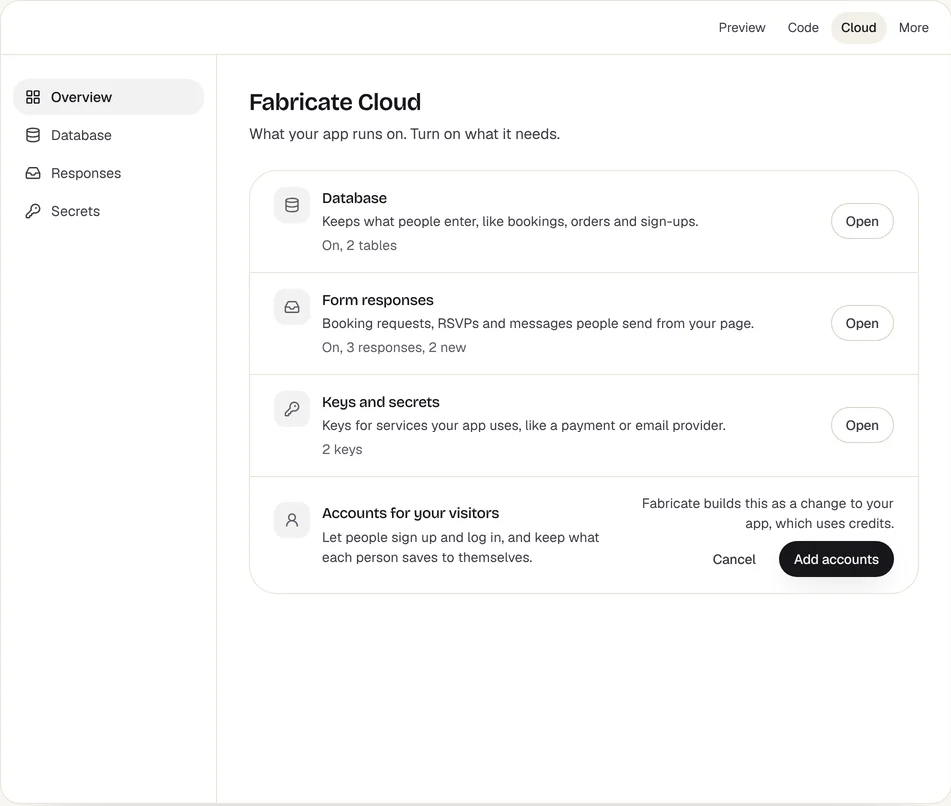
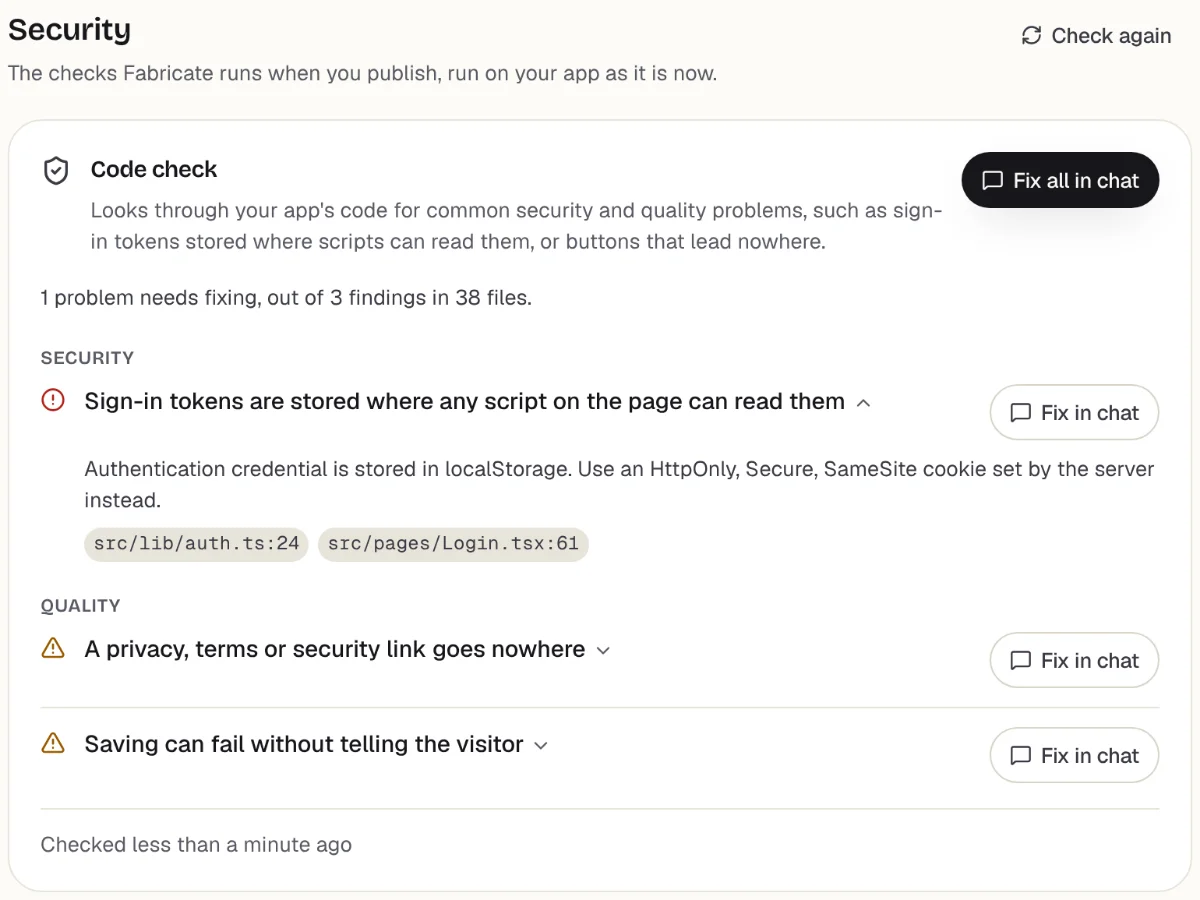
For people who would rather not code: describe the app and Fabricate builds all of it, the screens, a database, sign-in and the server code, and opens it in a real browser to check it before it can be published. On Pro and Max, see, edit and download the code, or send it to GitHub, so a developer can carry on in any editor.
What moves where
- Writing the code
- On Windsurf
- You, with Tab and the agent
- On Fabricate
- Fabricate, from a description
- Database
- On Windsurf
- Whatever you set up
- On Fabricate
- The app's own SQLite tables
- Sign-in
- On Windsurf
- Whatever you code
- On Fabricate
- Built in, with secure cookie sessions
- Hosting
- On Windsurf
- Your own
- On Fabricate
- Published from Fabricate
- The code
- On Windsurf
- Your repository
- On Fabricate
- Download or GitHub, on Pro and Max
Checks before you publish
What it does well
- No code to write
- Database and sign-in included
- Checked in a real browser before publishing
- Paid plans from
- $25 a month
- 350 credits a month on Pro
- Free plan
- 60 credits
- A month, to build and publish
- A live app
- Every plan
- Publishing is on every plan
The other Windsurf alternatives
What each one does well, and the kind of project it suits best.
- Number 2
Cursor
Best for: The cheapest AI editor
Cursor is a code editor that works like VS Code, with an Agent that edits files, runs commands and checks its work in a browser, and Tab suggestions across lines and files. Plus is $8 a month for Cursor's own models; Claude, GPT and Gemini need Premium at $30 and are charged at their API price.
- Tab across lines and files
- Imports VS Code settings
- Cloud Agents on Premium
Where Cursor beats Fabricate
If you write code, Cursor works on any project in any stack, and Tab suggests the next edit as you type.
From $8 a monthCursor vs WindsurfSources: cursor.com/pricing (opens in a new tab), checked ; Cursor docs: models and pricing (opens in a new tab), checked ; Cursor docs: Agent (opens in a new tab), checked ; Cursor help: Tab completion (opens in a new tab), checked ; Cursor docs: Cursor CLI (opens in a new tab), checked ; Cursor help: migrate from VS Code (opens in a new tab), checked ; Cursor docs: rules and AGENTS.md (opens in a new tab), checked
- Number 3
GitHub Copilot
Best for: Keeping the editor you have
Copilot works inside the editor you have: VS Code, Visual Studio, JetBrains IDEs, Xcode, Neovim, Eclipse, Zed and others, with agent mode in five of them. From Pro at $10 a month you can assign it work on GitHub and it opens a pull request.
- Works in JetBrains and Xcode
- Assign work on GitHub
- Business at $19 a user
Where GitHub Copilot beats Fabricate
If you live in JetBrains, Xcode or Visual Studio, Copilot works there, and it takes work assigned on GitHub.
From $10 a monthCursor vs GitHub CopilotSource: github.com/features/copilot/plans (opens in a new tab), checked
- Number 4
Claude Code
Best for: Handing off whole tasks
Claude Code is Anthropic's coding agent: it reads your codebase, edits files, runs commands and works with git, in the terminal, VS Code, JetBrains, a desktop app or the browser. It comes with Claude's paid plans, from Pro at $20 a month.
- Hands off whole tasks
- Runs beside any editor
- Included in Claude Pro
Where Claude Code beats Fabricate
If you code and want to hand over a whole task, such as a migration across many files, Claude Code works through it in your own repository.
From $20 a monthClaude Code vs CursorSources: claude.com/pricing (opens in a new tab), checked ; claude.com/product/claude-code (opens in a new tab), checked ; Claude Code docs: overview (opens in a new tab), checked
- Number 5
Replit
Best for: Coding with AI in the browser
Replit's Agent builds and runs the app in a browser workspace you can also code in. On Core, monthly credits pay for the Agent, publishing, network traffic and database storage, and use beyond them is billed.
- Code in the browser
- A database built in
- Git and GitHub
Where Replit beats Fabricate
Replit is a whole coding workspace: you can open any file and change it by hand next to the Agent, with Git built in.
From $20 a monthReplit vs CursorSources: replit.com/pricing (opens in a new tab), checked ; Replit docs: Replit Core (opens in a new tab), checked ; Replit docs: publishing costs (opens in a new tab), checked ; Replit docs: version control (opens in a new tab), checked
- Number 6
Lovable
Best for: Design-led web apps
Lovable builds web apps from a conversation and runs them on Lovable Cloud, with a database, storage and sign-in. GitHub sync runs both ways on every plan, so a developer can open the code in an editor.
- Lovable Cloud backend
- Publishes on the free plan
- Two-way GitHub sync
Where Lovable beats Fabricate
Several people can build together on one $25 plan, and every plan syncs both ways with GitHub.
From $25 a monthLovable alternativesSources: lovable.dev/pricing (opens in a new tab), checked ; Lovable docs: Lovable Cloud (opens in a new tab), checked ; Lovable docs: publishing (opens in a new tab), checked ; Lovable docs: GitHub (opens in a new tab), checked
- Number 7
Bolt.new
Best for: Starting from a repository you have
Bolt.new builds full-stack apps in the browser and runs them on Bolt Cloud, with a database, sign-in, storage and Stripe. It can open an existing GitHub repository, and takes apps to the app stores through Expo.
- Opens a GitHub repository
- Bolt Cloud backend
- Expo for the app stores
Where Bolt.new beats Fabricate
Bolt opens an existing GitHub repository and keeps working in it, and documents Expo through to the app stores; Fabricate imports a React project once, as a new app.
From $25 a monthBolt.new alternativesSources: bolt.new/pricing (opens in a new tab), checked ; Bolt help: Bolt Cloud (opens in a new tab), checked ; Bolt help: GitHub (opens in a new tab), checked ; Bolt help: Expo for mobile apps (opens in a new tab), checked
Windsurf, Devin Desktop and the alternatives
Windsurf did not go away; it changed its name. On June 2, 2026, Cognition renamed it Devin Desktop, bringing it under the Devin brand with Devin Cloud, Devin CLI and Devin Review. The editor, its extensions and your settings stayed the same, the Agent Command Center moved to the front, and the local agent became Devin Local, which takes over from Cascade.
That leaves the same choice as before, with clearer prices. Devin Desktop's Pro is $20 a month, and its quota covers frontier models from OpenAI, Anthropic, Google and SpaceXAI. Cursor's Plus is $8 for its own models, with other companies' models from Premium at $30, at their API price. GitHub Copilot's Pro is $10, with frontier models from Pro+ at $39, and it works inside the editor you already have.
If you code, the closest swap is Cursor, which works like VS Code as Devin Desktop does. If you live in JetBrains or Xcode, Copilot comes to you. If you would rather hand off whole tasks, Claude Code takes them from a terminal or your editor. And if what you want is the app rather than the code, a builder such as Fabricate, Replit, Lovable or Bolt.new writes it from a description.
Windsurf: what it does well, and what to watch for
What it does well
- Frontier models from several companies in Pro's $20 quota
- Unlimited Tab on every plan, Free included
- Devin's cloud agents from Pro
- Imports VS Code or Cursor settings, and Cursor's rules
Watch out for
- $20 a month, against $8 for Cursor Plus and $10 for Copilot Pro
- The free plan limits which models you can use
- The JetBrains plugin is in maintenance mode
- An editor: hosting the app is up to you
Frequently asked questions
- Is Windsurf still available?
- Yes, as Devin Desktop. On June 2, 2026, Cognition renamed Windsurf to bring it under the Devin brand. It is the same editor with the same features; settings, extensions and rules carry over, and plans and prices did not change.
- What is the best alternative to Windsurf?
- For most people who code, Cursor: an editor that works like VS Code, with Tab and an Agent, from $8 a month for its own models. To keep the editor you have, GitHub Copilot, from $10. To hand off whole tasks, Claude Code, with Claude Pro at $20. If you would rather not code at all, an app builder such as Fabricate, which we make.
- Is there a free Windsurf alternative?
- Several have free plans. Cursor's has limited Agent and Chat requests, and GitHub Copilot Free gives 2,000 completions a month with limited chat and agent use. Devin Desktop's own free plan has a light agent quota, a limited choice of models and unlimited Tab. Fabricate's Free plan gives 60 credits a month to build and publish apps, with no card needed.
- Can I move my Windsurf setup to Cursor?
- Mostly. Cursor imports VS Code settings, keybindings and extensions, and it reads AGENTS.md, which Devin Desktop reads too, so project instructions kept there carry over. Cursor's own rules live in .cursor/rules.
- What happened to Cascade?
- Cascade was Windsurf's agent. Devin Desktop's local agent is now Devin Local, which Cognition says is more efficient, supports subagents and shares its harness with Devin CLI. Cascade stayed available through July, and Devin Local is priced the same way.
- Does the Windsurf JetBrains plugin still work?
- It is in maintenance mode, and Cascade inside it is being deprecated; Cognition recommends running Devin in JetBrains over ACP instead. GitHub Copilot works in JetBrains IDEs with agent mode, and Cursor's agent runs in JetBrains too.
Sources
The pages this guide quotes, each with the day it was read.
- windsurf.com/pricing (opens in a new tab), checked
- Devin docs: from Windsurf to Devin Desktop (opens in a new tab), checked
- Devin docs: welcome to Devin Desktop (opens in a new tab), checked
- Devin docs: AI models (opens in a new tab), checked
- cursor.com/pricing (opens in a new tab), checked
- Cursor docs: models and pricing (opens in a new tab), checked
- Cursor docs: Agent (opens in a new tab), checked
- Cursor help: Tab completion (opens in a new tab), checked
- Cursor docs: Cursor CLI (opens in a new tab), checked
- Cursor help: migrate from VS Code (opens in a new tab), checked
- Cursor docs: rules and AGENTS.md (opens in a new tab), checked
- github.com/features/copilot/plans (opens in a new tab), checked
- claude.com/pricing (opens in a new tab), checked
- claude.com/product/claude-code (opens in a new tab), checked
- Claude Code docs: overview (opens in a new tab), checked
- replit.com/pricing (opens in a new tab), checked
- Replit docs: Replit Core (opens in a new tab), checked
- Replit docs: publishing costs (opens in a new tab), checked
- Replit docs: version control (opens in a new tab), checked
- lovable.dev/pricing (opens in a new tab), checked
- Lovable docs: Lovable Cloud (opens in a new tab), checked
- Lovable docs: publishing (opens in a new tab), checked
- Lovable docs: GitHub (opens in a new tab), checked
- bolt.new/pricing (opens in a new tab), checked
- Bolt help: Bolt Cloud (opens in a new tab), checked
- Bolt help: GitHub (opens in a new tab), checked
- Bolt help: Expo for mobile apps (opens in a new tab), checked
- fabricate.build/pricing, from our live plans
About this guide
Written by the Fabricate team. Fabricate is our product, so it is first on this page and marked "We make this". Where a reason to switch fits another tool better, the reason says which.
Each tool's card lists the pages we read about it and the day we read them. We compared the tools from their own pricing pages and documentation, not by signing up for them. Spotted something out of date? Write to info@fabricate.build.
Related guides
All alternatives- Cursor vs WindsurfCursor against Windsurf, now called Devin Desktop.Compare
- Cursor vs Windsurf vs GitHub CopilotThe three AI coding tools side by side.Compare
- Cursor alternativesOther AI editors and builders, compared for what they cost and do.Alternatives
- GitHub Copilot alternativesOther coding assistants and builders, if Copilot is not the fit.Alternatives
- Best AI code editorsThe AI editors worth trying, with who each one suits.Best list
Related pages
GitHub Copilot Alternatives
Looking for GitHub Copilot alternatives for building complete apps? Compare AI coding tools and app builders, including ...
Read moreClaude Code Alternatives
Claude Code is not on Claude's free plan and works in a codebase. Compare a free, open-source agent, agents in your edit...
Read moreCursor vs Windsurf
Compared side by side from each tool's own pages.
Read moreCursor vs Windsurf vs Copilot
Compared side by side from each tool's own pages.
Read moreAll AI App Builder Alternatives
Compare every alternative we have reviewed, side by side.
Read moreAI App Builder
Describe your app and get a frontend, database, logins and a live URL in minutes.
Read more