AlternativesUpdated
Best Devin Alternatives in 2026
Devin is Cognition's autonomous coding agent, and it now comes with Devin Desktop, the editor that was called Windsurf: the free plan has a light agent quota, and Pro at $20 a month adds Devin's cloud agents. If you want an app built without managing code, or a different agent, compare these alternatives.
 Fabricate CloudFabricate
Key takeaways
- Devin is Cognition's AI software engineer for coding tasks in a codebase you already have, and comes with Devin Desktop, the editor that was called Windsurf.
- Devin Desktop's free plan has a light agent quota; Pro, at $20 a month, adds Devin Cloud with extra usage at API prices, and Teams is $80 a month plus $40 a seat.
- Fabricate starts from a description instead of a codebase, and writes, checks and serves the whole web app. Building and publishing start free.
- GitHub Copilot and Claude Code are the nearest to handing Devin a task, and Cursor is the nearest editor to Devin Desktop.
Why Seek Devin Alternatives?
Devin is built for engineering work on a codebase you already have, so most reasons to look elsewhere are about what it starts from, who reviews its work and what the plans cover. Some name the alternative that fits them.
It Needs a Codebase and a Reviewer
Devin changes code in a repository your team has, and an engineer reads what it changes before it ships. A builder starts from a description of the app instead.
Fits: FabricateCloud Agents Start on Pro
The free plan has a light agent quota and limited models. Devin Cloud, its agents that work on their own, comes with Pro at $20 a month, and usage past the quota is charged at API prices.
Tasks Handed Over from GitHub
If your team plans its work on GitHub, Copilot takes a task assigned there from its Pro plan up and opens a pull request, for $10 a month.
Fits: GitHub CopilotSeats for the Whole Team
Teams is $80 a month for the team plus $40 for each full developer seat, for up to 100 users, and usage past the quota is extra.
Compare at a glance
Fabricate beside Devin, feature by feature.
- What You Start From
- Fabricate
- A sentence describing the app
- Devin
- A codebase your team already has
- Kinds of Work
- Fabricate
- Web apps, built and changed by asking
- Devin
- Coding tasks of almost any kind
- The App's Database
- Fabricate
- Written in, with its own SQLite
- Devin
- Whatever your stack already uses
- Running the App
- Fabricate
- Fabricate serves it, on every plan
- Devin
- Wherever your team hosts it
- Who Checks the Work
- Fabricate
- Fabricate opens it in a real browser
- Devin
- An engineer reviews each change
- On the Free Plan
- Fabricate
- 60 credits a month, no card
- Devin
- A light agent quota, limited models
- Paid Plans
- Fabricate
- Pro $25, Max $100 a month
- Devin
- Pro $20, Max $200, Teams $80 plus seats
Fabricate
We make thisBest for: Getting the app without a codebase
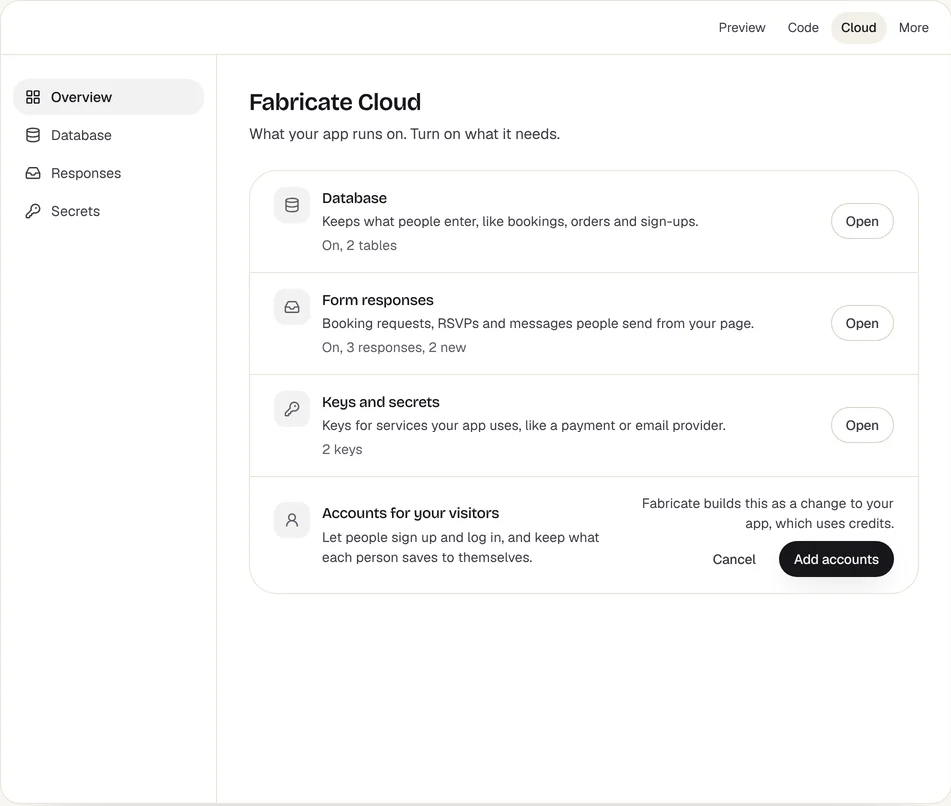
Devin works on a codebase you already have, with an engineer reviewing each change. Fabricate starts from a description instead: it writes the screens, the database, sign-in and the server routes, opens the app in a real browser to check it, and serves it as its own Cloudflare Worker, so there is no repository or hosting to look after. Building and publishing start free.
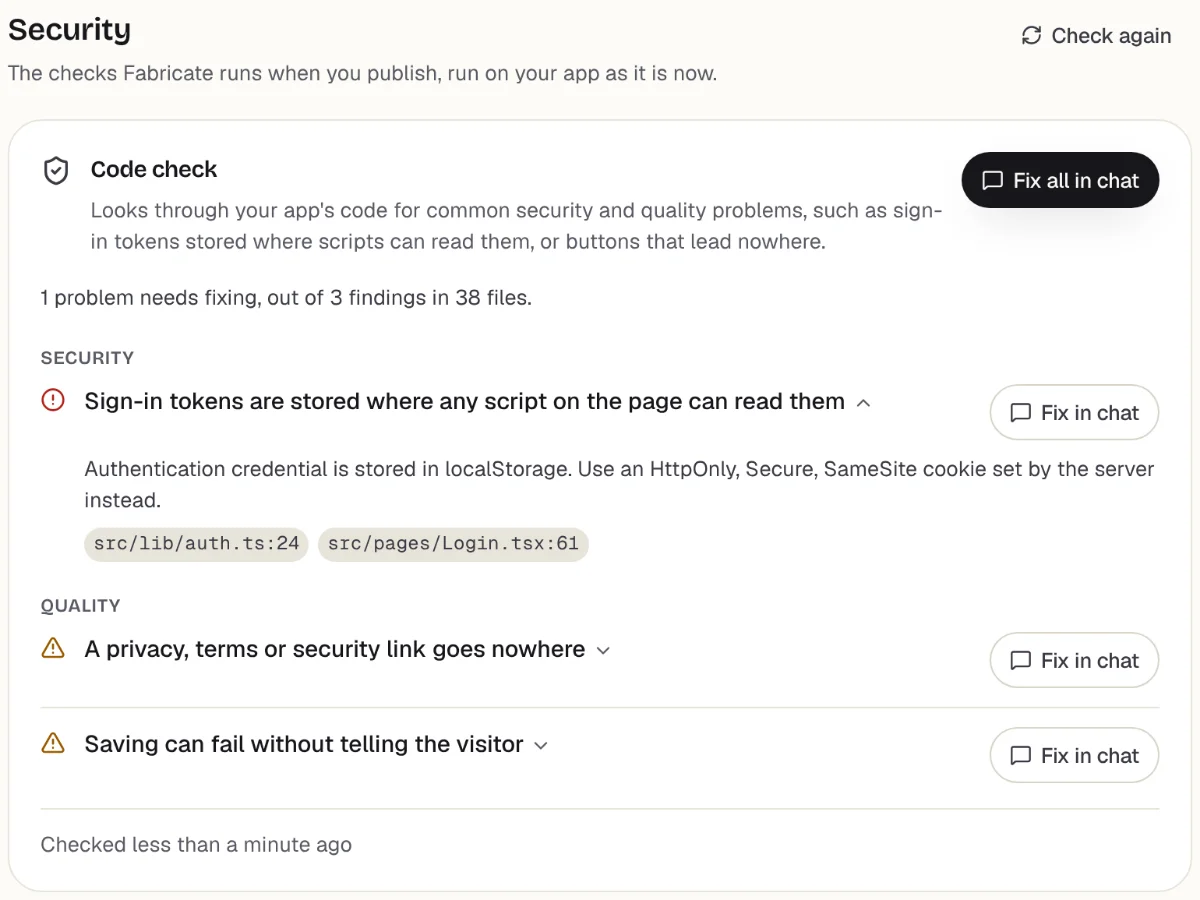
Checks before you publish
What it does well
- Starts from a description, not a repository
- Hosting and a database included
- Each app opened in a real browser first
- Changes made by asking in the chat
- Paid plans from
- $25 a month
- 350 credits a month on Pro
- Free plan
- 60 credits
- A month, to build and publish
- A live app
- Every plan
- Publishing is on every plan
How to Go from Devin to a Fabricate App
- 1
Describe the app in a sentence
Say what the app is for and who uses it. Fabricate starts from that rather than from a repository, and writes the database and sign-in itself.
- 2
Bring the React code, if there is some
If Devin has been working on a React or Next.js app, paste the repository's public GitHub address, or upload a .zip, on Fabricate's Import a project page. The check is free.
- 3
Ask for each change
Ask in the chat for each change, the way you would have written a task for Devin. There is no pull request to review.
- 4
Check it and publish
Fabricate opens the app in a real browser before it can go live; press Publish, and on Pro and Max point your own domain at it.
Chat
Your app
The other Devin alternatives
What each one does well, and the kind of project it suits best.
- Number 2
GitHub Copilot
Best for: Teams that plan their work on GitHub
Copilot is the closest to handing Devin a ticket: from Pro up you can assign it work on GitHub, and it makes the change on its own and opens a pull request for you to review. In the editor it completes code and answers in chat. There is a free plan, and Pro is $10 a month.
- Hand it work from GitHub
- A pull request back to review
- Completions and chat in the editor
When to pick GitHub Copilot
If what you liked about Devin was handing over a task and reviewing what came back, Copilot does that from GitHub itself, for half the price of Devin Pro.
From $10 a monthSource: github.com/features/copilot/plans (opens in a new tab), checked
- Number 3
Cursor
Best for: Developers who used Devin Desktop
Devin Desktop is the editor that was called Windsurf, and Cursor is the editor most like it: it works like VS Code, and its Agent edits files, runs commands and checks its work in a browser. Plus is $8 a month for Cursor's own models, and Premium adds Cloud Agents.
- The nearest editor to Devin Desktop
- An Agent that runs commands
- Plus at $8 for Cursor's own models
When to pick Cursor
If you used Devin mostly through Devin Desktop, Cursor puts the same kind of agent in an editor for less than half the price of Devin Pro.
From $8 a monthSources: cursor.com/pricing (opens in a new tab), checked ; Cursor docs: models and pricing (opens in a new tab), checked ; Cursor docs: Agent (opens in a new tab), checked
- Number 4
Claude Code
Best for: Handing a task to an agent
Claude Code takes a task from start to finish much as Devin does: it reads the repository, edits the files, runs commands and opens a pull request, from a terminal, VS Code, JetBrains, the desktop app or a browser. It comes with Claude's paid plans, starting with Pro at $20 a month, what Devin Pro costs.
- A whole task, start to finish
- Pull requests from the terminal
- Included with a Claude plan
When to pick Claude Code
If you want an agent that works in your own repository and you already pay for Claude, Claude Code comes with the plan, with no separate agent subscription.
From $20 a monthSources: Claude Code docs: overview (opens in a new tab), checked ; claude.com/product/claude-code (opens in a new tab), checked ; claude.com/pricing (opens in a new tab), checked
- Number 5
Bolt.new
Best for: A new full-stack app with no setup
Bolt.new is for when you want a new app rather than changes to one you have: from a prompt it builds a full-stack app on Bolt Cloud, with a database, sign-in, storage and server functions, and hosts it at a bolt.host address. The code can be downloaded or kept in sync with GitHub, and Expo takes the app to the app stores.
- A new app from one prompt
- Database and sign-in on Bolt Cloud
- Expo for the App Store and Play Store
When to pick Bolt.new
If the work you gave Devin was starting an app from nothing, Bolt builds it with the backend and hosting in place, and an engineer can still pick up the code from GitHub.
From $25 a monthSources: bolt.new/pricing (opens in a new tab), checked ; Bolt help: Bolt Cloud (opens in a new tab), checked ; Bolt help: GitHub (opens in a new tab), checked ; Bolt help: Expo for mobile apps (opens in a new tab), checked
- Number 6
Lovable
Best for: Apps built for you, code kept on GitHub
Lovable builds a web app from a conversation, runs its database, sign-in, storage and functions on Lovable Cloud, and keeps the code in step with a GitHub repository on every plan, so engineers can still review and change it there. Pro is $25 a month.
- Code your engineers can still review
- Backend run on Lovable Cloud
- Every plan syncs with GitHub
When to pick Lovable
If you want the app built for you but still want engineers to see every change, Lovable writes it into a GitHub repository they can review, on every plan.
From $25 a monthSources: lovable.dev/pricing (opens in a new tab), checked ; Lovable docs: Lovable Cloud (opens in a new tab), checked ; Lovable docs: GitHub (opens in a new tab), checked
- Number 7
Replit Agent
Best for: Watching the agent work, file by file
Replit's Agent builds and changes the app in a browser workspace with the code, a terminal and the database beside it, so you can follow each step or take over by hand, and it publishes the app from there. It can start from a GitHub repository. Core, at $20 a month, includes monthly credits for the Agent, publishing, traffic and storage.
- Follow every step in the workspace
- A database next to the code
- Starts from a GitHub repository
When to pick Replit Agent
If you liked seeing what Devin changed but want the app hosted too, Replit shows every file as the Agent works and publishes from the same workspace.
From $20 a monthSources: replit.com/pricing (opens in a new tab), checked ; Replit docs: Replit Core (opens in a new tab), checked ; Replit docs: import from a provider (opens in a new tab), checked
Devin vs Fabricate: Autonomous Engineer vs App Builder
Devin acts as an autonomous coding agent that can tackle complex, multi-step engineering tasks like debugging legacy codebases or setting up CI/CD. Fabricate focuses on one thing: turning a description into a complete, working web application.
Task scope: Devin handles open-ended engineering tasks. Fabricate handles product creation, from concept to a published application, with a workflow built for web apps.
Review: Devin's changes land in a codebase an engineer looks after. Fabricate opens every app it builds in a real browser and blocks one that crashes, never mounts or renders a blank page from publishing.
Deployment: with Devin, the app runs wherever your team hosts it. Fabricate publishes each app as its own Cloudflare Worker. Building and publishing start free.
Frequently asked questions
- How does Devin compare to Fabricate?
- Devin is Cognition's AI software engineer: it takes coding tasks in a codebase your team has, and an engineer reviews what it changes. It now comes with Devin Desktop, the editor that was called Windsurf. Fabricate builds a web app from a description instead, with the database and sign-in written in, opens it in a real browser to check it, and serves it itself.
- What do Devin and Fabricate cost?
- Devin Desktop is free with a light agent quota and limited models. Pro, at $20 a month, adds Devin Cloud and every model, with extra usage charged at API prices; Max is $200 a month, and Teams $80 a month plus $40 for each full developer seat, for up to 100 users. Fabricate's Free plan needs no card, and Pro is $25 a month for 350 credits. Credits pay for AI work, building the app and, on Pro and Max, the AI inside it; serving the published app is part of the plan.
- Do I need an engineer to use Devin?
- Devin works best with one. It takes coding tasks in a repository, and what it changes comes back as code for someone on the team to review and merge. Fabricate is built for people who want the finished app: it checks each app in a real browser itself before it can be published, and changes come from asking in the chat.
- Can Fabricate take over a project Devin worked on?
- If it is a React project, such as one built with Vite or Next.js, or a plain HTML site, yes: paste its public GitHub address or upload a .zip on Fabricate's Import a project page. The check is free, and the first build uses credits to get it running as it is. Projects in Vue, Svelte or Angular are not taken, and nor are ones with no package.json or index.html, such as a Python or Go service.
- Which alternative works most like Devin?
- For handing over a task: GitHub Copilot, which takes work assigned on GitHub from Pro up and opens a pull request, and Claude Code, which works through a task in your repository. For the editor, Cursor is the nearest to Devin Desktop. Fabricate, Bolt.new, Lovable and Replit build the app itself rather than working on yours.
Sources
The pages this guide quotes, each with the day it was read.
- windsurf.com/pricing (opens in a new tab), checked
- Devin docs: from Windsurf to Devin Desktop (opens in a new tab), checked
- Devin docs: welcome to Devin Desktop (opens in a new tab), checked
- Devin docs: AI models (opens in a new tab), checked
- github.com/features/copilot/plans (opens in a new tab), checked
- cursor.com/pricing (opens in a new tab), checked
- Cursor docs: models and pricing (opens in a new tab), checked
- Cursor docs: Agent (opens in a new tab), checked
- Claude Code docs: overview (opens in a new tab), checked
- claude.com/product/claude-code (opens in a new tab), checked
- claude.com/pricing (opens in a new tab), checked
- bolt.new/pricing (opens in a new tab), checked
- Bolt help: Bolt Cloud (opens in a new tab), checked
- Bolt help: GitHub (opens in a new tab), checked
- Bolt help: Expo for mobile apps (opens in a new tab), checked
- lovable.dev/pricing (opens in a new tab), checked
- Lovable docs: Lovable Cloud (opens in a new tab), checked
- Lovable docs: GitHub (opens in a new tab), checked
- replit.com/pricing (opens in a new tab), checked
- Replit docs: Replit Core (opens in a new tab), checked
- Replit docs: import from a provider (opens in a new tab), checked
- fabricate.build/pricing, from our live plans
About this guide
Written by the Fabricate team. Fabricate is our product, so it is first on this page and marked "We make this". Where a reason to switch fits another tool better, the reason says which.
Each tool's card lists the pages we read about it and the day we read them. We compared the tools from their own pricing pages and documentation, not by signing up for them. Spotted something out of date? Write to info@fabricate.build.
Related guides
All alternatives- Cursor, Windsurf and Copilot ComparedDevin Desktop, the editor once called Windsurf, beside Cursor and Copilot on price and models.Compare
- How Fabricate Writes the CodeHow Fabricate writes a whole app from a description instead of changing code you already have.Feature
- The Full-Stack BuilderThe screens, database, sign-in and server routes written together, with no repository to start from.Feature
- DeploymentWhere a Fabricate app runs once it is built, with no hosting of your own to set up.Feature
Related pages
Replit Alternatives
Seven Replit alternatives for when the workspace, the usage billing or the free app's 30-day limit is the problem, price...
Read moreCursor Alternatives
Cursor alternatives compared: GitHub Copilot, Claude Code, Windsurf, Zed and Replit for coding, plus Lovable and Fabrica...
Read moreWindsurf Alternatives
Windsurf is now Devin Desktop. Seven alternatives compared from their own pricing pages and docs on October 21, 2026: pr...
Read moreAll AI App Builder Alternatives
Compare every alternative we have reviewed, side by side.
Read moreAI App Builder
Describe your app and get a frontend, database, logins and a live URL in minutes.
Read more