Build a project management app without code
You can build a project management app without writing code: describe your projects, how a task moves from to-do to done and who works on it, and Fabricate builds a working web app with projects, tasks with owners and due dates, a kanban board you drag tasks across, comments on each task and a view of what is due this week.
Your team signs in, and every task is saved in the app's own database. Try it with a test project first, then ask for changes in the same chat.
- Free plan: 60 credits a month
- No card needed
- Live link included
From one message to a project management app
Then try it yourself and ask for changes in the same chat until it fits.
You write: A project management app for my team of 6. Everyone joins with an invite code I give them. We have projects, and each project has tasks with a title, an owner, a due date, a priority and a status: To do, Doing, Review and Done. Show each project as a board where we drag tasks between columns, with comments under each task. The home page shows each person the tasks due this week and anything late. Make it easy to use on a phone.
 Fabricate
I built your project management app: invite-code sign-in, projects with tasks, a board with To do, Doing, Review and Done columns that you drag tasks across, comments on each task, and a home page with each person's tasks due this week. Add a test project in the preview and drag a task across the board.
Then ask for changes, such as
- Add a timeline view
- Add labels to tasks
- Show who changed what
A whole new app usually takes about 20 to 35 credits.
Client portal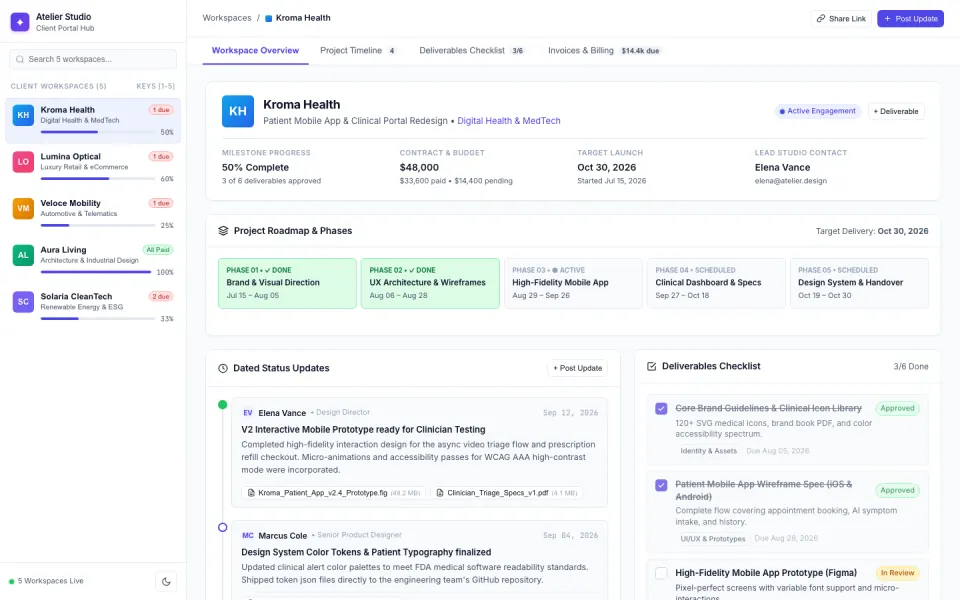
Who builds a project management app
Small teams
One place for the work, without learning a big tool's settings.
Agencies and studios
Client projects with tasks, owners and deadlines, and a view of who is busy.
Freelancers
Your own projects and tasks, in the stages you work in.
Clubs and volunteer groups
Event and project checklists with an owner and a date on every task.
What your project management app comes with
Projects and tasks
Projects split into tasks, each with an owner, a due date, a priority and a status.
A kanban board
Tasks as cards in columns such as To do, Doing and Done, dragged from one to the next.
Due this week
A list of what is due today and this week, and what is late.
Comments and photos
Comments under each task, and photos attached to a task.
Sign-in and roles
Your team signs in with an invite code. Ask for viewers who can see but not change.
Live updates
Ask for live updates and a moved card shows on everyone's screen without a refresh.
In short
- A project management app with projects, tasks, a kanban board, due dates and comments can be built from a plain-English description
- Your team signs in with an invite code, and with live updates a moved card shows on everyone's screen
- Email reminders, notifications about other people's changes and ready-made integrations are not built in
What goes into a project management app built with Fabricate
Project management tools try to fit every team, so a small one ends up paying for views it never opens and bending its work to the tool's words. A project management app built with Fabricate starts from your description: what a project is for you, the stages a task goes through, and who works on what.
Projects and tasks: each task has an owner, a due date, a priority and a status, and each project shows its tasks as a board you drag them across, or as a list. Ask for a page of what is due this week and what is late, comments under each task, photos on a task, and labels or checklists inside it.
Team and views: your team signs in with an invite code, and roles decide who can change what, such as viewers who can see but not edit. Ask for live updates so a moved card or a new comment shows on every open screen, a timeline of tasks by date, or a page per person with their open tasks.
What is not built in: email reminders, notifications when someone else changes a task, ready-made integrations with other tools, sharing documents between people, and a phone app from the App Store or Google Play. The app opens in any phone's browser, and anyone can add it to their home screen; published as a phone app on Pro and Max, it can remind each person of a due date on their own phone.
Project management apps you can start from
Choose one and the builder opens with its description filled in. Change any word before you build.
How to build a project management app
Four steps, all in one chat.
- 1Describe how your team works
Your projects, the stages a task goes through and who works on it.
- 2Run a test project
Add a few tasks and drag them across the board before you invite your team.
- 3Ask for changes
Add a page, a field or a colour by asking in the same chat.
- 4Publish it
The live app starts with a fresh database, so your test entries stay behind.
Chat

Your app

- Free60 credits a monthBuild, preview and publish. No card needed.
- A new app20 to 35 creditsA small change is about 3 to 10 credits.
- Pro350 credits a monthA live link and your own domain. Prices are on the pricing page.
Questions about project management apps
- Can I build a project management app without coding?
- Yes. Describe your projects, the stages a task goes through and who works on it, and Fabricate builds the app and shows it working in a preview. To change something, you ask in the chat. There is no code to write or read.
- Can I build an app like Trello or Asana?
- You can build the parts most teams use: boards, lists, tasks with owners and due dates, comments and a view of what is due. It is your own app rather than a hosted product, so there is no ready-made integrations library or App Store app, and you add features by asking for them.
- Does it send reminders when a task is due?
- Not by email. The app shows what is due today, this week and late when someone opens it. Published as a phone app on Pro and Max, the app can remind each person on their own phone at a time they set, such as before a booking, a class or a due date, even with the app closed; on an iPhone, once they have added it to the home screen. Email reminders, and notifications when someone else assigns or changes a task, are not built in.
- Can I attach files to tasks?
- Photos, yes: photos attached to a task can be shown in the app, up to your plan's storage. Other documents people upload stay private, for you to open in Fabricate, so for shared documents put a link to your own storage on the task.
- Can it have a timeline or time tracking?
- If you ask for them. A timeline of tasks by date and a time log on each task are screens Fabricate can build into the app; describe how you want them to look.
- Who can see the projects?
- Only the people you choose, if you ask for that when you describe the app: say that only you can sign in, or that your team join with an invite code you give them. A sign-in that anyone can register for does not keep your projects and tasks private. On Free, anyone with the link can open the app itself, so keep those details behind that owner or invite-only sign-in. On Pro and Max you can make the whole app private.
- Will it work on phones?
- Yes. It is a web app: it opens from its link in any phone or computer browser, and anyone can add it to their home screen from the browser. It is not an App Store or Google Play app. Published as a phone app on Pro and Max, it can remind each person on their own phone at a time they set; notifications about new activity, such as a new message, are not built in.
- What does it cost?
- You can start on Free, which includes 60 credits a month and needs no card. A whole new app usually takes about 20 to 35 credits and a small change about 3 to 10 credits. Current plans are on the pricing page.
Keep reading
Every Build page- Build a Job Tracking AppJobs, work orders and progress for a service business.Build it
- Build an Internal ToolForms, lists and approvals behind a staff sign-in.Build it
- Build a Client PortalA sign-in for clients to see their own updates, files and invoices.Build it
- Build a CRMContacts, companies and a deal pipeline in your own stages.Build it
- Build an Analytics DashboardKPI cards and charts for the numbers you watch.Feature
- Apps for AgenciesHow agencies use Fabricate for client work.For you
- Notion AlternativesNotes, wiki, docs and task tools, and when a Notion tracker should be an app.Alternatives
Start your project management app
Describe how your team works. Try it with a test project, then invite your team.
Build free. No card needed.
Related pages
Build a crypto website for your Web3 project
Describe your project and Fabricate builds a crypto website: the roadmap, the team, live prices and a sign-up form. Free...
Read moreCreate an invoice app for your business
Describe how you bill and Fabricate builds an invoice app: clients, invoices with line items, and paid and overdue total...
Read moreBuild an ecommerce website for your shop
Describe what you sell and Fabricate builds an ecommerce website: product pages, a cart and an order list. Free to start...
Read moreBuild a landing page that collects leads
Describe your offer and Fabricate builds a landing page: your pitch, a lead form and every lead in one list. Free to sta...
Read moreEverything You Can Build
Explore use cases, from MVPs to marketplaces.
Read moreAI App Builder
Describe your app and get a frontend, database, logins and a live URL in minutes.
Read more