Build an agency website
You can build an agency website without writing code: describe your agency, the work you are proud of and the clients you want, and Fabricate builds a working site with case studies, services, your team and a project enquiry form, and once it is published each enquiry reaches you by email and under Responses in Fabricate.
Ask for a client area later in the same chat. On Pro and Max, you can invite people to work on the app with you, under Team in Settings.
- Free plan: 60 credits a month
- No card needed
- Live link included
From one message to an agency website
Then try it yourself and ask for changes in the same chat until it fits.
You write: A website for my branding studio of 6 people. The home page shows our best 4 projects as large images. Each case study has the client, the brief, the work and the result. There is a services page, a team page with each person's role, and a project enquiry form with the company, the service, the budget, the timeline and the goals. Use a confident, minimal look. Make it easy to use on a phone.
 Fabricate
I built your branding studio website: a home page with your 4 best projects, a case study page for each with the client, the brief, the work and the result, a services page, a team page and a project enquiry form with budget and timeline. Send a test enquiry in the preview.
Then ask for changes, such as
- Add a filter by service
- Add a client area
- Add a careers page
A whole new app usually takes about 20 to 35 credits.
Grid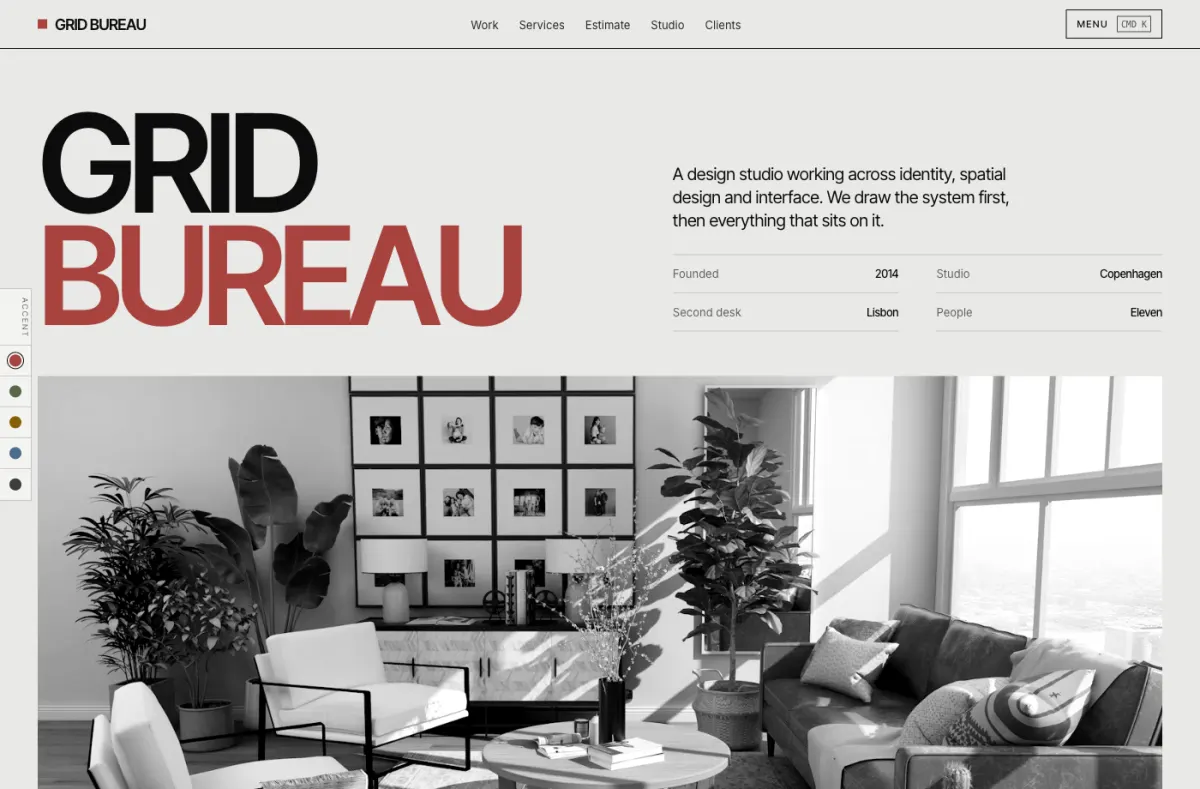
Who builds an agency website
Design and branding studios
The work first, with case studies that show how you think.
Marketing and SEO agencies
Results-led case studies and a request for an audit.
Web and software studios
Projects with what you built, your process and an estimate form.
Small creative teams
Who you are, what each person does and how to work with you.
What your agency website comes with
Case studies
The brief, the work and the results, with large images for each project.
Services
What you offer, how you work and what a project looks like.
Team
The people, their roles and what each is known for.
A project enquiry form
The budget, the timeline and the goals, before a first call.
Clients and quotes
The clients you have worked with and what they said, in their words.
A client area
Ask for a sign-in where each client sees their own projects.
In short
- An agency website with case studies, services, a team page and a project enquiry form can be built from a plain-English description
- Once it is live, each enquiry reaches you by email and under Responses in Fabricate
- A client area, a blog or a cost estimator can be added later in the same chat
What goes into an agency website built with Fabricate
An agency website is a pitch: it has to show the right work to the right client and make the next step easy. Website builders make many agency sites look like the theme they started from. An agency website built with Fabricate starts from your description of the work, the services and the clients you want.
The work: case studies with the brief, the work and the result, large images, and a filter by service or industry. Ask for a featured project on the home page, a page per service, and a team page with what each person is known for.
The next step: a project enquiry form with the budget, the timeline and the goals. Once the site is published, each enquiry reaches you by email and under Responses in Fabricate, and on Pro and Max it can also go to Slack, Zapier, Make or a webhook.
Growing it: a client area where each client signs in to see their own projects, a blog, or a cost estimator can be added later in the same chat. On Pro and Max, you can invite people to work on the app with you, under Team in Settings.
Agency websites you can start from
Choose one and the builder opens with its description filled in. Change any word before you build.
How to build an agency website
Four steps, all in one chat.
- 1Describe your agency
Your services, your best work and the clients you want.
- 2Send a test enquiry
Click through each case study and send yourself a test enquiry.
- 3Ask for changes
Add a page, a field or a colour by asking in the same chat.
- 4Publish it
The live app starts with a fresh database, so your test entries stay behind.
Chat

Your app

Once it is live
Every project enquiry lands in one place
Once your app is published, every project enquiry the client sends through it is kept under Responses in Fabricate, and you get an email for each one, up to a daily limit. You can download them all as a CSV file.
On Pro and Max, you can also turn on a confirmation email to the client, again up to a daily limit.
Fabricate does not send text messages.
Project enquiry
- Company
- Fieldstone Coffee
- Service
- Brand identity
- Timeline
- Launch in spring
- ops@fieldstone.example
- Email to youFor each new project enquiry, up to a daily limit.
- Confirmation to the clientOn Pro and Max, once you turn it on.
- Free60 credits a monthBuild, preview and publish. No card needed.
- A new app20 to 35 creditsA small change is about 3 to 10 credits.
- Pro350 credits a monthA live link and your own domain. Prices are on the pricing page.
Questions about agency websites
- Can I build an agency website without coding?
- Yes. Describe your agency, your services and your best work, and Fabricate builds the agency website and shows it working in a preview. To change something, you ask in the chat. There is no code to write or read.
- Can my team work on the site with me?
- On Pro and Max, you can invite people to work on the app with you, under Team in Settings. Each change anyone asks for is paid from your credits.
- Can clients sign in to see their projects?
- Yes, if you ask for it: a client area where each client signs in with an invite code and sees only their own projects and updates. The customer portal page explains what it can do.
- How do enquiries reach us?
- Once the site is published, each enquiry reaches you by email and under Responses in Fabricate, up to a daily limit. On Pro and Max, each new request sent through the app's forms, such as a booking or an enquiry, can also go to Slack, Zapier, Make or a webhook, under More > Connectors.
- Will it show up on Google?
- Publishing puts it on the web, where search engines and AI assistants look. Under More > SEO & AI search you can see what they read on your live site and change its title and description. Nobody can promise a place in search results.
- Can it use our own domain?
- Yes, on Pro and Max. On Free, a published app gets its own free address on fabricate.chat.
- What does it cost?
- You can start on Free, which includes 60 credits a month and needs no card. A whole new app usually takes about 20 to 35 credits and a small change about 3 to 10 credits. Current plans are on the pricing page.
Keep reading
Every Build page- Build a Portfolio WebsiteProjects, case studies, an about page and an enquiry form.Build it
- Build a Client PortalA sign-in for clients to see their own updates, files and invoices.Build it
- Build a Consulting WebsiteServices, case studies and a call request form.Build it
- Build a CRMContacts, companies and a deal pipeline in your own stages.Build it
- Team AccessInvite people to work on your apps with you.Feature
- ConnectorsSend new requests to Slack, Zapier, Make or a webhook.Feature
- Notion AlternativesNotes, wiki, docs and task tools, and when a Notion tracker should be an app.Alternatives
Start your agency website
Describe your agency and your best work. Send a test enquiry, then share the link.
Build free. No card needed.
Related pages
Build a crypto website for your Web3 project
Describe your project and Fabricate builds a crypto website: the roadmap, the team, live prices and a sign-up form. Free...
Read moreBuild a law firm website
Describe your practice and Fabricate builds a law firm website: practice areas, your lawyers, insights and an enquiry fo...
Read moreBuild an education website
Describe your school or classes and Fabricate builds an education website: courses, timetables, teachers and enquiries. ...
Read moreBuild a fitness website for your gym or classes
Describe your gym or classes and Fabricate builds a fitness website: timetable, coaches, memberships and class bookings....
Read moreEverything You Can Build
Explore use cases, from MVPs to marketplaces.
Read moreAI App Builder
Describe your app and get a frontend, database, logins and a live URL in minutes.
Read more