AlternativesUpdated
Best Retool Alternatives in 2026
Retool is powerful for internal tools, and its builder now makes an app from a description too. Teams still look elsewhere for pricing that does not grow with every user, code they can take with them, or open source they can run themselves.
 Fabricate CloudFabricate
Key takeaways
- Retool is powerful for internal tools on your existing databases and APIs, and it is priced per builder and per internal user.
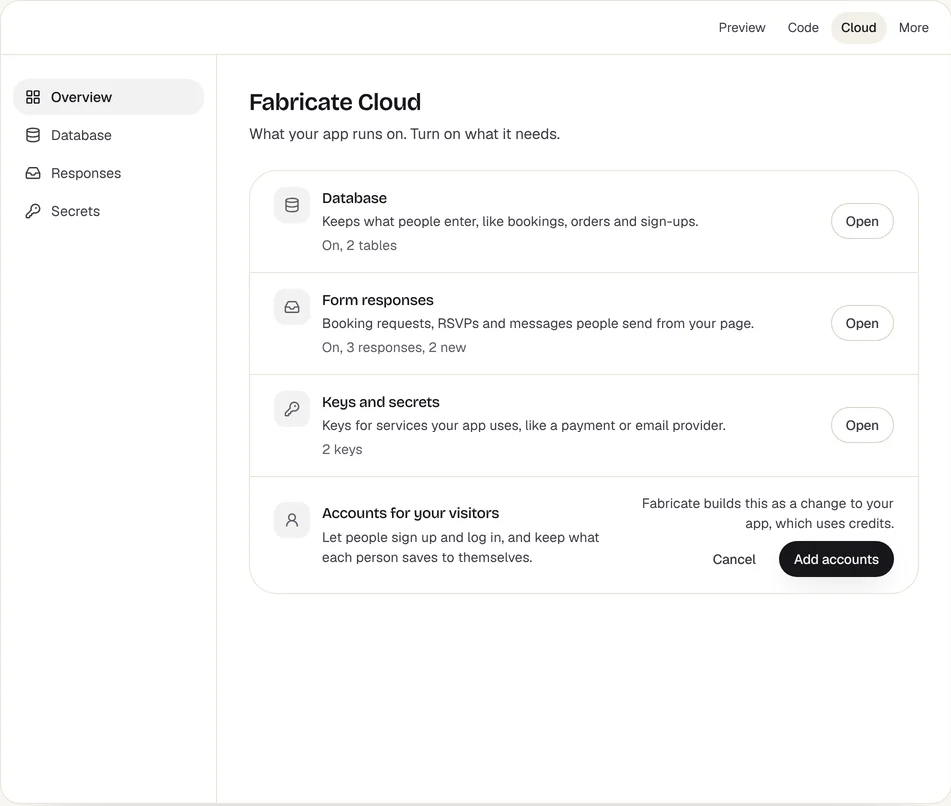
- Retool's builder now makes an app from a description, on your databases and APIs; Fabricate makes one with its own database, sign-in and roles written into the app.
- Retool apps are built from its components; Fabricate generates the interface as real React code, so any layout is possible.
- Retool exports apps as JSON or Toolscript for other Retool instances. On Pro and Max, see, edit and download the code, or send it to GitHub.
- For a tool that keeps its own data, such as an admin panel, a tracker or an approvals app, Fabricate builds it with no price per user; for tools over databases you already run, Retool is built for that.
Why Are Teams Seeking Retool Alternatives?
Priced per Person
Retool Team is $12 a month per builder and $7 per internal user, billed monthly, and Business is $65 and $18, so the bill grows with every person who uses a tool.
Apps Stay on Retool
Retool exports an app as JSON or a Toolscript archive, for moving it between Retool instances, not as a standalone codebase.
Limited Customization
While powerful, Retool's component library can feel limiting for custom UIs.
Self-Hosting Is Enterprise Only
Retool runs in your own cloud, or air-gapped, only on Enterprise, which is priced through sales. Retool says setup takes about 15 minutes with Docker, and your team then runs and updates the servers.
Compare at a glance
Fabricate beside Retool, feature by feature.
- Pricing
- Fabricate
- $25 a month, no charge per app user
- Retool
- $12 a month per builder, $7 per internal user
- Builds From a Description
- Fabricate
- Yes
- Retool
- Yes
- Custom UI
- Fabricate
- Any layout, in real code
- Retool
- Retool's components
- Data
- Fabricate
- The app's own SQLite tables
- Retool
- Your databases and APIs
- Code Export
- Fabricate
- On Pro and Max
- Retool
- JSON or Toolscript, for other Retool instances
- Self-Hosting
- Fabricate
- Your own Cloudflare account, on Pro and Max, with some setup
- Retool
- On Enterprise, priced through sales
- Free Plan
- Fabricate
- Build and publish; 1 app online for 30 days
- Retool
- Up to 5 users
Fabricate
We make thisBest for: Custom internal tools
AI-powered builder that creates custom internal tools from descriptions, with a database, sign-in and roles in the app's own code. People who use a published tool sign in to the app itself, with no price per user. Building and publishing start free.
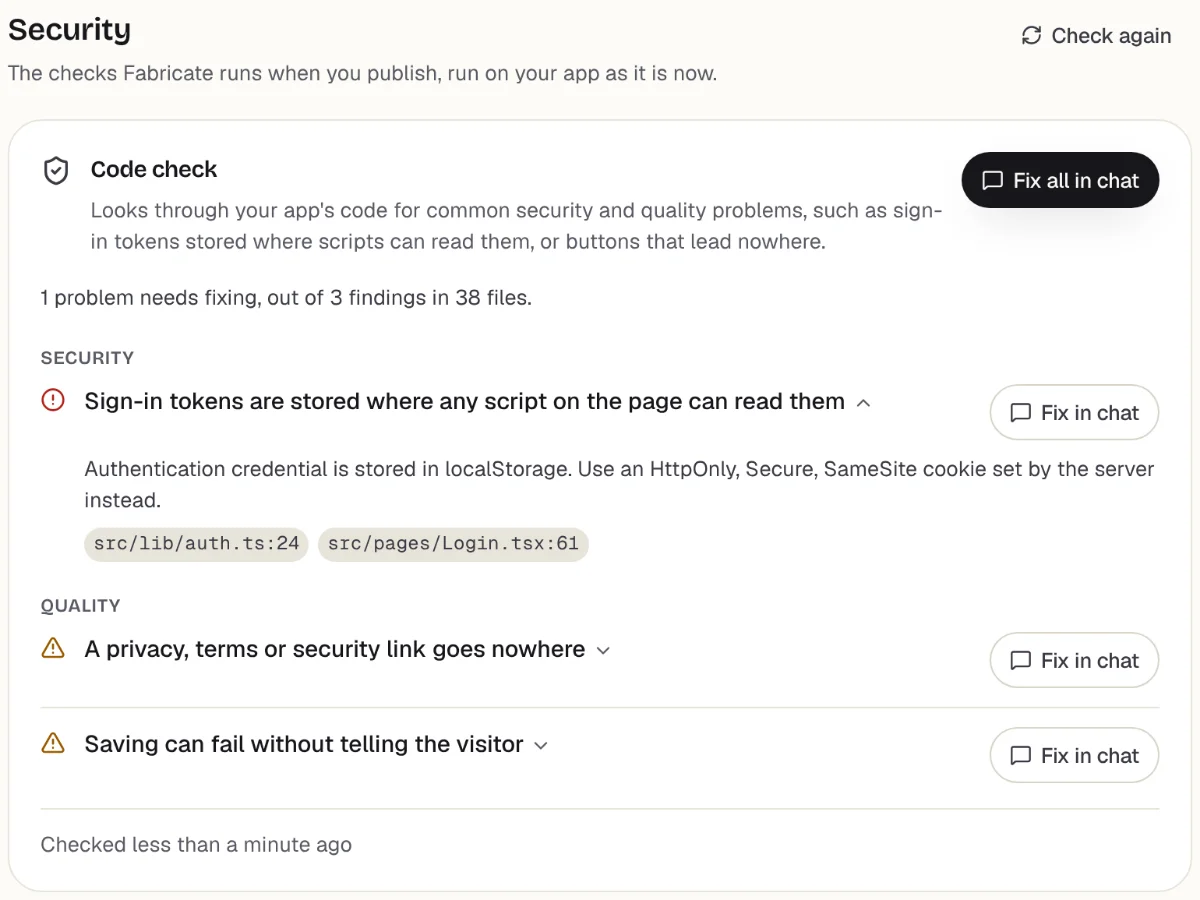
Checks before you publish
What it does well
- AI-powered
- Custom UI
- Roles and sign-in
- Code on paid plans
- Paid plans from
- $25 a month
- 350 credits a month on Pro
- Free plan
- 60 credits
- A month, to build and publish
- A live app
- Every plan
- Publishing is on every plan
The other Retool alternatives
What each one does well, and the kind of project it suits best.
- Number 2
Appsmith
Best for: Self-hosting
Open-source Retool alternative you can self-host.
- Open source
- Self-hosted
- Free tier
- Number 3
ToolJet
Best for: Open source needs
Open-source low-code platform for internal tools.
- Open source
- Self-hosted
- Many data connectors
- Number 4
Budibase
Best for: Business apps
Low-code platform for business apps.
- Low-code
- Self-hosted
- Open source
- Number 5
Glide
Best for: Spreadsheet-based tools
Builds apps for a team from a prompt, a PDF, a screenshot or a spreadsheet. The free plan builds but does not publish; Basic, at $25 a month, publishes 2 apps.
- Starts from a spreadsheet
- An AI agent builds the app
- Works across devices
- Number 6
Superblocks
Best for: Enterprise
Enterprise internal tool platform.
- Enterprise focus
- Integrations
- Number 7
Lovable
Best for: AI-built web apps
Builds web apps from a conversation, with Lovable Cloud for the database, sign-in and storage. Pro is $25 a month with unlimited users.
- AI-built web apps
- A managed backend
- Two-way GitHub sync
Retool and its alternatives: price per person, components and code
Retool made its name with a drag-and-drop builder for admin panels, dashboards and CRUD apps connected to existing databases and APIs. For engineering teams that needed operational tools without dedicating frontend time, its pre-built components and database connectors were the draw, and its rebuilt builder now also generates a working app from a description.
Pricing is per person. On Team, billed monthly, each builder is $12 a month and each internal user $7, so a 50-person operations team with 5 builders pays $375 a month; on Business, at $65 and $18, the same team pays $1,135. Every new hire who needs a tool adds to the bill.
The component library is the other trade-off. Retool's components cover common patterns well, and a tool built from them looks like a Retool app. Fabricate generates the interface as React code, so a tool can have whatever layout or look the team asks for.
Then there is the code. Retool exports an app as JSON or a Toolscript archive, for moving it between Retool instances, not as a standalone codebase, so leaving Retool means rebuilding the tools. Fabricate generates standard React and TypeScript. On Pro and Max, see, edit and download the code, or send it to GitHub, then deploy it to your own Cloudflare account with some setup.
Build Custom Internal Tools with AI
Fabricate generates the onboarding tool with its own screens, tables for hires, tasks and equipment requests in the app's own database, document uploads and role-based access, with no price per user.
Build free. No card needed.
Frequently asked questions
- Is Retool worth the price?
- For tools that sit on databases and APIs you already run, often yes: connecting to them is what Retool is built for. It is priced per person: on Team, billed monthly, $12 a month per builder and $7 per internal user. Fabricate, which we make, is $25 a month on Pro, and the people who use a published tool sign in to the app itself rather than taking a paid seat.
- What is the cheapest Retool alternative?
- Open-source tools you host yourself, such as Appsmith, ToolJet and Budibase, cost the servers you run them on. Retool's own Free plan covers up to 5 users. Fabricate's Free plan builds and publishes with no card needed.
- Can I build the same tools in Fabricate?
- Yes, when the tool keeps its own data: describe it and Fabricate builds admin panels, dashboards and internal tools with their own database, sign-in and roles. Retool is the better fit when a tool has to read and write databases you already run.
- Is Retool good for small teams?
- Retool's Free plan covers up to 5 users, so a small team can start at no cost; beyond that, every builder and internal user is a monthly price. Fabricate's price does not change with the number of people who use a published app.
- Can I export my Retool apps?
- Retool exports an app as a single JSON file or a Toolscript archive, with its queries, components and modules but not its resources, for moving it to another Retool organization or between cloud and self-hosted Retool. It is not a standalone codebase, so leaving Retool means rebuilding the tools. Fabricate generates React and TypeScript. On Pro and Max, see, edit and download the code, or send it to GitHub, then deploy it to your own Cloudflare account with some setup.
Sources
The pages this guide quotes, each with the day it was read.
- retool.com/pricing (opens in a new tab), checked
- Retool docs: import and export apps (opens in a new tab), checked
- glideapps.com/pricing (opens in a new tab), checked
- lovable.dev/pricing (opens in a new tab), checked
- Lovable docs: Lovable Cloud (opens in a new tab), checked
- fabricate.build/pricing, from our live plans
About this guide
Written by the Fabricate team. Fabricate is our product, so it is first on this page and marked "We make this". Each tool, ours or not, says who it suits best.
Each tool's card lists the pages we read about it and the day we read them. We compared the tools from their own pricing pages and documentation, not by signing up for them. Spotted something out of date? Write to info@fabricate.build.
Related guides
All alternatives- Build Internal Tools with AIGenerate internal tooling without per-user seat pricing.Build it
- Build Admin PanelsHow to build custom admin panels and dashboards with AI.Build it
- Best AI Website BuildersTop-ranked AI platforms for building web applications.Best list
- No-Code App BuilderModern no-code platforms that generate real, exportable code.Guide
- Airtable AlternativesSpreadsheet-databases, portals and apps for a base that has outgrown Airtable.Alternatives
- Retool pricing, explainedRetool's plans, what each builder and internal user costs, and how AI credits and agents bill.Pricing guide
Related pages
Appsmith Alternatives
Looking for Appsmith alternatives? Compare open-source internal tool builders and AI app builders that build complete ap...
Read moreAppSheet Alternatives
Six AppSheet alternatives compared on price per user, public apps, where the data lives and how you build, from each too...
Read morePlasmic Alternatives
Looking for Plasmic alternatives? Compare visual React builders and AI app builders that create production-ready applica...
Read moreAppy Pie Alternatives
Appy Pie charges per app, from $16 a month and $60 for iOS. Seven alternatives with one plan for several apps, web apps ...
Read moreAll AI App Builder Alternatives
Compare every alternative we have reviewed, side by side.
Read moreAI App Builder
Describe your app and get a frontend, database, logins and a live URL in minutes.
Read more