Build a custom admin panel without code
An admin panel is the private, signed-in part of an app where the people who run it manage its data: users, orders, bookings, content and settings. You can build one without writing code: describe the records you manage and who may change them, and Fabricate builds a working web app with a sign-in, roles, searchable tables and edit forms, backed by its own database.
Fabricate builds a new admin panel together with its database, rather than plugging into a database you already run. Try it in the preview with a few test records, then ask for changes in the same chat. Free to start.
- Free plan: 60 credits a month
- No card needed
- Live link included
An example description
From one message to an admin panel
Change it to match what you manage. The buttons on this page open the builder with this description filled in, and nothing is built until you choose to build it.
You write: An admin panel for my online shop. I manage products (name, price, stock, category, photo link), orders (customer name, email, items, total, status: new, paid, shipped or cancelled) and customers. Only staff can sign in: I am the owner and I invite staff with an invite code; nobody else can create an account. The owner can add and remove staff. Staff can update order status and stock but cannot delete anything. Open on a dashboard with today's orders, orders waiting to ship and products low on stock. Every table has search and filters. Make it easy to use on a phone.
 Fabricate
I built your shop admin panel: products, orders and customers in tables with search and filters, an owner sign-in with invite codes for staff, staff who can update order status and stock but not delete, and a dashboard of today's orders, orders to ship and low stock. Sign in as the owner and as staff in the preview.
Then ask for changes, such as
- Add change history
- Add a CSV import for products
- Add a returns table
A whole new app usually takes about 20 to 35 credits.
Dispatch desk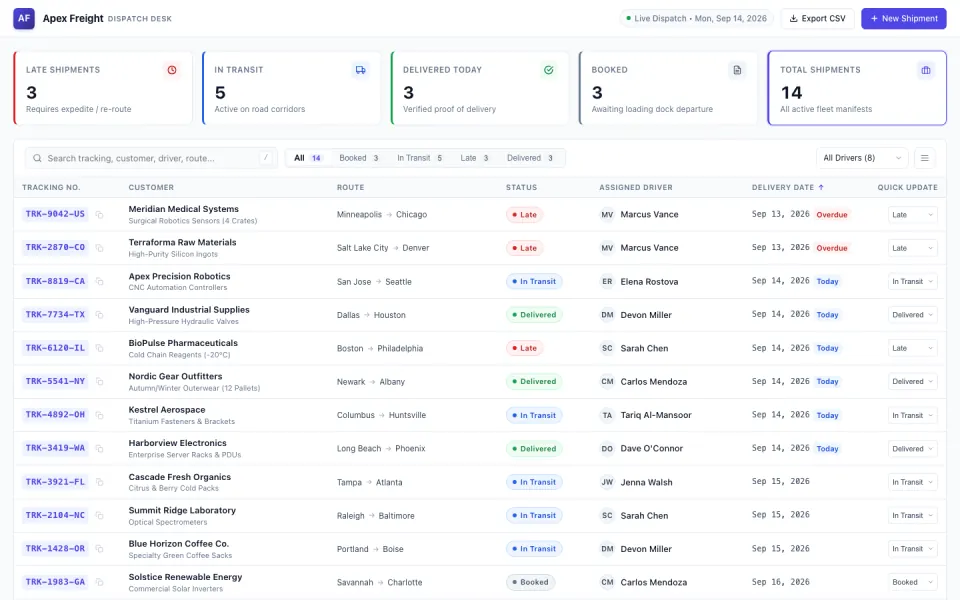
Who builds an admin panel
Small Businesses
Bookings, orders, customers and stock in one place that only you and your staff sign in to.
Founders Running an App
A back office for your product: users, sign-ups, content to approve and settings.
Operations Teams
Shared records such as suppliers, shipments, tickets or equipment, with rules on who may edit what.
Clubs and Nonprofits
Members, volunteers, events and donations, kept out of a shared spreadsheet.
What your admin panel comes with
Sign-In and Roles
Only people you allow can sign in. Ask for roles such as owner, admin and staff, and say what each one may see and change. Staff join with an invite code you give them.
Searchable Data Tables
Each kind of record gets a table with search, filters and sorting, and a page for every record.
Add and Edit Forms
Forms to create, edit and delete records, with required fields and checks on what is typed in.
A Dashboard to Open On
The numbers you check every day, such as new orders, open requests or items running low.
Change History
Ask for it and every change is recorded with who made it and when.
Its Own Database
Records are saved in the app's own SQLite database. Publishing gives the live app a fresh one, so test records stay behind.
In short
- An admin panel is the signed-in part of an app where staff manage its records, users and settings
- Fabricate builds one from a plain-English description, with sign-in, roles, searchable tables, edit forms and its own database
- It builds a new admin panel rather than connecting to a database you already run; a service with an API can be called with your own key
What goes into a custom admin panel
Every app that stores data needs somewhere to manage it: a place to look up a customer, fix an order, approve a post or change a setting. Ready-made options either connect to a database a developer already runs, like Retool and other internal-tool platforms, or are code templates a developer finishes. If you have neither a developer nor a database yet, both start you in the wrong place. Fabricate starts from a description of the records you keep and the people who handle them, and builds the admin panel and its database together.
Records and tables: name each kind of record and its fields (a customer with a name, a phone number and notes; an order with its items, a total and a status), and each one gets a table with search, filters and sorting, a page per record, and forms to add and edit it. Say which fields are required and which values a status can take.
People and roles: say who signs in and what each role may do, for example that the owner manages staff accounts, admins edit every record and staff only update an order's status. Staff join with an invite code you give them, so nobody else can create an account. Sign in as each role in the preview before you share the link.
What is not built in: Fabricate does not connect directly to a MySQL, Postgres or Firebase database you already run, and the app does not send text messages. The AI can write code that calls a service's API with a key you add, and it can build a screen that imports a CSV file, so records you keep elsewhere can move across.
Admin panels you can start from
Choose one and the builder opens with its description filled in. Change any word before you build.
How to build an admin panel
Four steps, all in one chat.
- 1Describe what you manage
The records you keep, their fields, who signs in and what each role may change.
- 2Sign in as each role
Add test records in the preview and try each role before you share the link.
- 3Ask for changes
Add a page, a field or a colour by asking in the same chat.
- 4Publish it
The live app starts with a fresh database, so your test entries stay behind.
Chat

Your app

- Free60 credits a monthBuild, preview and publish. No card needed.
- A new app20 to 35 creditsA small change is about 3 to 10 credits.
- Pro350 credits a monthA live link and your own domain. Prices are on the pricing page.
Questions about admin panels
- What is an admin panel?
- An admin panel is the private part of an app or website where the people who run it manage what is inside: user accounts, orders, bookings, content and settings. Visitors never see it; staff sign in to it. A typical admin panel has a table for each kind of record, forms to add and edit records, and roles that decide who may change what.
- How do I create an admin panel?
- With Fabricate, describe it in plain English: the kinds of records you manage, the fields each one has, who signs in and what each role may change. Fabricate builds the admin panel with its own database and shows it working in a preview. Add a few test records, then ask for changes in the chat. One click publishes it to a live link.
- What is the difference between an admin panel and an admin dashboard?
- The two words are often used for the same thing. Strictly, a dashboard shows numbers and charts to read at a glance, and an admin panel is where you change the data behind them. Most admin panels open on a dashboard, and Fabricate builds both in the same app when you ask for them.
- Can it connect to my existing database?
- Not directly. Fabricate builds a new admin panel with its own database, and it does not connect to a MySQL, Postgres or Firebase database you already run. If your data lives in a service with an API, the AI can write code that calls it, using a key you add in the app's settings, which only the published app receives. To bring records across, ask for a screen that imports a CSV file.
- Who can sign in to it?
- Only the people you choose, if you ask for that when you describe the app: say that only you can sign in, or that staff join with an invite code you give them. A sign-in that anyone can register for does not keep the records in it private. On Free, anyone with the link can open the app itself, so keep those details behind that owner or invite-only sign-in. On Pro and Max you can make the whole app private.
- Can I build an admin panel for free?
- You can start on Free, which includes 60 credits a month and needs no card. A whole new app usually takes about 20 to 35 credits and a small change about 3 to 10 credits. Current plans are on the pricing page.
- Do I need to know how to code?
- No. You describe the admin panel and ask for changes in plain English. If you do code, the source is standard React 19 and TypeScript, and on a paid plan you can download it or export it to GitHub.
- How is this different from Retool or an admin template?
- Retool and similar internal-tool platforms connect to a database you already run and let you arrange ready-made components, usually priced per user. Admin templates give a developer a starting point to finish in code. Fabricate builds the whole admin panel, database included, from a description, and you change it by asking in the chat. If your data already lives in a production database you must query directly, an internal-tool platform is the better fit.
Keep reading
Every Build page- AI App BuilderDescribe any app and get its frontend, database, logins and a live URL.Guide
- SaaS Dashboard BuilderDashboards with user management, settings and the numbers your product runs on.Build it
- Build a CRMKeep customers, contacts and follow-ups in one app.Build it
- Build an Inventory AppTrack stock, products and suppliers in one app.Build it
- AuthenticationSign-up, sign-in and private data for your app's users.Feature
- DatabaseHow each app stores its data in its own built-in SQLite database.Feature
- Retool AlternativesInternal-tool builders compared with Retool, on pricing, features and fit.Alternatives
Start your admin panel
Describe the records you manage and who handles them. Try each role, then share the link.
Build free. No card needed.
Related pages
Build a crypto website for your Web3 project
Describe your project and Fabricate builds a crypto website: the roadmap, the team, live prices and a sign-up form. Free...
Read moreBuild a membership site without code
Describe what members get and Fabricate builds a membership site: sign-in, members-only pages and paid plans with Stripe...
Read moreBuild a directory website
Describe your listings and Fabricate builds a directory website: categories, search, listing pages and listing requests....
Read moreCreate a job board website
Describe your jobs and Fabricate builds a job board website: job posts, search, applications and an employer sign-in. Fr...
Read moreEverything You Can Build
Explore use cases, from MVPs to marketplaces.
Read moreAI App Builder
Describe your app and get a frontend, database, logins and a live URL in minutes.
Read more