Build from ChatGPT or Claude
Ask your assistant. Fabricate builds it.
Already plan your business in ChatGPT or Claude? Connect Fabricate and ask it to build a new app or change one of yours, without leaving the chat.
- Uses your Fabricate credits, up to a limit you set
- Nothing published without your approval
- Remove it any time
Ideas stuck in a chat
You worked out your menu, prices and booking rules with an assistant. Then you have to start again somewhere else to get a website.
Build where you are already talking
Your assistant sends your description to Fabricate, shows the build's progress and opens a preview of your app.
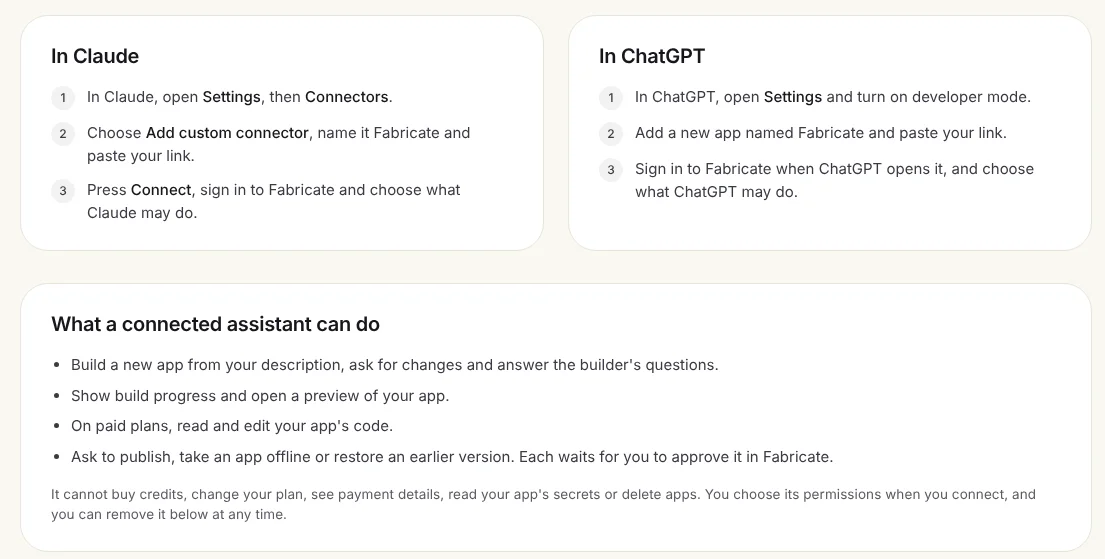
What a connected assistant can do
Build and change apps
Build a new app from your description, ask for changes and answer the builder's questions.
See progress and a preview
Your assistant shows how the build is going and opens a preview of your app.
You approve what goes live
Publishing, taking an app offline or restoring an earlier version each waits for you to approve it in Fabricate.
Code on paid plans
On Pro and Max, it can also read and edit your app's code.
How to connect
- 1
Copy your connection link
In Fabricate, open Settings, then ChatGPT and Claude. In the studio it is under More, then Settings.
- 2
In Claude
Open Settings, then Connectors, choose Add custom connector, name it Fabricate and paste your link.
- 3
Or in ChatGPT
Open Settings, turn on developer mode, add a new app named Fabricate and paste your link.
- 4
Sign in and choose what it may do
Then ask, for example: "Build a booking page for my hair salon with Fabricate."
What people ask for
- A booking page for a salon or a clinic
- An order form for a bakery or a caterer
- A quote request page for a trades business
- Changing prices or opening hours on an app you already have
Frequently Asked Questions
- Who pays for the builds?
- Builds use your Fabricate credits, up to a limit you set when you connect.
- What can the assistant not do?
- It cannot buy credits, change your plan, see payment details, read your app's secrets or delete apps.
- Can it publish without me?
- No. Publishing, taking an app offline and restoring a version each wait for you to approve them in Fabricate.
- How do I disconnect it?
- Open Settings, then ChatGPT and Claude, and press Remove next to the assistant.
Related pages
No Code Authentication
Add user authentication without coding. Signup, login, sessions, and user management generated into your app. Secure by ...
Read moreTake card payments in your app
Let customers pay for orders, bookings and deposits by card in your Fabricate app. Connect your own Stripe account on Pr...
Read moreOne-Click Deployment
Deploy your website or app with one click. SSL, CDN, and global hosting included. No server setup required.
Read moreAPI Integration
Connect to any API without coding. Integrate external services, fetch data, and automate workflows with simple descripti...
Read moreAll Fabricate Features
AI code generation, databases, auth, payments and more.
Read moreAI App Builder
Describe your app and get a frontend, database, logins and a live URL in minutes.
Read moreStart in the chat you already use
Create a free Fabricate account, then connect ChatGPT or Claude from Settings.