Check your app before you share it
Security and SEO & AI search, in one place
Fabricate checks your app when you publish. Now you can run the same checks any time, see what search engines and AI assistants read, and fix what is found in chat.
- On every plan
- Plain-English findings
- Fix in chat
You cannot tell what is wrong
You are not a developer. You cannot tell whether your app is safe, or what Google sees when it visits.
Findings in plain words, and a fix button
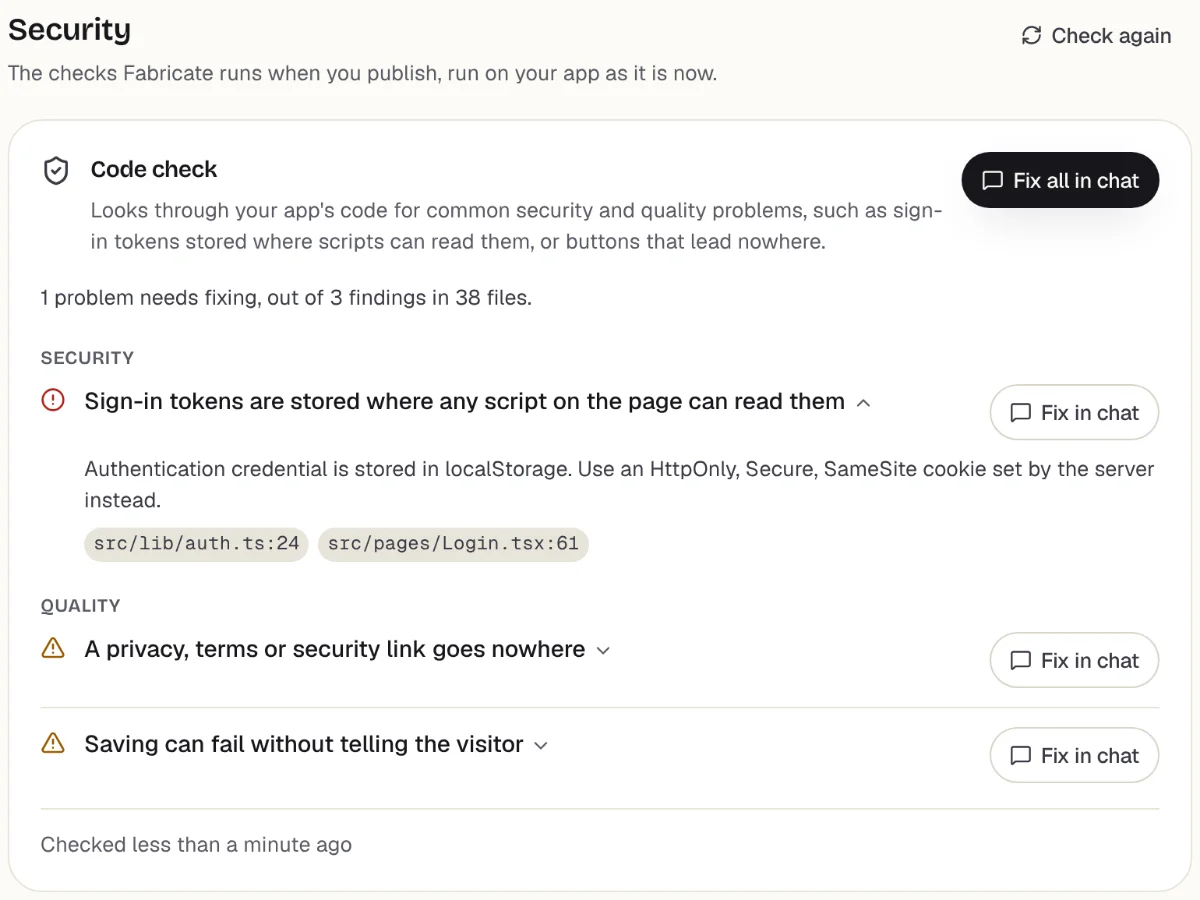
Each problem is explained simply, with "Fix in chat". Fabricate builds the fix after you confirm, which uses credits.
What it checks
Code check
Looks through your app's code for common security and quality problems, such as sign-in tokens stored where scripts can read them, or buttons that lead nowhere.
Browser check
Opens your app in a real browser to see that it loads and shows its content.
What search engines read
Whether your app is open to search engines and AI assistants, and the title, description, share image and robots.txt your live page gives them.
Edit your title and description
Change the words search results show, right there. They go live the next time you publish.
A copy for AI assistants
Assistants that do not run JavaScript are given a plain copy of your home page, kept fresh after each publish.
Fix in chat
Every finding has a fix. Fabricate asks before it builds one, since a fix uses credits.
How to run it
- 1
Open your app, then More, then Security
The code check runs on your app as it is now. Press "Run browser check" to open it in a browser too.
- 2
Open More, then SEO & AI search
See what your live page tells search engines, and change the title and description.
- 3
Press "Fix in chat"
Confirm, and Fabricate builds the fix. Publish again to put it live.
What it catches
- Sign-in details stored where any script can read them
- Privacy or terms links that go nowhere
- A missing page title or description in search results
- Shared links that show no picture
- A robots.txt that blocks search engines
Frequently Asked Questions
- Which plans include the checks?
- Every plan, including the free one. Fixes are built like any other change, which uses credits.
- Will this get my business found on Google or in ChatGPT?
- Nobody can promise that. Publishing puts your app on the web, where search engines and AI assistants look, and this page shows you what they can read.
- Do I have to understand the findings?
- No. Each one is written in plain words, and "Fix in chat" asks Fabricate to fix it for you.
- Is my app checked when I publish anyway?
- Yes. These are the checks Fabricate runs when you publish, available any time from More.
Related pages
Text to App
Transform text descriptions into working applications. Describe your app idea and get a complete application with databa...
Read moreAI Code Generation
Generate production-ready code with AI. From React components to full-stack applications. Clean, modern code you can exp...
Read moreNo Code Database
Build databases without coding. Every app gets built-in SQLite storage, tables created from your description, and a pane...
Read moreNo Code Authentication
Add user authentication without coding. Signup, login, sessions, and user management generated into your app. Secure by ...
Read moreAll Fabricate Features
AI code generation, databases, auth, payments and more.
Read moreAI App Builder
Describe your app and get a frontend, database, logins and a live URL in minutes.
Read moreShare your app with confidence
Describe your business, let Fabricate build it, then check it before you send the link.