See who visits your app
Visitor numbers, built in
After you publish, Fabricate counts the visits to your app. Open your app, then More, then Analytics. Your own views in Fabricate are not counted.
- No tracking code to add
- Counts people and bots separately
- Included with every app online
Sharing a link and hoping
You post your link on Instagram or WhatsApp, but you cannot tell whether anyone opened it, or when.
Numbers you can read
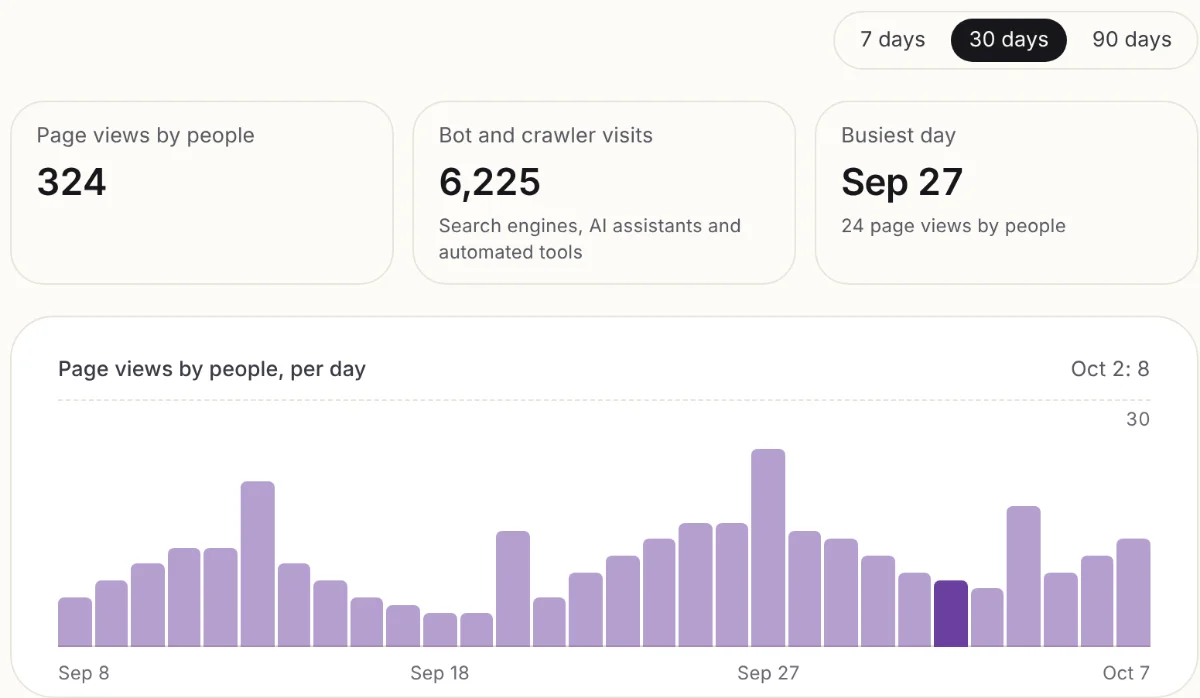
See page views by people per day, your busiest day, and how often search engines and AI assistants read your app.
What you see
Views by people
Page views by real visitors, per day, kept apart from bots.
Your busiest day
The day with the most visits, so you can see which post or offer worked, on Pro and Max.
Countries
Where your visitors come from, on Pro and Max.
Search engines and AI assistants
How often crawlers and AI assistants read your app, on Pro and Max.
How to open it
- 1
Publish your app
Visits are counted on your published app. Going live needs Pro. Share its link as usual.
- 2
Open your app, then More, then Analytics
The Free plan shows the last 7 days. Pro and Max also show longer history.
What it helps you answer
- Did anyone open the link I posted?
- Which day do customers look at my menu or prices?
- Are people visiting from my town or from abroad?
- Is my app being read by search engines and AI assistants?
Frequently Asked Questions
- Do I need to add Google Analytics or a tracking code?
- No. Fabricate counts visits to your published app for you.
- Are my own visits counted?
- Not your views inside Fabricate. Analytics shows visits to your published app.
- Which plans include analytics?
- Every app that is online. Going live needs Pro. Pro and Max show longer history, countries, bot and crawler visits, and your busiest day.
- Where do I find it?
- Open your app in Fabricate, choose More, then Analytics.
Related pages
AI TypeScript Builder
Build type-safe TypeScript applications with AI. End-to-end type safety from database to UI. Catch bugs before they reac...
Read moreAI Mobile App Builder
Create mobile-optimized web applications with AI. Responsive layouts, touch interactions, and native-like UX generated f...
Read moreAn AI shadcn/ui Builder Alternative
Looking for a shadcn/ui builder? Fabricate apps use hand-written CSS instead, and Radix primitives can be added for acce...
Read moreCloudflare App Builder
Deploy apps on Cloudflare with AI. Each app is its own Worker, backed by a Durable Object with built-in SQLite. Global e...
Read moreAll Fabricate Features
AI code generation, databases, auth, payments and more.
Read moreAI App Builder
Describe your app and get a frontend, database, logins and a live URL in minutes.
Read moreBuild it, share it, see who comes
Describe your business and Fabricate builds the app. Publish it and watch the visits come in.