Fabricate Cloud
Everything your app saves, in one tab
Bookings, orders, sign-ups, messages and the photos or documents people send from your app are kept for you. Open your app and choose Cloud to see them, check what the app used, and turn on what it needs.
- Included with every app
- No servers to set up
- Open it from the studio
Orders spread over chats and sheets
Requests arrive by WhatsApp, email and phone. You copy them into a spreadsheet by hand, and something always slips through.
One place your app fills in
What customers enter in your app lands in its own database and its responses list, and the files they attach land in its storage, ready to open whenever you need them.
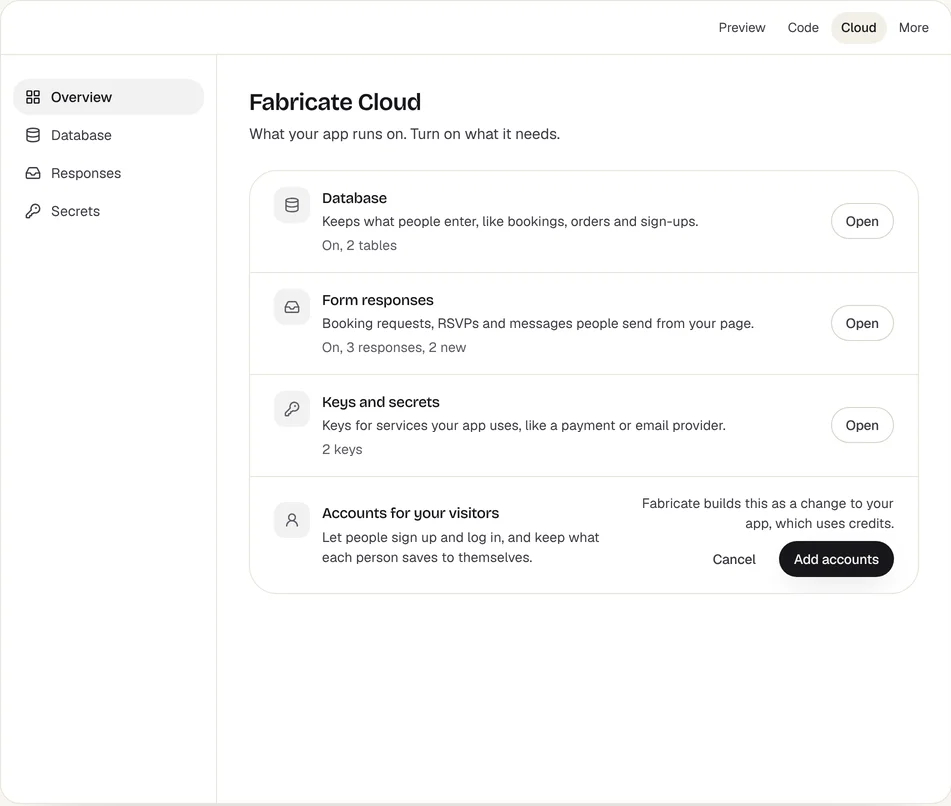
What is in Cloud
Database
Keeps what people enter, like bookings, orders and sign-ups. Open it to see what your app has saved.
Form responses
Booking requests, RSVPs and messages people send from your published app, with new ones marked.
Keys and secrets
Keys for services your app uses, like a payment or email provider, kept out of your app's code.
Accounts for your visitors
Let people sign up and log in, and keep what each person saves to themselves.
Storage
Photos and documents your app keeps, with upload, open and delete. Each file can be up to 10 MB: JPEG, PNG, GIF or WebP images, PDFs and text files.
Usage
The credits this app used in the last 30 days, day by day: building, changes and credits returned, with its files and the requests it received.
How to open it
- 1
Open your app, then Cloud
The overview shows each part, whether it is on, and how much it holds.
- 2
Open what you need
Database, Responses, Secrets, Storage and Usage each open with one click from the Cloud menu.
- 3
Turn on what is missing
Adding accounts or a database is a change Fabricate builds for you. It tells you it uses credits before it starts.
- 4
Ask for an upload when you need one
For example: "Let customers attach a photo of the job to their quote request." Files they send are private: only you can open them, under Storage.
What it keeps for you
- Booking and appointment requests
- Orders and enquiries
- Event RSVPs and sign-ups
- Customer and client lists
- Keys for payments and email
- Visitor accounts and their saved data
- Photos attached to quote requests, and CVs sent with job applications
- Gallery and product photos you upload yourself
Frequently Asked Questions
- Where is Cloud?
- Open your app in Fabricate and choose Cloud, next to Preview and Code.
- Do I need to set up a server or a database?
- No. Your app's database and form responses come with it. If your app has none yet, ask for one, or use the button in Cloud.
- Do I hear about new responses?
- Yes. Fabricate emails you about new form responses, up to a daily limit, and every response is kept in Cloud under Responses.
- Does turning something on cost credits?
- Adding accounts or a database changes your app, so Fabricate builds it like any other change, which uses credits. It says so before it starts.
- How much can I store?
- Free 100 MB, Pro 5 GB and Max 25 GB, counted across all your apps. Each file can be up to 10 MB. Storage shows how much you have used.
- Who can see the files people send?
- Only you. Files a visitor sends, like a document or a photo for a quote, are private and open only in Fabricate. Only images your app shows to everyone, like a gallery, are public.
- Do hosting and storage use credits?
- No. Credits pay for building and changing your app. Usage shows what each app used; hosting, storage and requests do not use credits.
Related pages
React Native and Fabricate
Fabricate does not generate React Native. It builds mobile-first React web apps that run in iOS and Android browsers - h...
Read moreSee who visits your app
See how many people visit your published app, your busiest day and where visitors come from. Built in, no tracking code ...
Read moreCheck your app before you share it
Check your app for security problems and see what search engines and AI assistants read on it. Fix what is found by aski...
Read moreInvite your team
Invite staff or a partner to change your Fabricate app by chatting, or just to view it. On Pro and Max. You stay the own...
Read moreAll Fabricate Features
AI code generation, databases, auth, payments and more.
Read moreAI App Builder
Describe your app and get a frontend, database, logins and a live URL in minutes.
Read moreStop copying orders by hand
Describe what you take from customers and Fabricate builds the app that keeps it for you.