How-to guideUpdated
How to make an app: seven steps and one real build
The seven steps to make an app in 2026, then the same steps on one real build: a booking app for a dog-walking business, made on Fabricate's Free plan from three sentences, tried as a client and as the owner, changed twice and checked at phone size.
Write down who will use the app and what each of them does in it, choose how to build it and make a first version: with an AI app builder, you describe it in a few sentences. Then use it the way your customers will, ask for one change at a time, check it on a phone and a computer, and put it online. The booking app below had its first version in 2 minutes 9 seconds, for 18.3 credits, and its two changes took 1 minute 4 seconds and 27 seconds.
 Northside Dog Walks
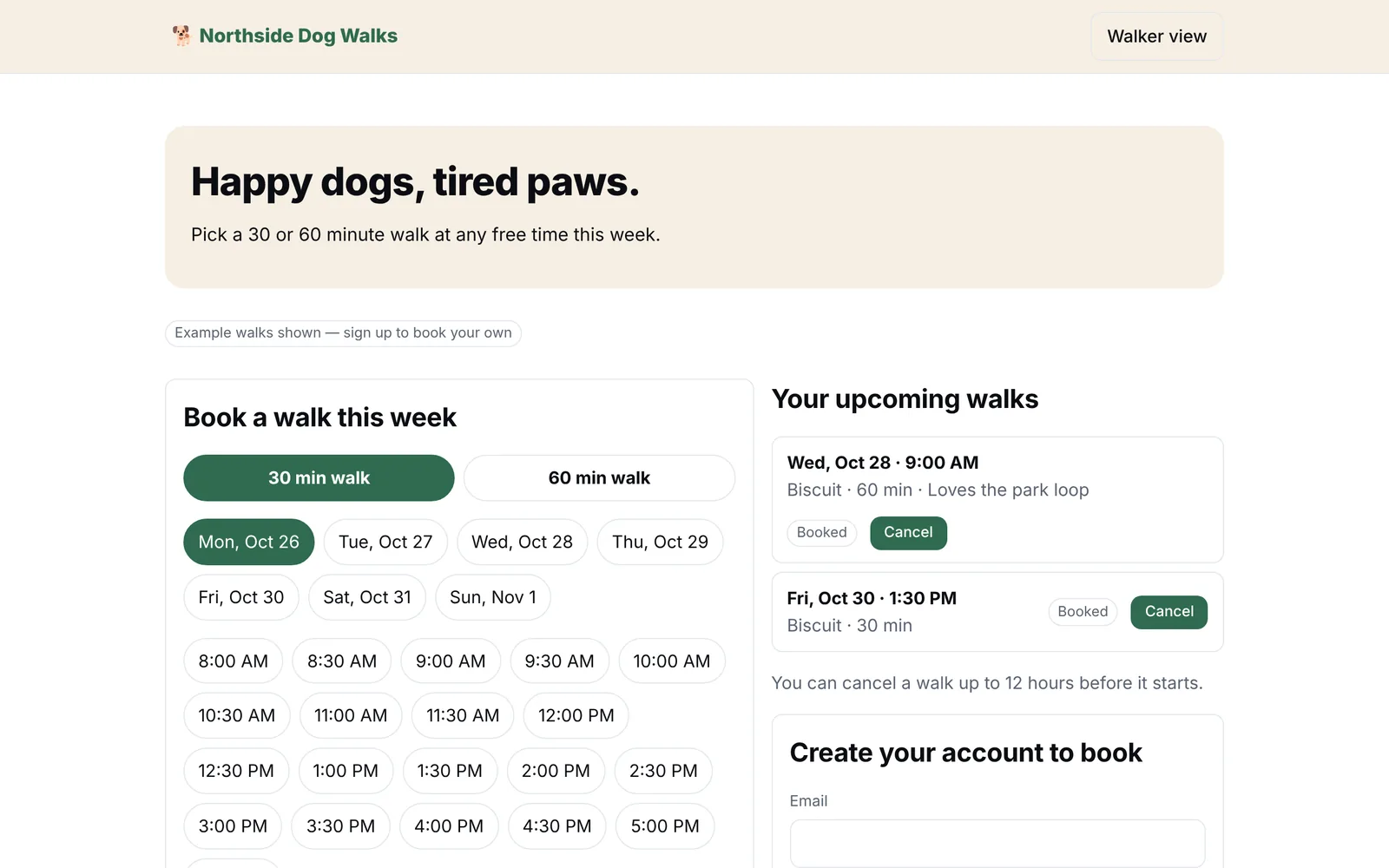 Made with FabricateThree sentences and two changes on the Free plan: 35.5 credits in all.
How to make an app in seven steps
The same steps hold whichever way you build it: with an AI app builder, a no-code builder or a developer.
- 1
Write down what the app is for
In a paragraph: who uses it, what each of them does in it, and what you need to see. Leave out anything you would not miss in the first week; you can add it later.
- 2
Choose how to build it
Describe it to an AI app builder, lay it out in a no-code builder, hire a developer or write the code yourself. The four ways, what each costs to start and who each suits are below.
- 3
Make a first version
With an AI app builder, paste your paragraph and wait a few minutes. With a no-code builder, start with the screen your users see first. Either way, aim for something you can click through, not something finished.
- 4
Use it the way your customers will
Sign up as a customer and do the main job from start to finish, then open your own side and check what arrived. If the builder says what it did not check, check that first.
- 5
Ask for one change at a time
Name the screen, say what is wrong and what you want instead. One change at a time is quicker to check and easier to undo: every reply in Fabricate's chat has a Go back to this point button.
- 6
Check it on a phone and a computer
Look at every screen at both sizes. In the build below, the walk cards stretched on a computer screen, and one sentence fixed them.
- 7
Put it online and share the link
Publish it and send the link to a few customers first, then change what they stumble on. Going live needs Pro. A web app needs no app store: people open it from its link, and can add it to their Home Screen.
One real build, screen by screen
We made this booking app on October 26, 2026, on a new Free account with no setting changed, and kept the screens. They are in the order it happened, and the times and credits on them are the studio's own.
- 1
Describe it in three sentences
The idea went into the box on Fabricate's home screen as three sentences: who the app is for, what clients do in it, and what the owner needs to see. No template, no drawn screens, no colors.
What we typedA booking app for Northside Dog Walks, my dog-walking business. Clients sign up, book a 30 or 60 minute walk at a free time this week, and see their upcoming walks. I see every booking for the week and can mark a walk as done.
Northside Dog WalksFabricate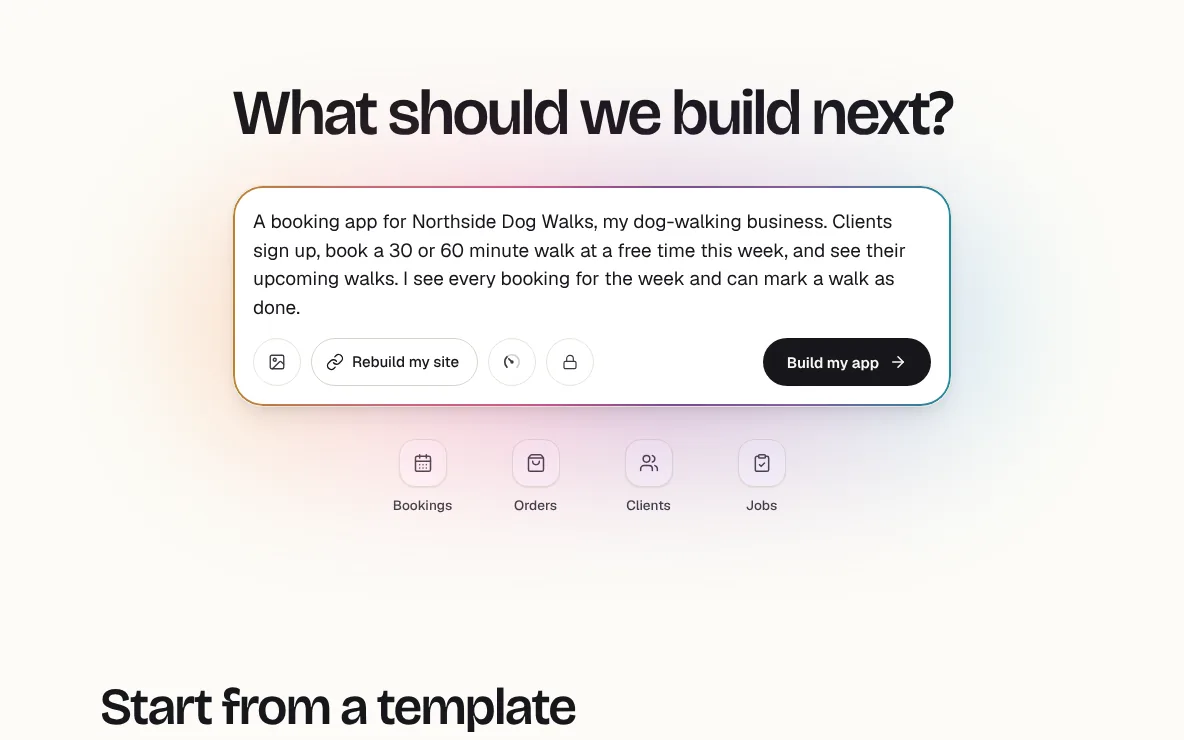
The idea in Fabricate's box, before Build my app. - 2
Fabricate plans it, then builds it
The studio opened with the chat on the left and the app taking shape on the right, in four steps: understanding the idea, planning the pages, building the app and checking that everything works. You can type your next change while it builds.
Northside Dog WalksFabricate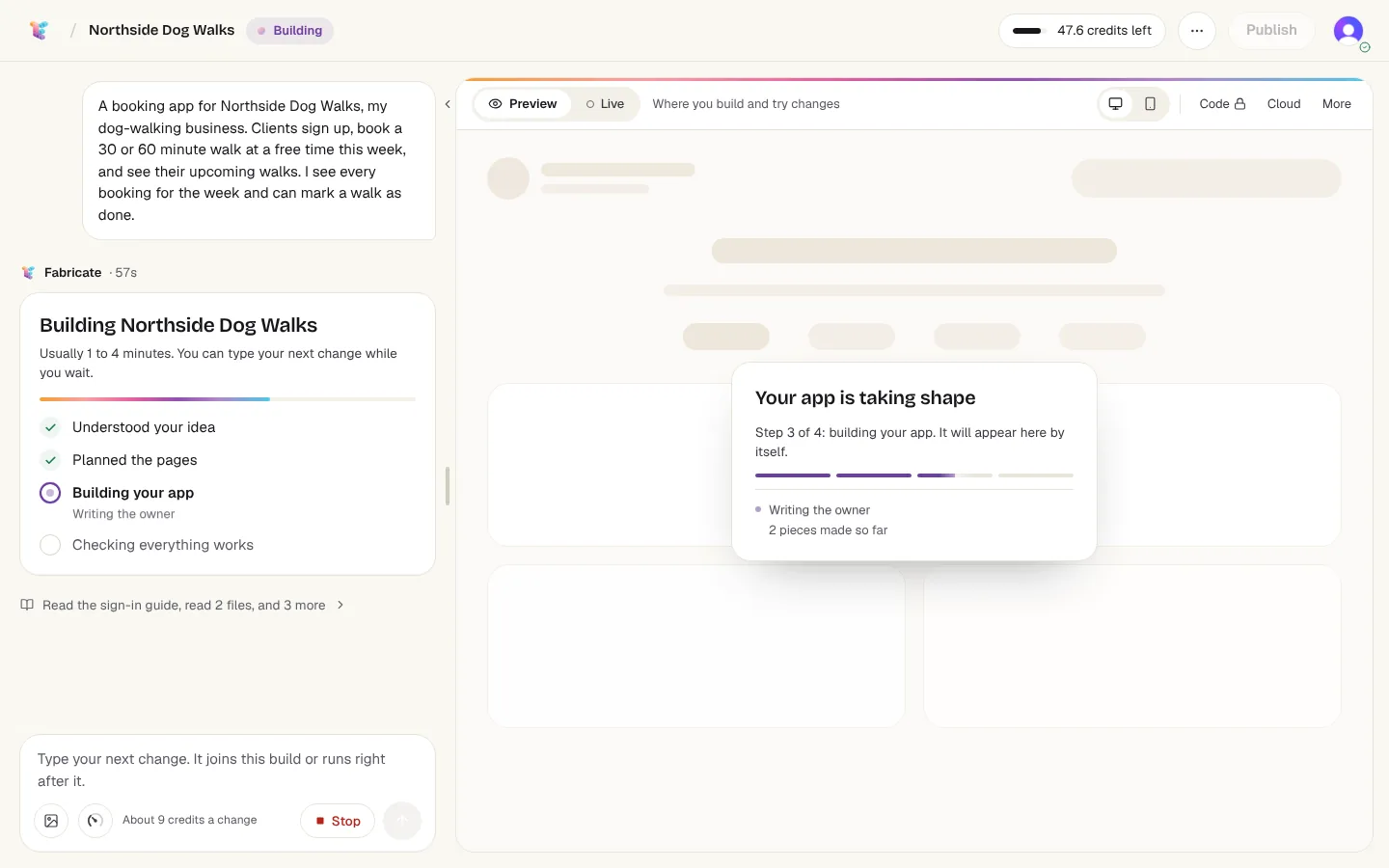
57 seconds in: the plan is done and the app is being written. - 3
A first version in 2m 9s
It came back with a booking page, sign-up for clients, no double bookings, and a walker view of the week behind a passcode. In the chat, Fabricate listed what it had made, said it had checked the app, and said what it had not finished testing: the whole booking flow, which it asked us to try once ourselves.
- Built in 2m 9s
- 18.3 credits
- Low thinking effort
Northside Dog WalksFabricate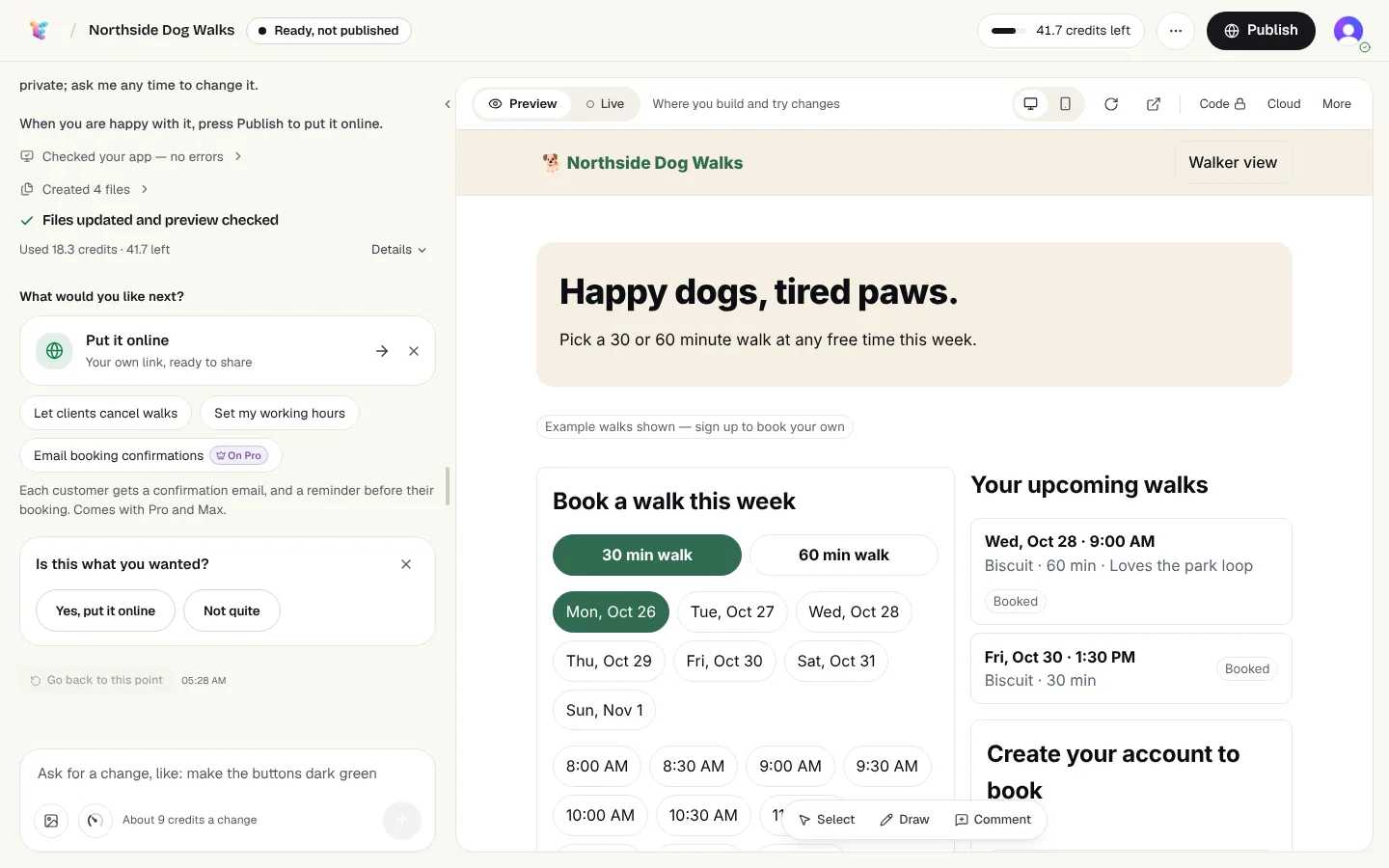
The first version, showing example walks until a client signs up. - 4
Use it as a client
We signed up in the preview as a client, booked a 60 minute walk on Tuesday at 10:00 AM for a dog called Pepper, and left a note about the key. The walk showed up under Your upcoming walks at once. The confirmation says payment is arranged directly with the business: we had not asked the app to take payments.
Northside Dog WalksFabricate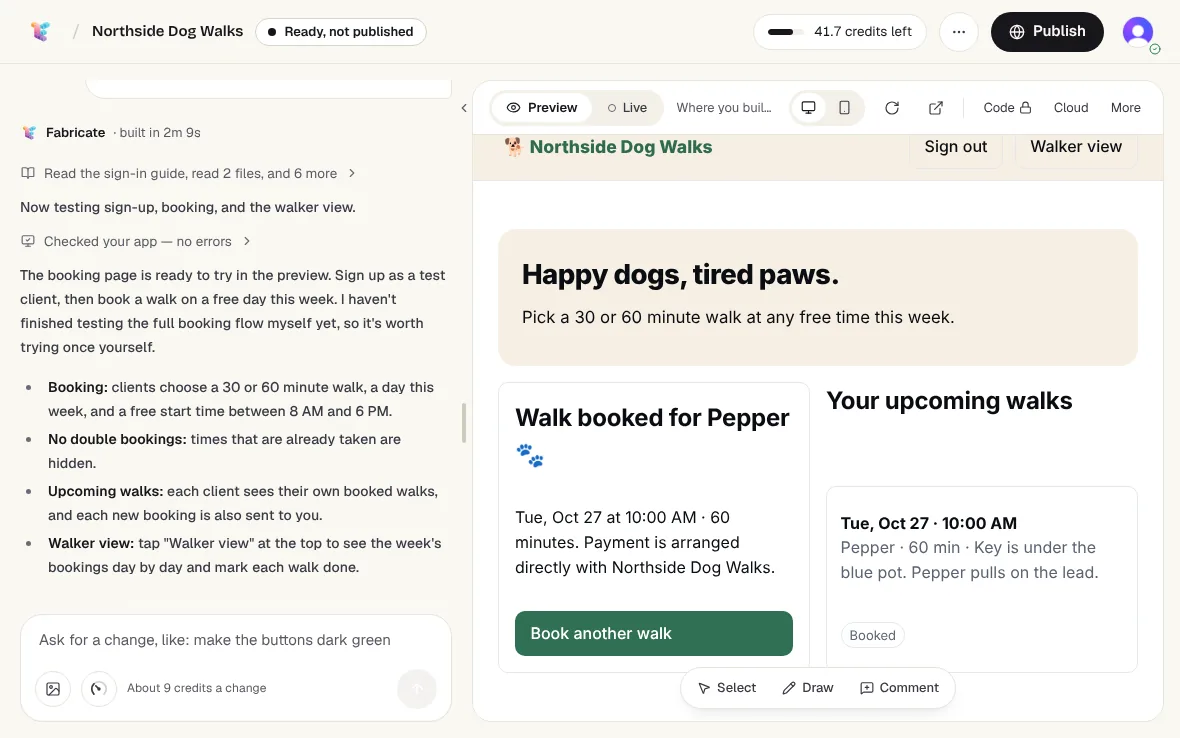
Signed in as a client, with the first walk booked. - 5
Check the owner's side
The walker view opened with the passcode Fabricate gave in the chat. It showed the week day by day, our walk with the client's email and note, and a Mark done button. The week's other booking, for a dog called Rex, was a test walk Fabricate had booked in the preview while checking its work.
Northside Dog WalksFabricate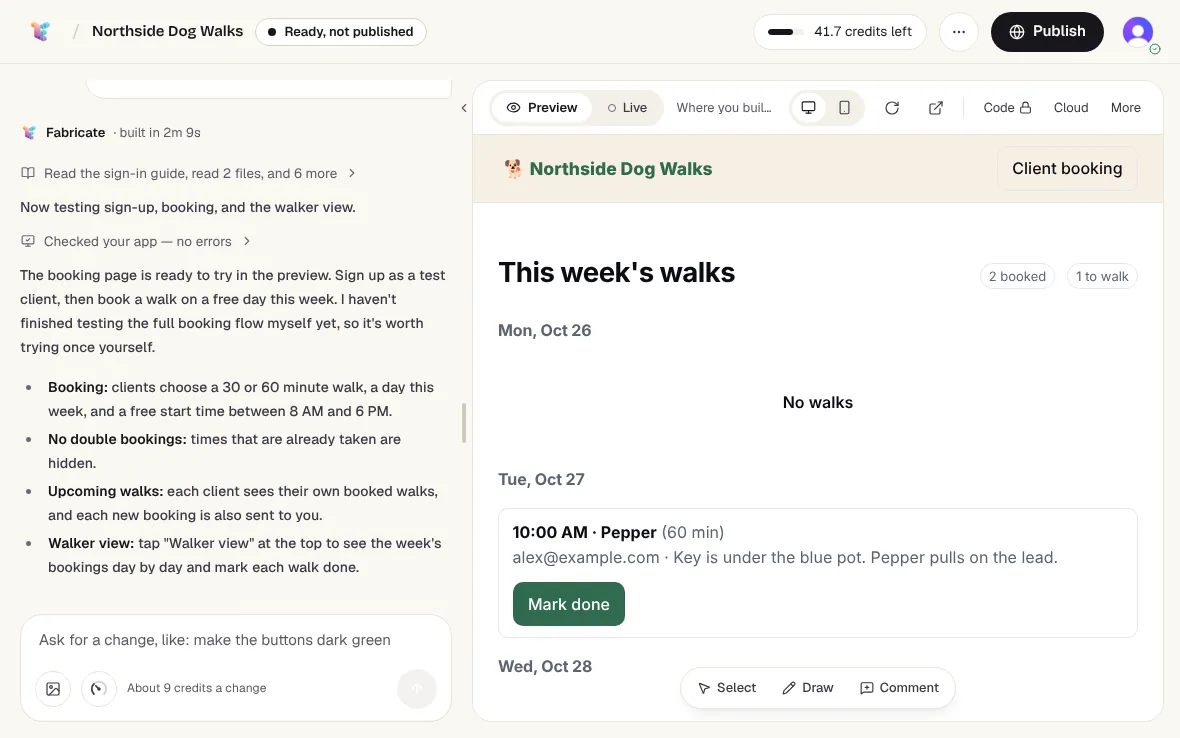
The owner's week, with Mark done on each walk. - 6
Ask for a change in plain words
Clients could not cancel a walk, and Fabricate had offered that as a next step, so we asked for it in one sentence. Fabricate said it had tested cancelling behind the scenes but had not clicked the new button itself, so we did: the walk turned Cancelled for the client and was crossed out in the owner's view.
The change we asked forLet clients cancel a walk up to 12 hours before it starts, and show cancelled walks in my walker view.
- Built in 1m 4s
- 10.7 credits
Northside Dog WalksFabricate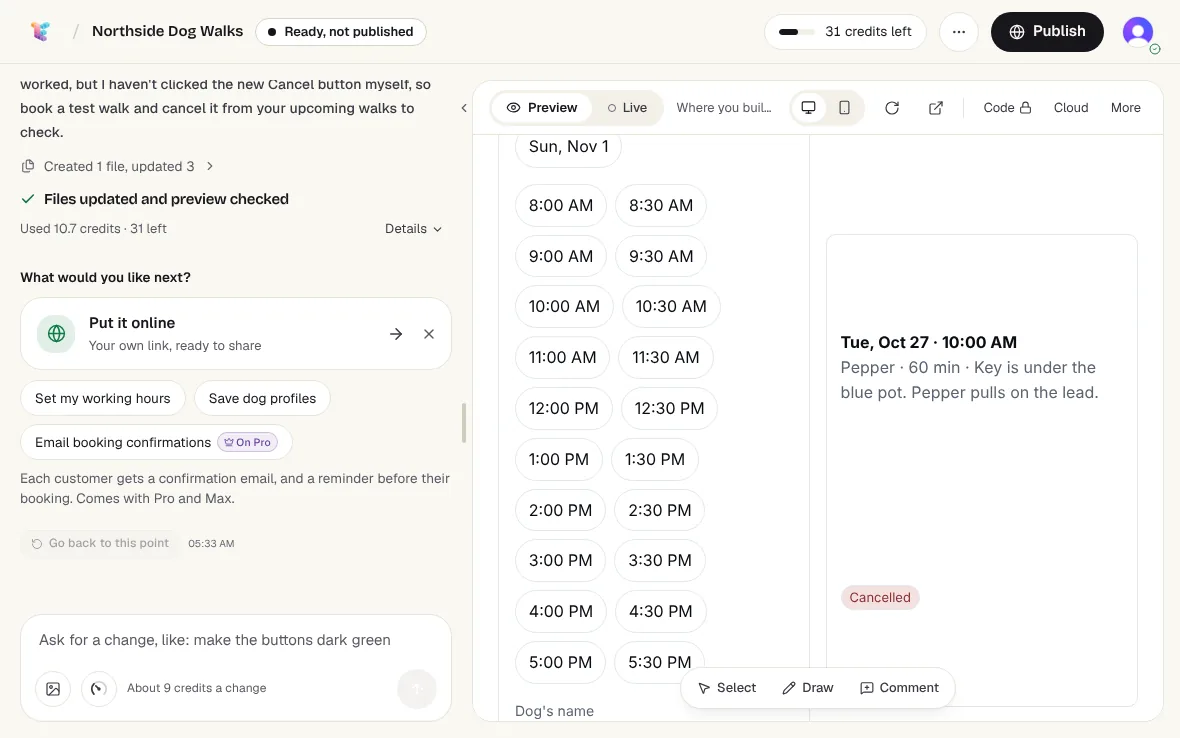
The cancelled walk in the client's view, in a card far taller than its text. - 7
Fix what looks wrong
On a computer screen, the walk cards stretched far taller than their text, leaving a big empty gap. One sentence fixed it. Fabricate said it had not looked at the page at computer width, so we checked: the cards sit right under the heading, and a new booking shows its Cancel button.
The fix we asked forOn a computer screen, each upcoming walk card is stretched very tall with a big empty gap. Make the cards fit their text and sit right under the Your upcoming walks heading.
- Built in 27s
- 6.5 credits
Northside Dog WalksFabricate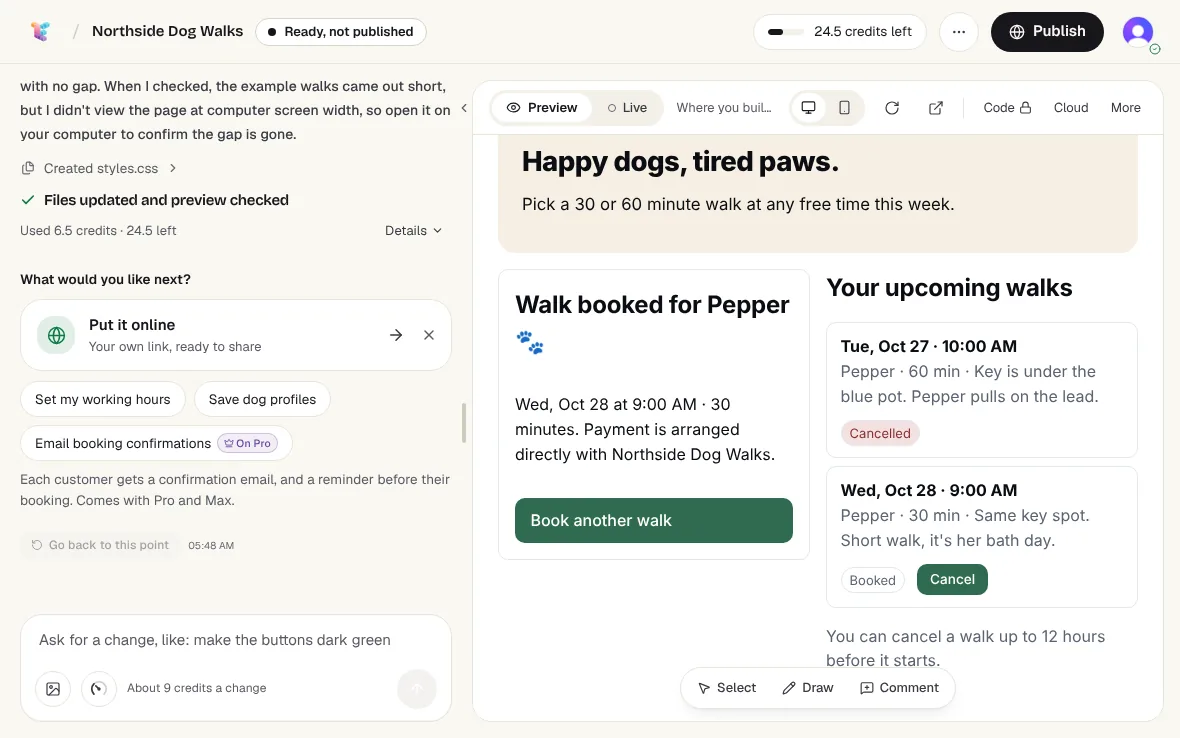
After the fix: short cards, right under the heading. - 8
Check it at phone size
At phone size, Fabricate's studio puts the chat and the app on two tabs. The app put the booking form first and the walks under it, each in its own short card.
Chat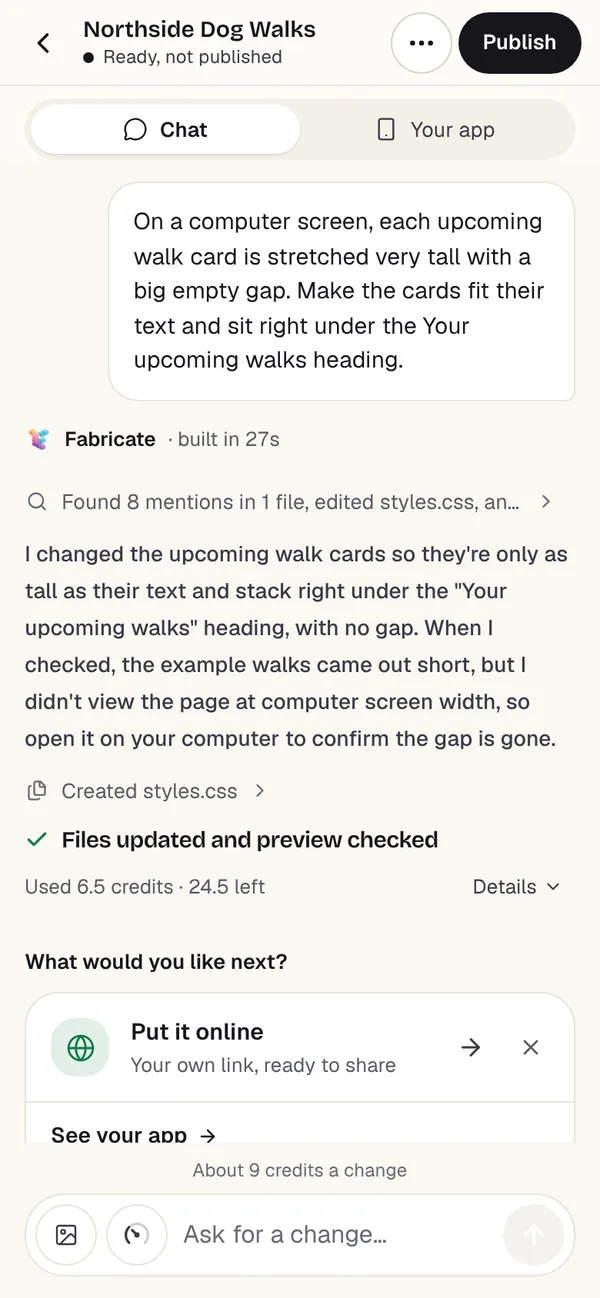 Your app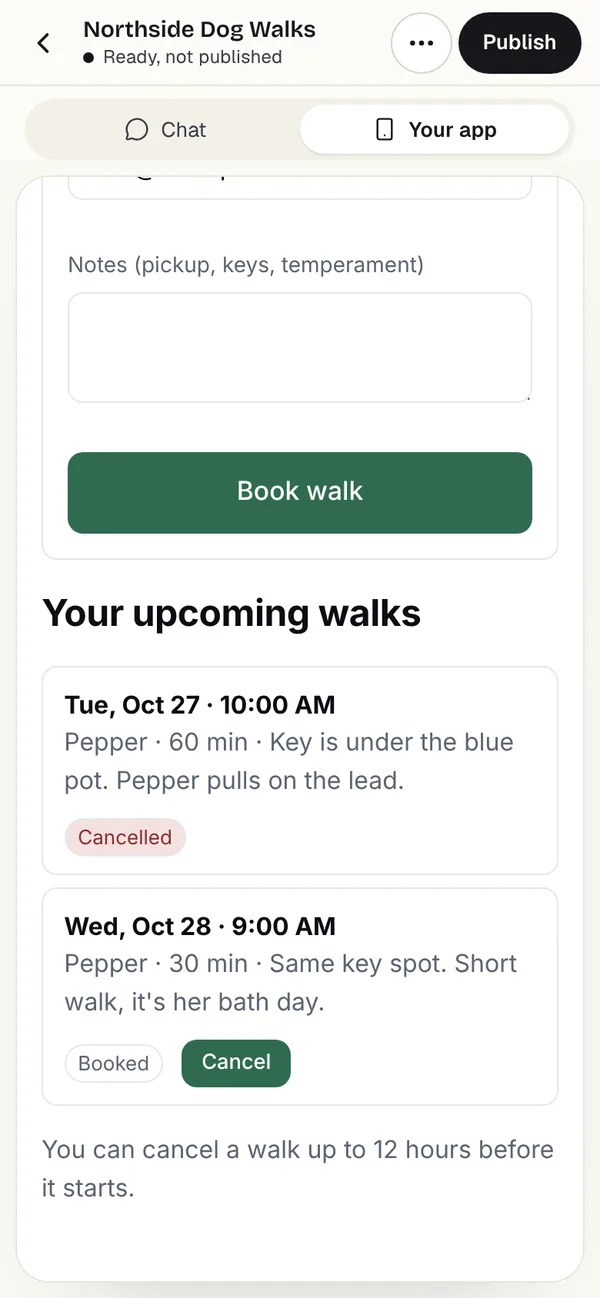
At phone size: the fix in the chat, and the walks in the app.
- From the idea to a first version
- 2m 9sFrom the idea to a first version
- The first version
- 18.3 creditsThe first version
- Both changes
- 17.2 creditsBoth changes
- Credits in all, of Free's month
- 35.5 of 60Credits in all, of Free's month
For comparison, real builds in October 2026: a first build that finished took a median of about 2 minutes on Free, and about 6 minutes on Pro, which thinks harder unless you change it. Free's 60 credits a month are enough for about 1 new app or 6 changes, as the pricing page puts it.
We stopped before publishing. Going live needs Pro. Publishing gives the app its own link to share, and the Publish button sits at the top of the studio from the first version on.
Four ways to make an app
What you do in each, what it costs to start and what it suits. Prices are first paid plans, billed monthly, as each pricing page showed them on October 26, 2026.
- Describe it to an AI app builderFabricate (we make it), Base44, Emergent, Replit, Lovable and Bolt.new
- What you do
- Write what the app does in plain words, then ask for changes in a chat.
- What it costs to start
- $0 to try; first paid plans $20 to $25 a month
- Good for
- Web apps with sign-in and data: bookings, orders, client portals, trackers
- Lay it out in a no-code builderSoftr, Glide, Bubble and Adalo
- What you do
- Place screens, fields and buttons in a visual editor, and set up the data yourself.
- What it costs to start
- $0 to try; first paid plans $25 to $65 a month
- Good for
- People who want to place every screen themselves
- Hire a developerA freelancer or an agency
- What you do
- Write down the screens, the data and who signs in, and ask for a quote.
- What it costs to start
- A median $65.38 an hour in the US in 2025
- Good for
- Store apps, unusual features, and code someone keeps up for you
- Write the code yourselfIn a code editor, with or without an AI coding tool
- What you do
- Learn a language and a framework, or have an AI coding tool write the code while you review it.
- What it costs to start
- Your time; a store app adds Apple's $99 a year and Google's $25 once
- Good for
- People who want to learn, or to own every line
An AI app builder is the quickest way to a first version, because describing the app is the whole of the work up front: the build above took three sentences and two changes. A no-code builder takes more of your time and gives you a say over every screen. A developer is paid by the hour and can build what the other ways cannot, including a store app.
If you are unsure, start with the way that shows you the app soonest. A first version from an AI app builder is also a clear brief for a developer, if you hire one later.
How much does it cost to make an app?
What making an app costs each way, and what a month of building costs on Fabricate.
Read the guideBest AI app builders for non-coders
AI app builders compared for people who would rather not write code.
Read the guideBest no-code app builders
No-code app builders compared, with who each one suits.
Read the guide50 app ideas to build with AI
Ideas sorted by who they are for, each small enough to build in an afternoon.
Read the guideWeb app or store app
A store app is downloaded from the App Store or Google Play. A web app opens from a link on any phone, and can sit on the Home Screen like one.
- A year, Apple's developer program
- $99A year, Apple's developer program
- Once, to register for Google Play
- $25Once, to register for Google Play
- Store fees for a web app
- $0Store fees for a web app
A store app is built for iPhone or Android and published through Apple's App Store or Google Play: Apple's developer program costs $99 a year and Google Play's registration $25 once. Apple says every app in its store is reviewed, and its guidelines ask that an app go beyond a repackaged website, so a store app needs features a website does not have.
A web app needs neither store. It opens in a phone's browser from its link; on an iPhone, Safari can add it to the Home Screen and open it as a web app, and on Android, Chrome can install it. Apple's guidelines put it plainly: "For everything else there is always the open Internet."
Fabricate builds web apps, not store apps, so its apps reach phones through their link. They do not send push notifications or take in-app purchases; on Pro and Max, they can take card payments through Stripe Checkout.
Put a web app on your Home Screen
On an iPhone, in Safari
Open the app's link, tap the More button, then Share, and scroll down to Add to Home Screen. If it is not there, add it under Edit Actions. Choose Open as Web App to use it like an app, then tap Add.
On Android, in Chrome
Open the app's link, tap More on the right of the address bar, then Install and create shortcut, then Install. Chrome calls these web apps.
How long it takes to make an app
- A first build on Free, median, October 2026
- 2 minutesA first build on Free, median, October 2026
- A first build on Pro, median
- 6 minutesA first build on Pro, median
- Our first version
- 2m 9sOur first version
With an AI app builder, a first version takes minutes. On Fabricate in October 2026, a first build that finished took a median of about 2 minutes on Free and about 6 minutes on Pro, and a change about 1 minute on Free. Our first version took 2 minutes 9 seconds, and our two changes 1 minute 4 seconds and 27 seconds.
The first version is the quick part. The rest of the time goes on using the app, finding what is wrong or missing, and changing it a sentence at a time, which is why the steps above spend more words on checking than on building.
A no-code builder takes longer, because you place the screens and set up the data yourself. With a developer, how long depends on what the app does: ask for a date along with the quote, against a written list of the screens, the data and who signs in.
How hard is it to make an app?
Describing an app is not hard: ours was three sentences, and each change one more. The hard parts are deciding what the app should do, noticing what is wrong when you use it, and saying exactly what you want instead. None of that needs code.
The other hard part is knowing what your builder cannot do. Fabricate writes the screens, sign-in, the database and the server code into one project, checks its work after each change, and in this build said each time what it had not checked. Every app is opened in a real browser and checked before it can be published. It does not make store apps, send push notifications or text messages, or take in-app purchases.
Writing the app in code is the hard way: a language, a framework, a database and hosting, and for a store app, each store's tools and rules. It is also the way that can make anything.
Mistakes to avoid
Most come down to checking too little, too late.
Building everything at once
Start with the one job the app must do, like booking a walk. Our first version had no payments, reminders or working hours; Fabricate suggested working hours next, and confirmation and reminder emails on Pro and Max.
Skipping your own check
Use the app as each kind of user, from sign-up to the end of the main job. After each of this build's three runs, Fabricate said what it had not checked: those are the first things to try.
Checking one screen size
Look at every screen on a phone and on a computer. Our walk cards stretched on a computer screen, and it took one sentence to fix.
Vague change requests
Name the screen, say what is wrong and what you want instead. "Make the cards fit their text and sit right under the heading" worked the first time; "make it look better" leaves the builder guessing.
Planning a store app by default
Decide whether you need a store at all. A web app opens from a link with no store fee; a store app adds Apple's $99 a year, Google's $25 once and Apple's review.
Forgetting the owner's side
An app has at least two sides: the people who use it, and you. Say what you need to see in the first message; ours asked for the week's bookings in one sentence and got a walker view behind a passcode.
Questions people ask
- How do I make an app?
- Write down who will use it and what each of them does in it, choose how to build it, and make a first version. Then use it the way your customers will, ask for one change at a time, check it on a phone and a computer, and put it online. With an AI app builder like Fabricate, the first version comes from a few sentences: the booking app in this guide took three sentences and two changes.
- How do I create an app for free?
- You can build one and try it free. Fabricate's Free plan comes with 60 credits a month and needs no card; the booking app in this guide used 35.5 of them for its first version and two changes. Going live needs Pro. Most no-code builders have a free plan too, each with its own limits on what goes live.
- Can I make an app without coding?
- Yes. With an AI app builder you describe the app in plain words and ask for changes the same way; with a no-code builder you lay out the screens in a visual editor. The booking app in this guide took no code at all. On Fabricate the code is there when you want it. On Pro and Max, see, edit and download the code, or send it to GitHub.
- How hard is it to make an app?
- Describing an app to an AI app builder takes a few sentences. The harder parts are deciding what it should do, using it to find what is wrong, and saying exactly what you want changed. Writing it in code yourself, or making a store app, is the hard way.
- How long does it take to make an app?
- A first version takes minutes with an AI app builder: on Fabricate in October 2026, a first build that finished took a median of about 2 minutes on Free and about 6 minutes on Pro. Ours took 2 minutes 9 seconds. Getting it right takes longer, because most of the work is using the app and asking for changes.
- How much does it cost to make an app?
- It depends on the way you build it. AI app builders cost $0 to try and $20 to $25 a month on a first paid plan, no-code builders $25 to $65 a month, and a developer is paid for their time, a median $65.38 an hour in the US. A store app adds Apple's $99 a year and Google's $25 once. The booking app in this guide used 35.5 credits on Fabricate's Free plan.
- Can I make an app for iPhone and Android?
- A web app works on both from one link, and can be added to the Home Screen. A store app is published through Apple's App Store and Google Play separately, at $99 a year for Apple and $25 once for Google. Fabricate builds web apps, not store apps.
- How do I make a website an app on my iPhone?
- Open the website in Safari, tap the More button, then Share, and scroll down to Add to Home Screen; if it is not there, add it under Edit Actions. Apple's guide says you can choose Open as Web App to use the website as if it's an app.
- How do I make an app with AI?
- Describe it to an AI app builder: who uses it, what they do in it and what you need to see. Fabricate turns that into a web app with sign-in, a database and server code, then takes changes in plain words. The booking app in this guide had its first version in 2 minutes 9 seconds, from three sentences.
Sources
The pages this guide quotes, each with the day it was read.
- base44.com/pricing (opens in a new tab), checked
- emergent.sh/pricing (opens in a new tab), checked
- replit.com/pricing (opens in a new tab), checked
- lovable.dev/pricing (opens in a new tab), checked
- bolt.new/pricing (opens in a new tab), checked
- softr.io/pricing (opens in a new tab), checked
- glideapps.com/pricing (opens in a new tab), checked
- bubble.io/pricing (opens in a new tab), checked
- adalo.com/pricing (opens in a new tab), checked
- O*NET OnLine: software developers (15-1252.00) (opens in a new tab), checked
- Apple Developer Program (opens in a new tab), checked
- Play Console Help: get started with Play Console (opens in a new tab), checked
- App Store Review Guidelines (opens in a new tab), checked
- iPhone User Guide: bookmark a website (opens in a new tab), checked
- Google Chrome Help: use web apps (opens in a new tab), checked
- fabricate.build/pricing, from our live plans
- Fabricate's credit medians, measured from real builds, September 1 to 18, 2026; build times on each plan, October 1 to 25, 2026
About this guide
Written by the Fabricate team. We make Fabricate, the app builder this guide's build was made with, so we mark it wherever it appears, and each of the four ways says who it suits.
The build was made on October 26, 2026 on a copy of Fabricate we ran to take the screens, with the same builder and AI as fabricate.build, on a new Free account; every figure about it is what the studio showed. What the guide says about the other ways to build, Apple and Google comes from the pages under Sources, with the day each was read. We compared the tools from their own pricing pages and documentation, not by signing up for them. Spotted something out of date? Write to info@fabricate.build.
Keep reading
All guides- Build a booking app without codeWhat a booking app built with Fabricate includes, from the request to the confirmation.Build it
- Pet sitting app builderBooking requests, pet care notes and visit logs for pet sitters and dog walkers.For you
- AI mobile app builderWeb apps that work on a phone: what Fabricate builds for small screens, and what it does not.Feature
- Best AI app builders for non-codersAI app builders compared for people who would rather not write code.Best list