Buyer's guideUpdated
Best AI App Builders for Small Business
Five tools compared on what a small business needs from an app: taking bookings, orders and requests from customers, giving staff and customers a sign-in, what you pay for each person, and the price of putting it online.
Fabricate is ours, so every other pick says where it beats Fabricate, and each tool's price comes with the page we read it on.
 Restaurant
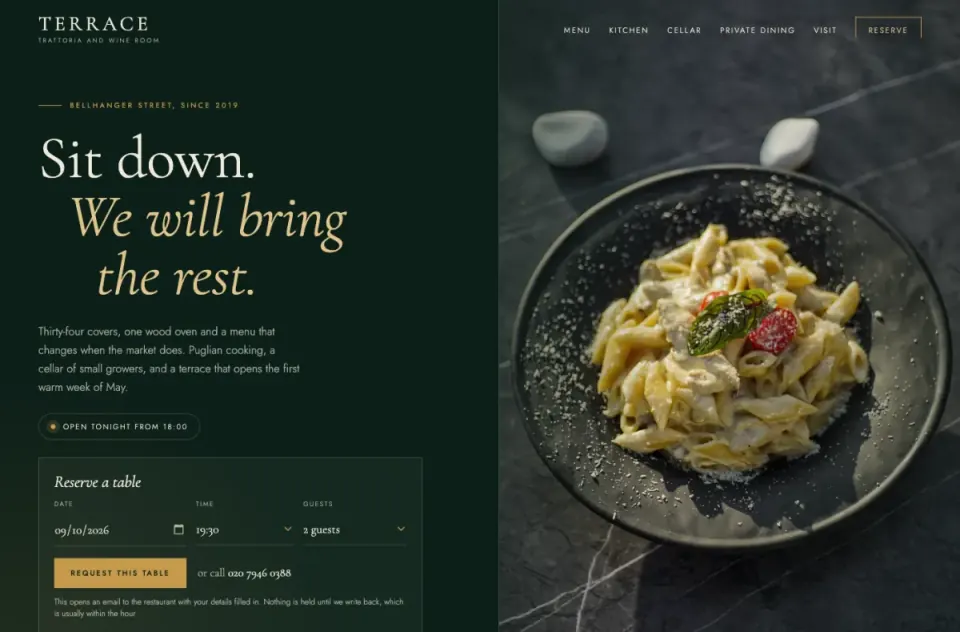 Made with FabricateA new app usually takes about 20 to 35 credits.
The short answer
Also good: AppSheet if you pay for Google Workspace, Lovable for good-looking screens.
- Top pick · we make this
Fabricate
Best for an app customers use
Describe the app in plain words. Fabricate builds the pages, the records and sign-in, and you change it by asking.
From $25 a monthThe details on Fabricate - No code
Softr
Best for a portal on your spreadsheet
Builds client portals and internal tools from a description with its AI Co-Builder, on Softr's own databases or on data you keep in Airtable or Google Sheets.
From $25 a monthThe details on Softr - AI builder
Glide
Best for team apps from a spreadsheet
Builds business apps for your team with an AI agent, from a prompt, a spreadsheet, a document or an image.
From $25 a monthThe details on Glide
Key takeaways
- Fabricate builds apps a business's customers use, for bookings, orders and requests, with its own records and sign-in, and it does not count the people who sign in. Building and previewing are free; publishing is on Pro and Max.
- Softr suits a client portal on data you already keep in Airtable or Google Sheets, with app users capped by plan.
- Glide suits apps for your own team built from a spreadsheet; apps for people outside your organization start on Plus.
- AppSheet Core is included in most paid Google Workspace plans, and every person who signs in needs a license.
- Lovable makes polished screens and publishes to a lovable.app address on every plan.
Compare at a glance
Whether customers can use the app, how you build it, who you pay for and what the cheapest paid plan costs.
- FabricateWe make this
- Customers use it
- Yes, on Pro and Max
- How you build
- Describe it in chat
- Who you pay for
- Not counted
- Paid plans from
- $25 a month
- SoftrNo code
- Customers use it
- Client portals
- How you build
- Describe it, or its editor
- Who you pay for
- App users capped by plan
- Paid plans from
- $25 a month
- GlideAI builder
- Customers use it
- From Plus, at $50 a month
- How you build
- Describe it in chat
- Who you pay for
- Published apps capped by plan
- Paid plans from
- $25 a month
- AppSheetNo code
- Customers use it
- Each one licensed, or Publisher Pro without sign-in
- How you build
- A no-code editor
- Who you pay for
- Every signed-in user
- Paid plans from
- $5 per user a month
- LovableAI builder
- Customers use it
- Yes, on every plan
- How you build
- Describe it in chat
- Who you pay for
- App usage on Cloud credits
- Paid plans from
- $25 a month
The cheapest paid plan billed monthly, read on each tool's pricing page on October 21, 2026; the others cost less billed yearly. Fabricate's figures come from our live plans.
How we compared
We compared the five tools on what a small business needs from an app: whether customers can use it, how you build it, whether it keeps its own records, who you pay for and what it costs to go live. For the other four we read their pricing pages and documentation on October 26, 2026, and each one's section lists the pages we read. We did not sign up for them for this guide.
Fabricate is ours. It comes first here because it is built for apps a business's customers use, and where another tool is the better pick, its section says so.
What we looked for
Customers can use it
Can customers book, order or send a request, without an account or with their own sign-in?
Built from a description
Can you describe the app in plain words instead of learning an editor?
Its own records
Does it keep the bookings, orders and customers it collects?
Who you pay for
Does the price grow with every customer or staff member who signs in?
Going live
What does it cost to put the app at an address you can share?
Top picks for 2026
Fabricate
Top pickWe make thisBest for: An app your customers use
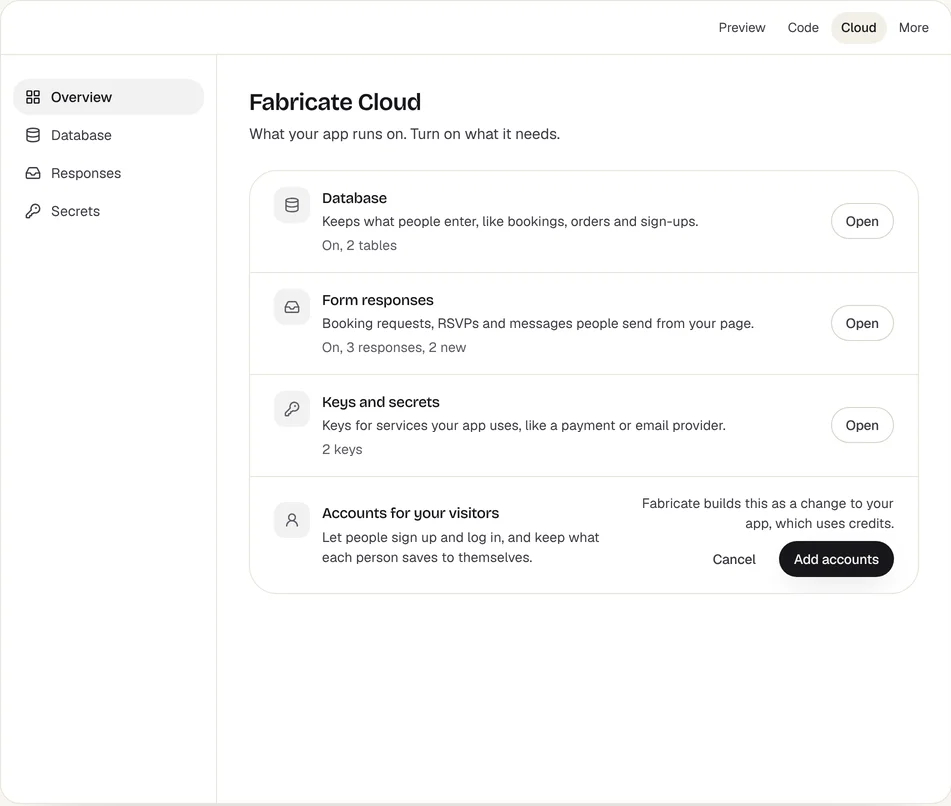
Describe the app your business needs in plain words, such as bookings for a salon, orders for a bakery or job requests for a plumber, and Fabricate builds it: the pages, its own database and sign-in for you, your staff or your customers. The people who sign in to a published app are not counted as seats. Building and previewing are free; publishing is on Pro and Max.
Fabricate Cloud
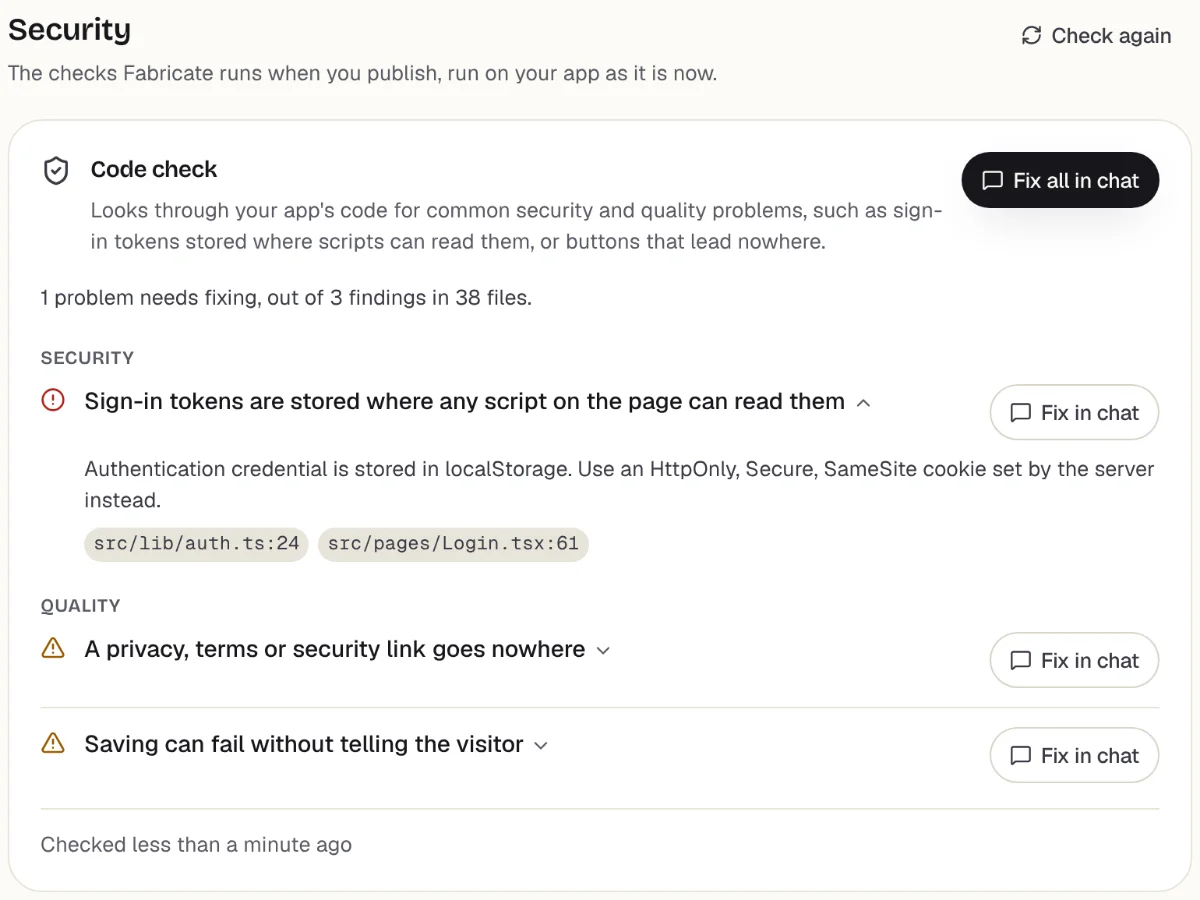
Checks
What it does well
- Bookings, orders and requests from customers
- Sign-in for staff or customers
- No price per person who signs in
Watch out for
- Web apps that work on phones, not app store apps
- Publishing needs Pro
- Paid plans from
- $25 a month
- 350 credits a month on Pro
- Free plan
- 60 credits
- A month, to build and preview
- A live app
- Pro and Max
- Publishing is on paid plans
Softr
No codeBest for: A portal on data you already keep
Builds client portals and internal tools from a description with its AI Co-Builder, on Softr's own databases or on data you keep in Airtable or Google Sheets. Its Free plan covers up to 3 builders and 5 app users; Basic is $25 a month, and each plan caps the app users who sign in.
What it does well
- Client portals
- Sits on Airtable or Google Sheets
- Workflows built in
Watch out for
- App users are counted against the plan
- Softr branding stays until Pro, at $119 a month
Where Softr beats Fabricate
If your records already live in Airtable or Google Sheets, a Softr app can sit on them, and you can keep editing in its no-code editor when its AI credits run out.
Sources: softr.io/pricing (opens in a new tab), checked ; Softr docs: AI Co-Builder (opens in a new tab), checked Fabricate vs Softr
Glide
AI builderBest for: Apps for your own team
Builds business apps for your team with an AI agent, from a prompt, a spreadsheet, a document or an image. The free plan builds but publishes no apps; Basic, at $25 a month, publishes 2, and apps for people outside your organization start on Plus, at $50.
What it does well
- Starts from a spreadsheet
- A mockup to approve first
- Apps for your team
Watch out for
- No published apps on the free plan
- Apps for customers start on Plus
Where Glide beats Fabricate
For an app only your staff use, built from a spreadsheet you already keep, Glide is built around exactly that.
Sources: glideapps.com/pricing (opens in a new tab), checked ; Glide docs: what is GlideOS? (opens in a new tab), checked Glide alternatives
AppSheet
No codeBest for: Businesses on Google Workspace
Google's no-code platform for apps and automations over Google Sheets and other data. Starter is $5 per user a month and Core $10, and Core is included in most paid Google Workspace plans; an app anyone can open without signing in needs Publisher Pro, at $50 a month per app.
What it does well
- In most paid Google Workspace plans
- Works on Google Sheets
- Automations
Watch out for
- Every person who signs in needs a license
- Public apps are a separate plan
Where AppSheet beats Fabricate
If your business already pays for Google Workspace, AppSheet Core is usually in the plan, so a staff app on your Sheets can cost nothing extra.
Source: about.appsheet.com/pricing (opens in a new tab), checked AppSheet alternatives
Lovable
AI builderBest for: Good-looking web apps
Builds web apps from a conversation, with Lovable Cloud for the database, sign-in and storage. Pro is $25 a month, and every plan publishes to a lovable.app address.
What it does well
- Polished screens
- A managed backend
- Publishes on every plan
Watch out for
- Access rules are yours to get right
- Building and Cloud draw on credits
Where Lovable beats Fabricate
The most polished screens from a first description, and a lovable.app address on every plan, so you can share something before you pay.
Sources: lovable.dev/pricing (opens in a new tab), checked ; Lovable docs: Lovable Cloud (opens in a new tab), checked ; Lovable docs: publishing (opens in a new tab), checked Lovable alternatives
What a small business can build with Fabricate
From this one description Fabricate builds the request page customers use without an account, the owner's sign-in and the list of requests to price and book, in an app with its own database; publishing it is on Pro and Max.
Build free. No card needed.
Our verdict
For a small business whose customers use the app, to book a time, place an order or send a job request, Fabricate is our pick, and we make it. You describe the app in plain words, it keeps the records the app collects, and nobody who signs in counts toward the price. Putting the app online is on Pro and Max.
Softr comes second for a client portal on data you already keep in Airtable or Google Sheets. Glide and AppSheet suit apps for your own staff, AppSheet especially if you already pay for Google Workspace. Lovable makes the most polished screens from a first description.
Frequently asked questions
- What is the best AI app builder for a small business?
- It depends on who uses the app. For an app your customers use, to book, order or send a request, Fabricate, which we make, builds it with its own records and sign-in. For a portal on data you already keep in Airtable or Google Sheets, Softr. For an app only your staff use, Glide or, if you pay for Google Workspace, AppSheet.
- Can I build a booking or ordering app without coding?
- Yes. Describe it in plain words, such as "customers pick a service and a time without an account, and only I sign in to see the week", and Fabricate builds the pages, the records and your sign-in. Building and previewing are free, and putting it online is on Pro and Max.
- Do I pay for every customer who signs in?
- On some tools, yes. AppSheet licenses every person who signs in, and Softr caps the app users on each plan. Fabricate does not count the people who sign in to a published app.
- Can my app take payments?
- Yes. On Fabricate: Stripe payments written into the app, on your own keys, on Pro and Max. The money goes to your own Stripe account, not through Fabricate.
- Will it work on my customers' phones?
- Yes, as a web app: it opens from its link in any phone or computer browser. It is not an App Store or Google Play app.
Sources
The pages this guide quotes, each with the day it was read.
- softr.io/pricing (opens in a new tab), checked
- Softr docs: AI Co-Builder (opens in a new tab), checked
- glideapps.com/pricing (opens in a new tab), checked
- Glide docs: what is GlideOS? (opens in a new tab), checked
- about.appsheet.com/pricing (opens in a new tab), checked
- lovable.dev/pricing (opens in a new tab), checked
- Lovable docs: Lovable Cloud (opens in a new tab), checked
- Lovable docs: publishing (opens in a new tab), checked
- fabricate.build/pricing, from our live plans
About this guide
Written by the Fabricate team. Fabricate is our product, so the guide marks it, and each pick, ours or not, says who it suits best.
Each tool's section lists the pages we read about it and the day we read them. We compared the tools from their own pricing pages and documentation, not by signing up for them. Spotted something out of date? Write to info@fabricate.build.
Related guides
All best lists- Build an Online Ordering AppOrders from your own site, kept in one list for you.Build it
- Build a Booking SystemServices, times and a week of bookings in one place.Build it
- Build a Job Tracking AppJob requests from customers and a list for your crew.Build it
- Best AI App Builders for Non-CodersFive tools compared for people who do not write code.Best list
Related pages
Best AI Code Editors in 2026
Five AI code editors compared on what differs: pricing, free-tier limits, model access and autocomplete. Plus when an ap...
Read moreBest AI Builders for Freelancers
Find the best AI app builders for freelance developers and designers. Compare tools that help you deliver client project...
Read moreBest AI Builders for Agencies
Compare the best AI app builders for digital agencies. Find tools that help agencies scale client delivery, manage proje...
Read moreBest AI Builders for Enterprises
Compare the best AI app builders for enterprise organizations. Find platforms with security, compliance, governance, and...
Read moreBest AI App Builders
Buyer's guides for every kind of project and budget.
Read moreAI App Builder
Describe your app and get a frontend, database, logins and a live URL in minutes.
Read more