AlternativesUpdated
The best Airtable alternatives in 2026
Why people leave Airtable, which tool fits each reason, and how to move a base. Fabricate is ours, so we also say when it is not the right pick.
The short answer: to keep a spreadsheet-database, Baserow, NocoDB or Grist, each of which you can also run on your own server; to keep the base and put a portal on it, Softr; when the base has become an app people sign in to, Fabricate. Every price below was read on the tool's own pricing page on October 26, 2026.
 Fabricate CloudFabricate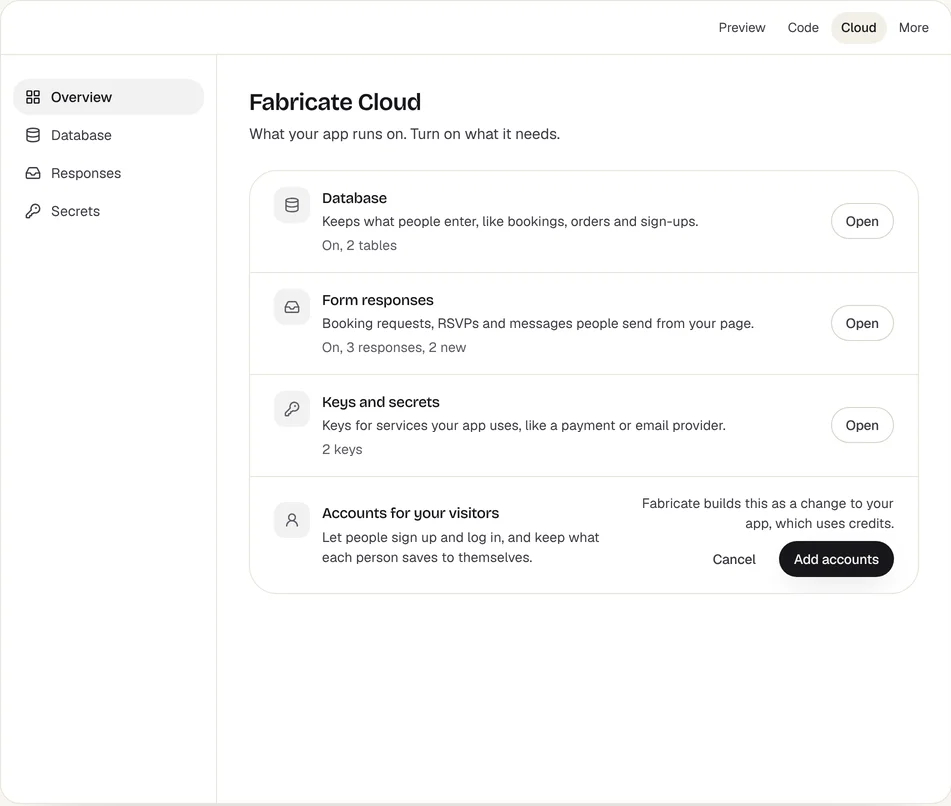
Key takeaways
- Airtable's free plan holds 1,000 records a base and Team 50,000; at the limit you keep your data but cannot add records until you upgrade.
- Team is $24 a seat a month billed monthly, so every editor adds to the bill.
- Baserow, NocoDB and Grist are the closest switches: each imports an Airtable base and has a free edition you run yourself.
- Softr keeps the base and puts a portal on it; Notion suits docs with tables; Microsoft Lists suits teams on Microsoft 365.
- Fabricate fits a base that has become an app: it builds the screens, sign-in and the app's own database as code. Building and previewing are free; publishing is on Pro and Max.
Why people look for an Airtable alternative
Each reason points to a different tool. Find yours, then jump to the pick that fits it.
The record limit stops new records
Airtable's free plan holds 1,000 records a base and Team 50,000. At the limit you can still use your bases and nothing is removed, but you cannot add records until you upgrade.
Fits: BaserowEvery editor is a paid seat
Team is $24 a seat a month billed monthly, so ten editors pay $240 a month. Some tools price the whole team, not each person in it.
Fits: NocoDBThe base has become an app
Orders that move through stages, bookings with rules, requests that need approval, clients who should see only their own records: that is an app, with screens, sign-in and rules of its own.
Fits: FabricatePeople outside your team need a way in
Airtable's Portals add-on lets guests in from $120 a month for 15 of them on Team. Some tools put a portal on the base you already have.
Fits: SoftrFormulas, on your own server
Airtable's pricing page has no plan you run on your own server. Grist's Community edition runs on yours, free and open source, and its formulas are Python.
Fits: GristYour team lives in Microsoft 365
If your company already pays for Microsoft 365, a tracking app inside Teams may be one you already have.
Fits: Microsoft Lists
Compare at a glance
What each tool is best for, how many records it holds, whether you can run it yourself, and the cheapest paid plan.
- FabricateWe make this
- Best for
- A base that has become an app
- Records
- Not counted by the plan; each app has its own SQLite database
- Run it yourself
- Download the code on Pro and Max
- Paid plans from
- $25 a month
- AirtableThe tool you have now
- Best for
- Shared bases for a team
- Records
- 1,000 a base free; 50,000 on Team
- Run it yourself
- No plan to run yourself
- Paid plans from
- $24 a seat a month
- Baserow
- Best for
- A like-for-like switch
- Records
- 3,000 a workspace free; 50,000 on Premium; no limit on your own server
- Run it yourself
- Free, with an open-source core
- Paid plans from
- $12 a user a month
- NocoDB
- Best for
- Big teams on a budget
- Records
- 1,000 free; 50,000 on Plus; no limit on your own server
- Run it yourself
- Free, under a fair-code license
- Paid plans from
- $15 a seat, or $135 for any number
- Grist
- Best for
- Spreadsheet people
- Records
- 5,000 a document free; 100,000 on Pro
- Run it yourself
- Free and open source (Apache 2.0)
- Paid plans from
- $10 a user a month
- Softr
- Best for
- A portal on your base
- Records
- Your Airtable base, or Softr Databases
- Run it yourself
- No plan to run yourself
- Paid plans from
- $25 a month
- Notion
- Best for
- Docs with tables
- Records
- Blocks limited on Free for 2 or more members
- Run it yourself
- No plan to run yourself
- Paid plans from
- $12 a member a month
- Microsoft Lists
- Best for
- Microsoft 365 teams
- Records
- Lists you share in Microsoft 365
- Run it yourself
- Runs in Microsoft 365
- Paid plans from
- Comes with Microsoft 365 business plans
The cheapest paid plan billed monthly, read on each tool's own pricing page on October 26, 2026; most cost less billed yearly. Fabricate's figures come from our live plans.
Fabricate
We make thisBest for: A base that has become an app
Fabricate builds a web app from a description: the screens, server routes, sign-in and the app's own SQLite database, written as code. Describe what a base holds, who signs in and what each person may see or change, and the app keeps to it; bring the records over as CSV. Building and previewing are free; publishing is on Pro and Max.
What moves where
- Tables and records
- On Airtable
- Bases, with a record limit on each plan
- On Fabricate
- The app's own SQLite tables, imported from CSV
- Views
- On Airtable
- Grid and other views of a table
- On Fabricate
- Screens with the lists, filters and boards you ask for
- Forms
- On Airtable
- Airtable forms
- On Fabricate
- Forms whose answers land in the app's Responses
- Interfaces and portals
- On Airtable
- Interface Designer, and Portals for guests
- On Fabricate
- Pages behind sign-in, with roles
- Automations
- On Airtable
- Automation runs, capped by plan
- On Fabricate
- Rules in the app's server code; Slack, Zapier, Make or a webhook on Pro and Max
- Who pays
- On Airtable
- Each editor, by the seat
- On Fabricate
- The plan: Pro includes 3 team seats, and the app's users are not billed
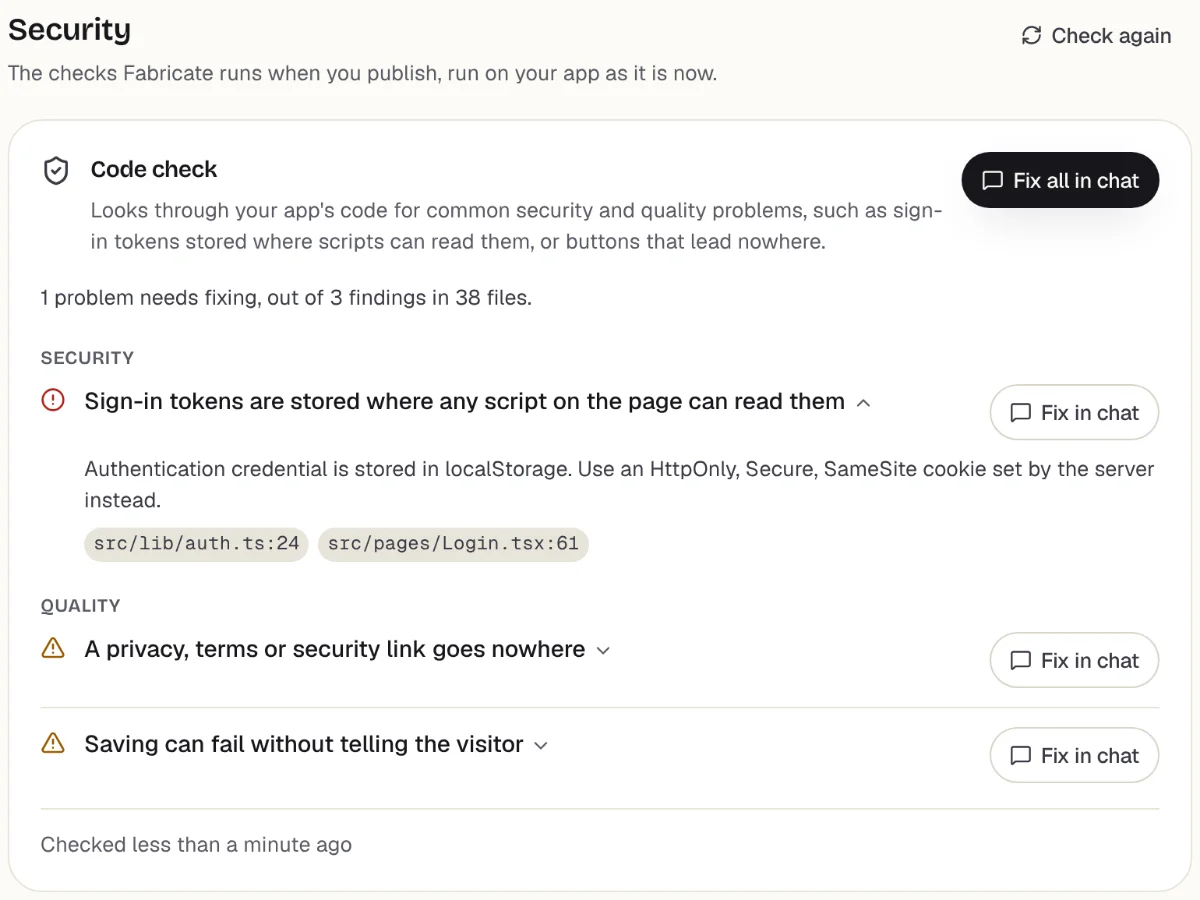
Checks before you publish
What it does well
- Its own database and sign-in
- Rules and roles in the code
- No price per person who signs in
- Paid plans from
- $25 a month
- 350 credits a month on Pro
- Free plan
- 60 credits
- A month, to build and preview
- A live app
- Pro and Max
- Publishing is on paid plans
Moving a base to Fabricate in six steps
Fabricate rebuilds what the base does as an app, and you bring the records over as CSV.
- 1
Download each table
In each table's grid view, remove the filters, click the down arrow beside the view's name and choose Download CSV.
- 2
Describe the app
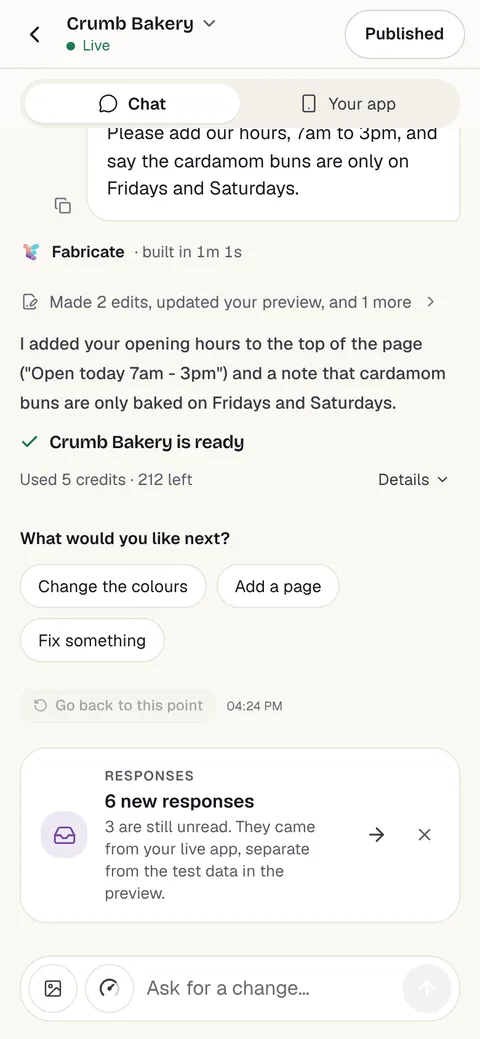
Say what the base is for, who signs in and what each person may see or change. Attach a CSV, or a few rows of one, so Fabricate sees the fields.
- 3
Ask for an import screen
Ask for a screen, behind your own sign-in, where you upload a CSV file and the app adds its rows. Try it with one of your files.
- 4
Test it in the preview
Sign up, save and edit data, and check who can see what, before anyone else does.
- 5
Put it online
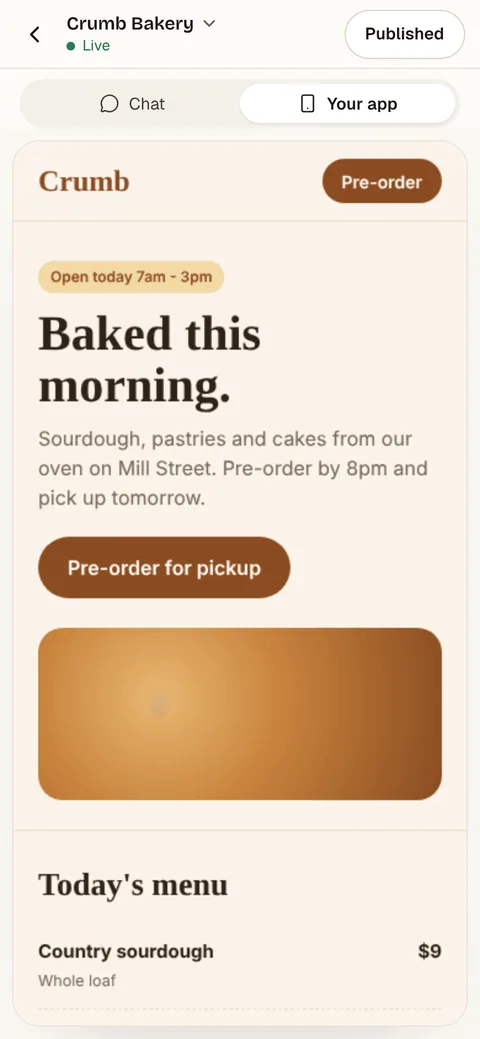
On Pro, one press of Publish gives it its own address to share, after the same browser check.
- 6
Bring the records in
The published app starts with a fresh database of its own, without your test records, so import your CSV files there.
Chat
Your app
The other Airtable alternatives
What each one does well, and the kind of project it suits best.
- Number 2
Baserow
Best for: A like-for-like switch
Baserow is the closest like-for-like switch: a spreadsheet-database with grid, form and gallery views and an application builder. Cloud Free holds 3,000 rows a workspace and Premium is $12 a user a month billed monthly; on your own server, its pricing page lists no row limit.
- Imports a base from its share link
- Free to run yourself
- An application builder
Where Baserow beats Fabricate
If you want Airtable's way of working without its limits, Baserow imports a base's tables, field types, links between tables and attachments from a share link, and its features outside Premium are open source under the MIT License.
From $12 a user a monthSources: baserow.io/pricing (opens in a new tab), checked ; Baserow docs: import from Airtable (opens in a new tab), checked ; Baserow on GitHub (opens in a new tab), checked
- Number 3
NocoDB
Best for: Big teams on a budget
NocoDB puts a spreadsheet interface on a database, in its cloud or on your own server. Cloud Plus is $15 a seat a month billed monthly, or $135 a month for any number of seats, and the self-hosted Community edition is free under NocoDB's Sustainable Use License, which it calls fair-code.
- One price for any number of seats
- Free to run yourself
- Imports from Airtable
Where NocoDB beats Fabricate
For a big team, NocoDB's Plus plan is $135 a month for any number of seats, where Airtable Team charges $24 for each editor. Its Airtable import works from a shared base or view link, with a personal access token for a shared base's records, and leaves formula fields behind.
From $15 a seat a monthSources: nocodb.com/pricing (opens in a new tab), checked ; NocoDB docs: import from Airtable (opens in a new tab), checked ; NocoDB on GitHub (opens in a new tab), checked
- Number 4
Grist
Best for: Spreadsheet people
Grist is a spreadsheet-database whose formulas are Python. Free holds 5,000 records a document and Pro 100,000 at $10 a user a month billed monthly, and the Community edition is open source under the Apache 2.0 license, free to run on your own server.
- Python formulas
- Open source under Apache 2.0
- Imports Airtable with attachments
Where Grist beats Fabricate
If your base is mostly formulas, Grist's are Python on every plan, and its import copies a whole Airtable base with its attachments, though not its views, interfaces or forms.
From $10 a user a monthSources: getgrist.com/pricing (opens in a new tab), checked ; Grist help: importing data (opens in a new tab), checked ; Grist on GitHub (opens in a new tab), checked
- Number 5
Softr
Best for: A portal on your base
Softr builds client portals and member dashboards on top of your data, Airtable included: it reads, creates and updates Airtable records, so the base stays where it is. Basic is $25 a month billed monthly, for 1 builder and 10 app users.
- Keeps Airtable as the data
- Portals your users sign in to
- Its own database too
Where Softr beats Fabricate
If the base works and only people outside your team need a way in, Softr puts a portal on it without moving any data: in its words, Airtable acts as your single source of truth.
From $25 a monthSoftr pricing, explainedSources: Softr: Airtable integration (opens in a new tab), checked ; softr.io/pricing (opens in a new tab), checked
- Number 6
Notion
Best for: Docs with tables
Notion keeps databases inside documents, with views, forms and sites. Plus is $12 a member a month billed monthly; on the free plan, a workspace with two or more members has a limit on blocks.
- Databases inside docs
- Forms and sites
- Wikis and notes too
Where Notion beats Fabricate
If your base is mostly plans, notes and lists that people read and edit together, Notion puts the tables inside the documents.
From $12 a member a monthNotion alternativesSource: notion.com/pricing (opens in a new tab), checked
- Number 7
Microsoft Lists
Best for: Microsoft 365 teams
Microsoft calls Lists your smart information-tracking app in Microsoft 365: lists started from templates, shared with your team, shown in Microsoft Teams and automated with Power Platform. It comes with Microsoft 365 business and enterprise plans.
- Inside Microsoft Teams
- Templates to start from
- Power Platform automations
Where Microsoft Lists beats Fabricate
If your company already pays for Microsoft 365, Lists comes with it and sits inside Teams, so there is no new tool to buy or sign in to.
Source: Microsoft Lists (opens in a new tab), checked
Where Airtable fits, and where Fabricate differs
Airtable is a spreadsheet-database: tables with typed fields, linked records and views, with forms, automations, interfaces and AI on top. Its plans count editors, records a base, automation runs and API calls, and its Portals add-on lets people outside your team in, from $120 a month for 15 guests on Team.
Many bases start as a list and become a process: orders that move through stages, bookings with rules, requests that need approval, clients who should see only their own records. At that point the base is an app, and the limits that bite are seats, records and guest access.
Fabricate builds that app as code. You describe the tables, who signs in and what each person may see or change, and it writes the screens, the server routes that enforce those rules and the app's own SQLite database. The people who sign in are not billed per person, and serving the published app is part of the plan, not a meter.
What it does not do is behave like a spreadsheet. There is no grid anyone can add a column to; a new field is a change you ask for in the chat. If your team edits a shared table freely, Baserow, NocoDB or Grist keep that way of working.
Where Fabricate and Airtable differ
Where the data lives
Fabricate
Fabricate generates the backend as code in your project: server routes in a Durable Object on Cloudflare Workers, with the app's data in that Durable Object's built-in SQLite database. When the app needs accounts, sign-in is built in, with PBKDF2 password hashing and opaque HttpOnly cookie sessions.
Airtable
Airtable keeps records in bases, with a limit a base on each plan: 1,000 records on Free, 50,000 on Team, 125,000 on Business and 500,000 on Enterprise Scale.
In short: Airtable is a shared table first. Fabricate is an app first, with the tables inside it.
People outside your team
Fabricate
Each app has its own sign-in, with roles and owner-only or invite-code access, and its server code decides what each person may see or change. The people who sign in are not billed.
Airtable
Airtable's Portals add-on lets people outside your team in, from $120 a month for 15 guests on Team and $150 on Business.
In short: For a few guests on a base you keep, Portals or Softr are the quick route. For many customers or clients who each see their own records, an app with its own sign-in fits better.
Moving your data
Fabricate
Records come over as CSV files, through an import screen you ask for. Views, forms and rules are rebuilt from your description, not copied.
Airtable
Airtable downloads a grid view as CSV from the menu beside the view's name, in its web and desktop apps. Baserow, NocoDB and Grist each import a base directly.
In short: To carry a base over as it is, a tool with an Airtable import is less work. Fabricate rebuilds what the base does and takes its records as CSV.
Airtable: what it does well, and what to watch for
What it does well
- Typed fields, linked records and many views of one table
- Automations and Interface Designer on the free plan
- Up to 5 editors on the free plan
- Two-way sync, an admin panel and SAML SSO on Business
Watch out for
- 1,000 records a base on the free plan and 50,000 on Team
- Every editor is a paid seat: $24 a month on Team, billed monthly
- Guests outside your team need the Portals add-on, from $120 a month
- Automation runs and API calls stop at the plan's limit
Try it with one prompt
Fabricate builds this as one app: an orders table in the app's own database, a staff view with every order, a customer view with only their own, the status steps, and a screen that imports the orders you download from Airtable.
Build free. No card needed.
Frequently asked questions
- What is the best free Airtable alternative?
- For a spreadsheet-database, Baserow, NocoDB and Grist each have a free cloud plan and a free edition you run yourself: Baserow's cloud Free holds 3,000 rows a workspace, NocoDB's 1,000 records and Grist's 5,000 records a document. Fabricate's Free plan builds and previews an app, with no card needed; publishing is on Pro and Max.
- Is there an open-source Airtable alternative?
- Yes. Grist's Community edition is open source under the Apache 2.0 license, and Baserow's features outside Premium are under the MIT License; both run free on your own server. NocoDB's self-hosted Community edition is free too, under its Sustainable Use License, which NocoDB calls fair-code.
- Can I import my Airtable base into another tool?
- Baserow imports a base from its share link: tables, records, field types, links between tables, attachments and grid views, but not automations, interfaces or comments. NocoDB imports from a shared base or view link, with a personal access token for a shared base's records, and leaves formula fields behind. Grist copies a whole base with its attachments, but not views, interfaces or forms. For Fabricate, download each table as CSV and ask for an import screen.
- How do I export my data from Airtable?
- In a grid view, click the down arrow beside the view's name and choose Download CSV. It works in Airtable's web and desktop apps, and to get every record in a table, export a view with no filters.
- What happens when I hit Airtable's record limit?
- Airtable's pricing page says you can still use your bases and it never removes your data, but you cannot add more records or attachments until you upgrade; automation runs and API calls stop at the plan's limit. The free plan holds 1,000 records a base, Team 50,000 and Business 125,000.
- Can Fabricate replace Airtable?
- For a base that runs a process, such as orders, bookings or approvals, yes: Fabricate builds it as a web app with its own database, sign-in and roles, and you bring the records over as CSV. For a shared table your team edits freely, a spreadsheet-database such as Baserow, NocoDB or Grist is the closer fit.
- How much does Airtable cost compared with Fabricate?
- Airtable Team is $24 a seat a month billed monthly, or $20 billed yearly, so five editors pay $120 a month; Business is $54 a seat billed monthly. Fabricate Pro is $25 a month for the plan, with 3 team seats, and the people who sign in to your app are not billed.
Sources
The pages this guide quotes, each with the day it was read.
- airtable.com/pricing (opens in a new tab), checked
- Airtable help: getting started with views (opens in a new tab), checked
- baserow.io/pricing (opens in a new tab), checked
- Baserow docs: import from Airtable (opens in a new tab), checked
- Baserow on GitHub (opens in a new tab), checked
- nocodb.com/pricing (opens in a new tab), checked
- NocoDB docs: import from Airtable (opens in a new tab), checked
- NocoDB on GitHub (opens in a new tab), checked
- getgrist.com/pricing (opens in a new tab), checked
- Grist help: importing data (opens in a new tab), checked
- Grist on GitHub (opens in a new tab), checked
- Softr: Airtable integration (opens in a new tab), checked
- softr.io/pricing (opens in a new tab), checked
- notion.com/pricing (opens in a new tab), checked
- Microsoft Lists (opens in a new tab), checked
- fabricate.build/pricing, from our live plans
About this guide
Written by the Fabricate team. Fabricate is our product, so it is first on this page and marked "We make this". Where a reason to switch fits another tool better, the reason says which.
Each tool's card lists the pages we read about it and the day we read them. We compared the tools from their own pricing pages and documentation, not by signing up for them. Spotted something out of date? Write to info@fabricate.build.
Related guides
All alternatives- Glide alternativesBuilders that turn a spreadsheet into an app, compared.Alternatives
- Retool alternativesInternal tool builders for the data you already have.Alternatives
- Build an internal tool for your teamForms, lists, approvals and dashboards behind a staff sign-in.Build it
- Build a custom CRM without codeContacts, companies, a deal pipeline and follow-ups in an app of your own.Build it
- No Code DatabaseHow each app keeps its data in its own built-in SQLite database.Feature
- How much does it cost to make an app?What making an app costs each way, and what a month of building costs on Fabricate.Guide
Related pages
Notion Alternatives
Seven Notion alternatives compared from their own pricing pages on October 26, 2026: for notes, wikis, docs, tasks, and ...
Read moreAll AI App Builder Alternatives
Compare every alternative we have reviewed, side by side.
Read moreAI App Builder
Describe your app and get a frontend, database, logins and a live URL in minutes.
Read more