AlternativesUpdated
The best Notion alternatives in 2026
Why people leave Notion, which tool fits each reason, and how to move what you keep there. Fabricate is ours, so we also say when it is not the right pick.
The short answer: for notes on your own device, Obsidian or Anytype; for docs with tables, Superhuman Docs, formerly Coda; for a team wiki, Confluence; for tasks, ClickUp; for an open-source workspace on your own server, AppFlowy; and when a Notion database has become something clients or customers sign in to, Fabricate. Every price below was read on the tool's own pricing page on October 26, 2026.
 Client portal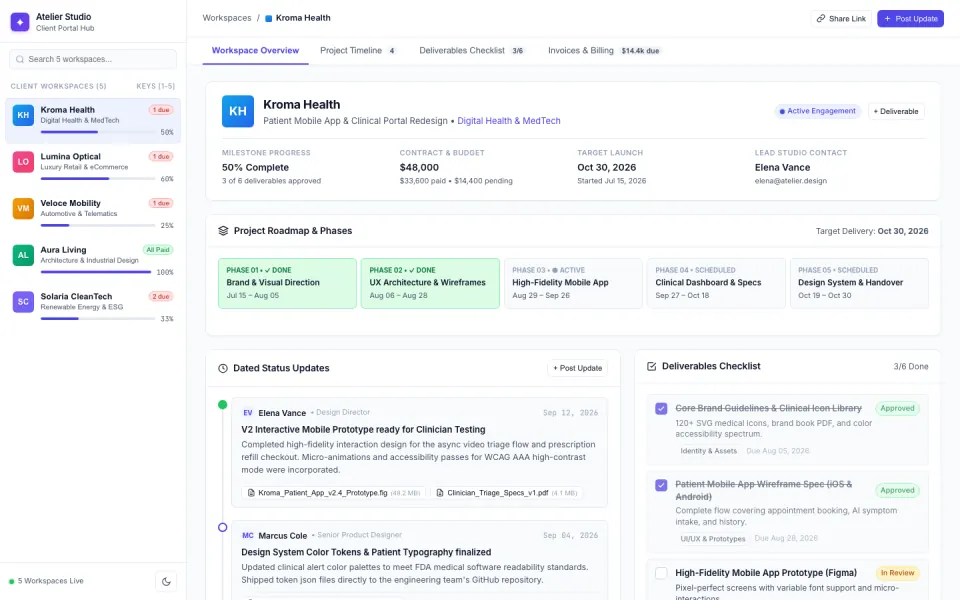
Key takeaways
- Most people leave Notion for one of the jobs it does, notes, a wiki, docs with tables, tasks or a tracker, and a different tool is best at each.
- Obsidian and Anytype keep your work on your own device; AppFlowy is open source and runs on your own servers.
- Superhuman Docs, formerly Coda, suits docs that calculate; Confluence suits a team wiki and is free for up to 10 users; ClickUp suits tasks.
- Fabricate is not a notes app. It fits the Notion databases that have become apps, with sign-in and roles of their own. Building and previewing are free; publishing is on Pro and Max.
- Every price here is the cheapest paid plan billed monthly, read on the tool's own page on October 26, 2026.
Why people look for a Notion alternative
Most people leave Notion for one of the jobs it does. Find yours, then jump to the pick that fits it.
Notes that live on your device
Obsidian keeps notes as files in open formats on your own device, works offline, and its app is free without limits; Sync, if you want it, is $5 a month.
Fits: ObsidianDocs that calculate
Superhuman Docs, formerly Coda, puts tables, formulas and automations inside a document, billed per Doc Maker.
Fits: Superhuman DocsA wiki for a bigger team
Confluence is free for up to 10 users, with pages, spaces and databases; Standard is $7.15 a user a month for a team of 10 to 25, billed monthly.
Fits: ConfluenceTasks before documents
ClickUp starts from tasks, with Kanban and calendar views and docs beside them, and its free plan has no cap on members.
Fits: ClickUpOpen source, on your own server
AppFlowy is open source under the AGPL-3.0 license, runs on your own infrastructure, and offers help moving from Notion.
Fits: AppFlowyA tracker that has become an app
A database that clients, customers or staff sign in to, with rules about who sees and changes what, has become an app. Fabricate builds it as one.
Fits: Fabricate
Compare at a glance
What each tool is best for, where your work lives, what its free plan allows, and the cheapest paid plan.
- FabricateWe make this
- Best for
- Trackers that should be apps
- Where your work lives
- The app's own database, on Cloudflare
- Free plan
- Builds and previews; publishing is paid
- Paid plans from
- $25 a month
- NotionThe tool you have now
- Best for
- Docs, wikis and databases
- Where your work lives
- Your Notion workspace
- Free plan
- Blocks limited for 2 or more members
- Paid plans from
- $12 a member a month
- Obsidian
- Best for
- Private notes
- Where your work lives
- Files on your own device
- Free plan
- The app is free without limits
- Paid plans from
- $5 a month for Sync
- Superhuman Docs
- Best for
- Docs that calculate
- Where your work lives
- Superhuman Docs
- Free plan
- Pages limited in shared docs
- Paid plans from
- $15 per Doc Maker a month
- Anytype
- Best for
- Private, offline work
- Where your work lives
- Your device, encrypted
- Free plan
- 100 MB of remote storage
- Paid plans from
- $5 a month
- AppFlowy
- Best for
- Running it yourself
- Where your work lives
- AppFlowy Cloud or your own servers
- Free plan
- One owner and 100 MB in the cloud
- Paid plans from
- $16 a member a month
- ClickUp
- Best for
- Tasks first
- Where your work lives
- ClickUp
- Free plan
- Any number of members, 60 MB
- Paid plans from
- $10 a user a month
- Confluence
- Best for
- A team wiki
- Where your work lives
- Confluence
- Free plan
- Up to 10 users
- Paid plans from
- $7.15 a user a month, for 10 to 25 users
The cheapest paid plan billed monthly, read on each tool's own pricing page on October 26, 2026; most cost less billed yearly. Fabricate's figures come from our live plans.
Fabricate
We make thisBest for: A tracker that has become an app
Fabricate is not a notes app. It fits the Notion databases that have become apps: client portals, trackers and request forms that people sign in to. Describe who signs in and what each person may see or change, and it builds a web app with its own database, sign-in and roles, written as code. Building and previewing are free; publishing is on Pro and Max.
What moves where
- Databases
- On Notion
- Notion databases and their views
- On Fabricate
- The app's own SQLite tables, imported from CSV
- Pages for clients
- On Notion
- Shared pages and guests
- On Fabricate
- Pages behind sign-in, where each client sees their own records
- Forms
- On Notion
- Notion forms
- On Fabricate
- Forms whose answers land in the app's Responses
- Who sees what
- On Notion
- Page sharing and permissions
- On Fabricate
- Roles enforced by the app's server code
- Notes and docs
- On Notion
- Your workspace
- On Fabricate
- Stay in Notion, or move to a notes app
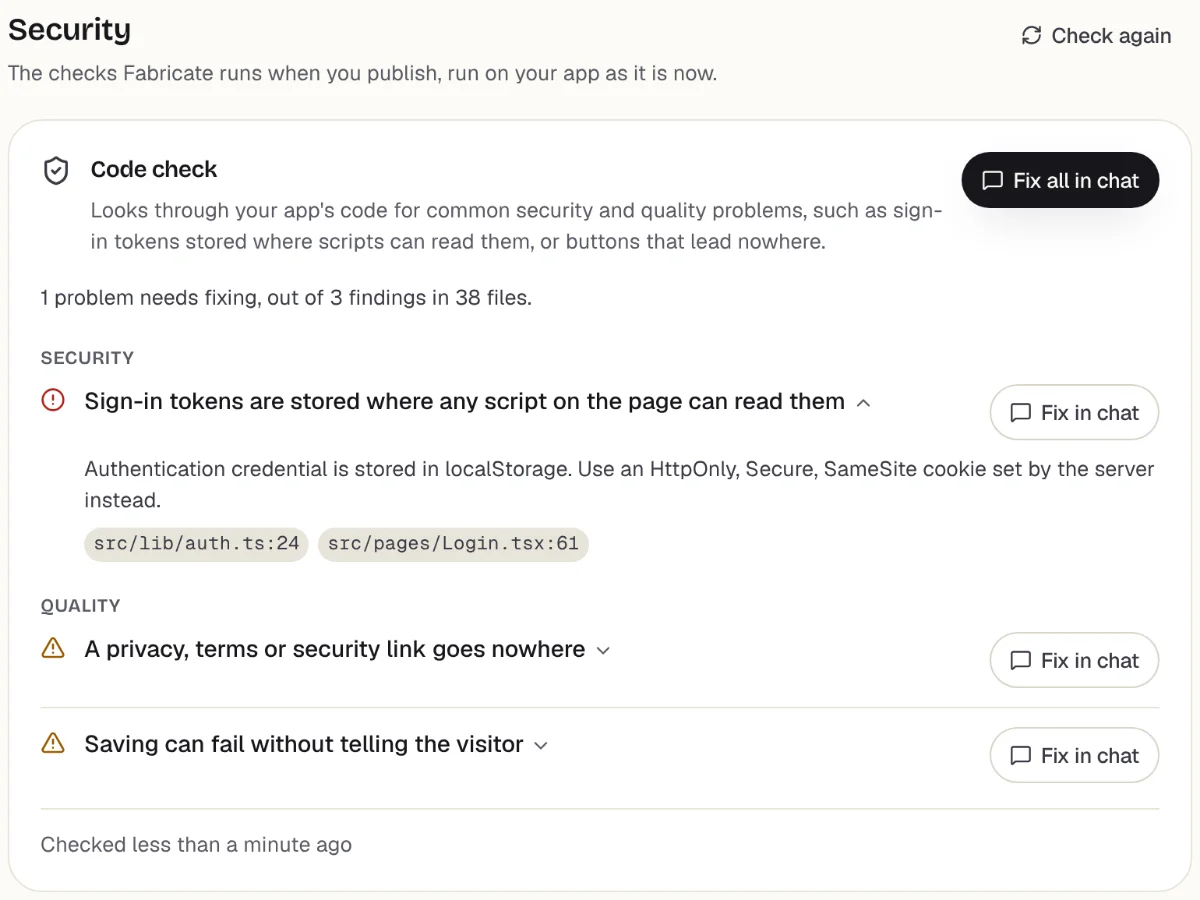
Checks before you publish
What it does well
- Sign-in and roles for clients and staff
- Its own database, written as code
- Checked in a real browser before it can be published
- Paid plans from
- $25 a month
- 350 credits a month on Pro
- Free plan
- 60 credits
- A month, to build and preview
- A live app
- Pro and Max
- Publishing is on paid plans
Moving a Notion database to Fabricate
Your notes stay where they are. Fabricate rebuilds the database that should be an app, and you bring its records over as CSV.
- 1
Export the database
Open the database as a full page and export it as CSV.
- 2
Describe the app
Say who signs in, what each person may see or change and what the app saves. Attach the CSV, or a few rows of it, so Fabricate sees the fields.
- 3
Ask for an import screen
Ask for a screen, behind your own sign-in, where you upload a CSV file and the app adds its rows. Try it with one of your files.
- 4
Test it in the preview
Sign up, save and edit data, and check who can see what, before anyone else does.
- 5
Put it online
On Pro, one press of Publish gives it its own address to share, after the same browser check.
- 6
Bring the records in
The published app starts with a fresh database of its own, without your test records, so import your CSV files there.
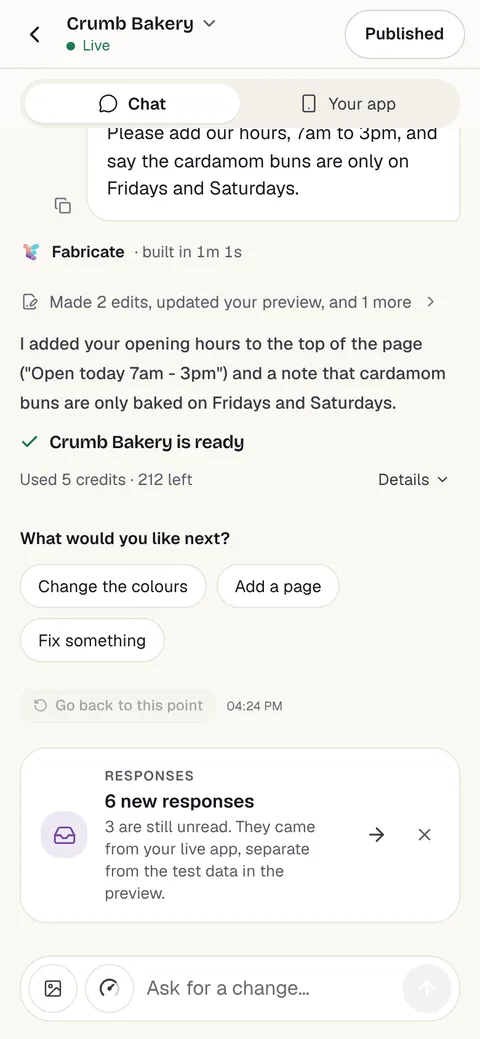
Chat
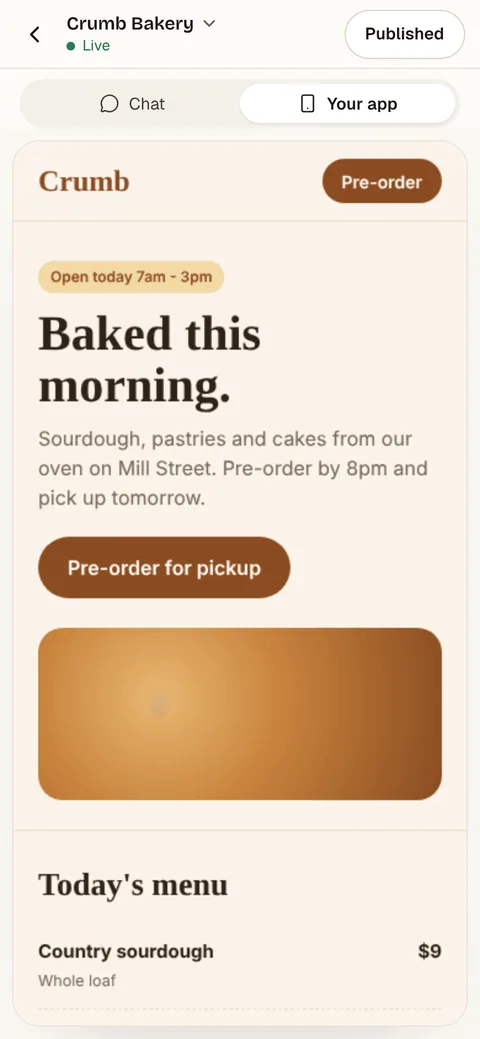
Your app
The other Notion alternatives
What each one does well, and the kind of project it suits best.
- Number 2
Obsidian
Best for: Private notes
Obsidian is a note-taking app that keeps your notes as files on your own device, in open formats, even offline, with thousands of plugins and themes. The app is free without limits; Sync is $5 a month and Publish $10 a site, billed monthly.
- Notes on your own device
- Free, with no sign-up
- Thousands of plugins
Where Obsidian beats Fabricate
Fabricate builds apps, not notes. For notes of your own, Obsidian keeps them as files on your device in open formats, works offline and costs nothing.
From $5 a month for SyncSources: obsidian.md/pricing (opens in a new tab), checked ; obsidian.md (opens in a new tab), checked
- Number 3
Superhuman Docs
Best for: Docs that calculate
Coda is now Superhuman Docs: documents with tables, views, forms, formulas and automations in one doc. Pro is $15 per Doc Maker a month billed monthly, and Business $40.
- Tables and formulas in a doc
- Automations
- Billed per Doc Maker
Where Superhuman Docs beats Fabricate
If the work is a document that also calculates, Superhuman Docs keeps the tables, formulas and automations inside the doc your team already reads, with no app to publish.
From $15 per Doc Maker a monthSources: Superhuman Docs plans (opens in a new tab), checked ; coda.io (opens in a new tab), checked
- Number 4
Anytype
Best for: Private, offline work
Anytype keeps your work in a vault on your own device, encrypted, works offline and syncs peer to peer on a local network. The free plan has 100 MB of remote storage; Plus is $5 a month billed monthly.
- Encrypted
- Works offline
- Peer-to-peer sync
Where Anytype beats Fabricate
If privacy comes first, Anytype keeps your vault on your device, encrypted, and works offline; a Fabricate app runs online, on Cloudflare.
From $5 a monthSources: anytype.io/pricing (opens in a new tab), checked ; anytype.io (opens in a new tab), checked
- Number 5
AppFlowy
Best for: Running it yourself
AppFlowy is an open-source workspace, under the AGPL-3.0 license, that you can run on your own infrastructure, with help moving from Notion and Confluence. Cloud Pro is $16 a member a month billed monthly; self-hosted, Free has one seat and Team is $10 a seat a month billed yearly.
- Open source (AGPL-3.0)
- Runs on your own servers
- Help moving from Notion
Where AppFlowy beats Fabricate
If you want the workspace itself on your own servers, AppFlowy publishes its source under AGPL-3.0 and offers help moving from Notion and Confluence.
From $16 a member a monthSources: appflowy.com/pricing (opens in a new tab), checked ; appflowy.com (opens in a new tab), checked ; AppFlowy on GitHub (opens in a new tab), checked
- Number 6
ClickUp
Best for: Tasks first
ClickUp starts from tasks, with Kanban, calendars, forms and collaborative docs beside them. Free Forever has no cap on tasks or members and 60 MB of storage; Unlimited is $10 a user a month billed monthly, and AI is priced separately.
- Tasks and docs together
- Kanban and calendar views
- A free plan for any team size
Where ClickUp beats Fabricate
For a team's tasks and projects, ClickUp is ready the day you sign up, with views and docs made for them; a Fabricate app is built around one process you describe.
From $10 a user a monthSource: clickup.com/pricing (opens in a new tab), checked
- Number 7
Confluence
Best for: A team wiki
Confluence is Atlassian's wiki: pages, spaces, databases and whiteboards, free for up to 10 users. For a team of 10 to 25, Standard is $7.15 a user a month and Premium $14.10, billed monthly, and the price a user falls as the team grows.
- Free for up to 10 users
- Pages and spaces
- Rovo AI on Standard
Where Confluence beats Fabricate
For a company wiki, Confluence is built for pages and spaces that many people read, and it is free for up to 10 users.
From $7.15 a user a month, for 10 to 25 usersSource: Confluence pricing (opens in a new tab), checked
Where Notion fits, and where Fabricate differs
Notion is a workspace of pages and databases: notes, docs, wikis and project trackers in one place, with forms, sites, AI and agents on top. Plus is $12 a member a month billed monthly and Business $24, which adds Notion Agent, AI Meeting Notes and SAML SSO.
Because it does so much, people leave it one job at a time. A notes app, a wiki and a task manager each do one of its jobs with less setup, and each pick on this page is the one we would name for that job.
One job is different: a database that other people use. A client list where each client should see their own part, a request tracker with an approval step, an order list customers check: in Notion those are shared pages and permissions. Built as an app, each person signs in and the app's server decides what they see.
Fabricate builds that kind of app from a description, with its own database, sign-in and roles, written as code. It does not replace your notes or your docs, and this page ranks it first because it is ours, not because it does what Notion does.
Where Fabricate and Notion differ
Sharing with clients
Fabricate
Each app has its own sign-in, with roles and owner-only or invite-code access, and its server code decides what each person may see or change.
Notion
Notion shares pages with members and guests: its free plan allows 10 guests and Plus any number, and Business adds granular database permissions.
In short: For a few guests on pages you keep, Notion's sharing is enough. For clients who each sign in to their own records, an app does that job better.
Moving your data
Fabricate
Records come over as CSV files, through an import screen you ask for. Views, forms and rules are rebuilt from your description, not copied.
Notion
Notion exports any page or database as PDF, HTML, or Markdown and CSV, and a full-page database as CSV.
In short: Databases move as CSV. Pages move as Markdown or PDF, to a notes app or a wiki.
Notion: what it does well, and what to watch for
What it does well
- Docs, wikis and databases in one workspace
- Basic forms and sites on the free plan
- No limit on pages and blocks for one person on the free plan
- Exports pages as Markdown or PDF and databases as CSV
Watch out for
- On the free plan, a workspace with two or more members has a limit on blocks
- Notion AI is a trial on Free and Plus; Notion Agent and AI Meeting Notes need Business
- File uploads stop at 5 MB on the free plan
- Every member is a paid seat on Plus and Business
Try it with one prompt
Fabricate builds this as one app: projects, milestones and deliverables in the app's own database, a client view with only their own projects, a staff view with every client, and a screen that imports the projects you export from Notion.
Build free. No card needed.
Frequently asked questions
- What is the best free Notion alternative?
- It depends on what you use Notion for. For your own notes, Obsidian's app is free without limits. For a team wiki, Confluence is free for up to 10 users. For tasks, ClickUp's Free Forever plan has no cap on members. AppFlowy's Free plan on your own server has one seat, and Anytype's free plan has 100 MB of remote storage.
- Is there an open-source Notion alternative?
- AppFlowy is open source under the AGPL-3.0 license and runs on your own infrastructure, with help moving from Notion. If what matters is owning the files, Obsidian keeps your notes as files in open formats on your own device.
- How do I export my data from Notion?
- Notion's help center says any page or database exports as PDF, HTML, or Markdown and CSV, and a full-page database exports as CSV. Export the databases you want to move as CSV, and the pages as Markdown for a notes app or a wiki.
- Can Fabricate replace Notion?
- Not as a notes app or a wiki: Fabricate builds web apps. It replaces the Notion databases that have become apps, such as a client portal, a CRM or a request tracker that people sign in to, with screens, sign-in and roles of their own. Keep your notes and docs in Notion or a notes app.
- What is Superhuman Docs?
- It is Coda's new name: coda.io says Coda is now Superhuman Docs, and its pricing page has moved to superhuman.com. Pro is $15 per Doc Maker a month billed monthly, or $12 billed yearly, and Business $40, or $33 billed yearly.
- How much does Notion cost compared with Fabricate?
- Notion Plus is $12 a member a month billed monthly, or $10 billed yearly, and Business $24, so a team of five on Plus pays $60 a month. Fabricate Pro is $25 a month for the plan, with 3 team seats, and the people who sign in to your app are not billed.
- Can I build a client portal instead of sharing Notion pages?
- Yes. Describe the portal to Fabricate: who signs in, what each client sees and what they can approve. It builds a web app where each client signs in and sees only their own records. Publishing it is on Pro and Max.
Sources
The pages this guide quotes, each with the day it was read.
- notion.com/pricing (opens in a new tab), checked
- Notion help: export your content (opens in a new tab), checked
- obsidian.md/pricing (opens in a new tab), checked
- obsidian.md (opens in a new tab), checked
- Superhuman Docs plans (opens in a new tab), checked
- coda.io (opens in a new tab), checked
- anytype.io/pricing (opens in a new tab), checked
- anytype.io (opens in a new tab), checked
- appflowy.com/pricing (opens in a new tab), checked
- appflowy.com (opens in a new tab), checked
- AppFlowy on GitHub (opens in a new tab), checked
- clickup.com/pricing (opens in a new tab), checked
- Confluence pricing (opens in a new tab), checked
- fabricate.build/pricing, from our live plans
About this guide
Written by the Fabricate team. Fabricate is our product, so it is first on this page and marked "We make this". Where a reason to switch fits another tool better, the reason says which.
Each tool's card lists the pages we read about it and the day we read them. We compared the tools from their own pricing pages and documentation, not by signing up for them. Spotted something out of date? Write to info@fabricate.build.
Related guides
All alternatives- Build a client portal for your service businessA portal where each client signs in to their own projects and requests.Build it
- Build a custom CRM without codeContacts, companies, a deal pipeline and follow-ups in an app of your own.Build it
- Build a project management app without codeTasks, a kanban board and due dates, behind a sign-in.Build it
- Build an internal tool for your teamForms, lists, approvals and dashboards behind a staff sign-in.Build it
- Airtable alternativesWhere to go when a base outgrows Airtable, from spreadsheet-databases to apps.Alternatives
- Best AI App Builders for Non-CodersAI app builders compared for people who would rather not write code.Best list
Related pages
Airtable Alternatives
Seven Airtable alternatives compared from their own pricing pages and docs on October 26, 2026: record limits, seats, se...
Read moreAll AI App Builder Alternatives
Compare every alternative we have reviewed, side by side.
Read moreAI App Builder
Describe your app and get a frontend, database, logins and a live URL in minutes.
Read more