Free Website Builder
Fabricate AI is a free AI website builder: describe the site in a few sentences and it builds the pages and publishes them at a free fabricate.chat address, where a new site stays online for 30 days. The Free plan includes 60 credits a month and no credit card, and it can build a web app with sign-in and saved data as well as a website.
Start free with AI-powered website generation, a monthly credit allowance, and 1 app online for 30 days. No credit card, no hidden fees, no catch. Describe what you want and get a professional website in minutes.
- Free plan: 60 credits a month
- No credit card required
- Free fabricate.chat address
Start from an example
Pick one and the builder opens with its description filled in, or open a finished template and make it yours. Change any word before you build.
A small business website
What you sell, your hours and where to find you, with a form that saves each request.
A website for my bakery: a home page with photos, our menu with prices, opening hours and our address, and a form where customers can ask for a custom cake. Save every request so I can see them in one list.
A portfolio
Your best work first, an about page and a way to get in touch.
A portfolio website for my photography: a full-screen gallery of my best photos, an about page, prices for portrait and event shoots, and a contact form.
A booking page
Clients pick a service and a time, and you see the week's bookings in one list.
A booking website for my hair salon: clients pick a service, a stylist and a time and leave their name and phone number, without an account. Only I can sign in, and I see all bookings for the week in one list.
A job request form
Customers describe the job and their address, and every request lands in your list.
A website for my plumbing business: our services and the areas we cover, and a form where customers describe the job, their address and a good time to call, without an account. Only I can sign in and see new requests, and I can mark each one booked or done.
Or start from a finished website
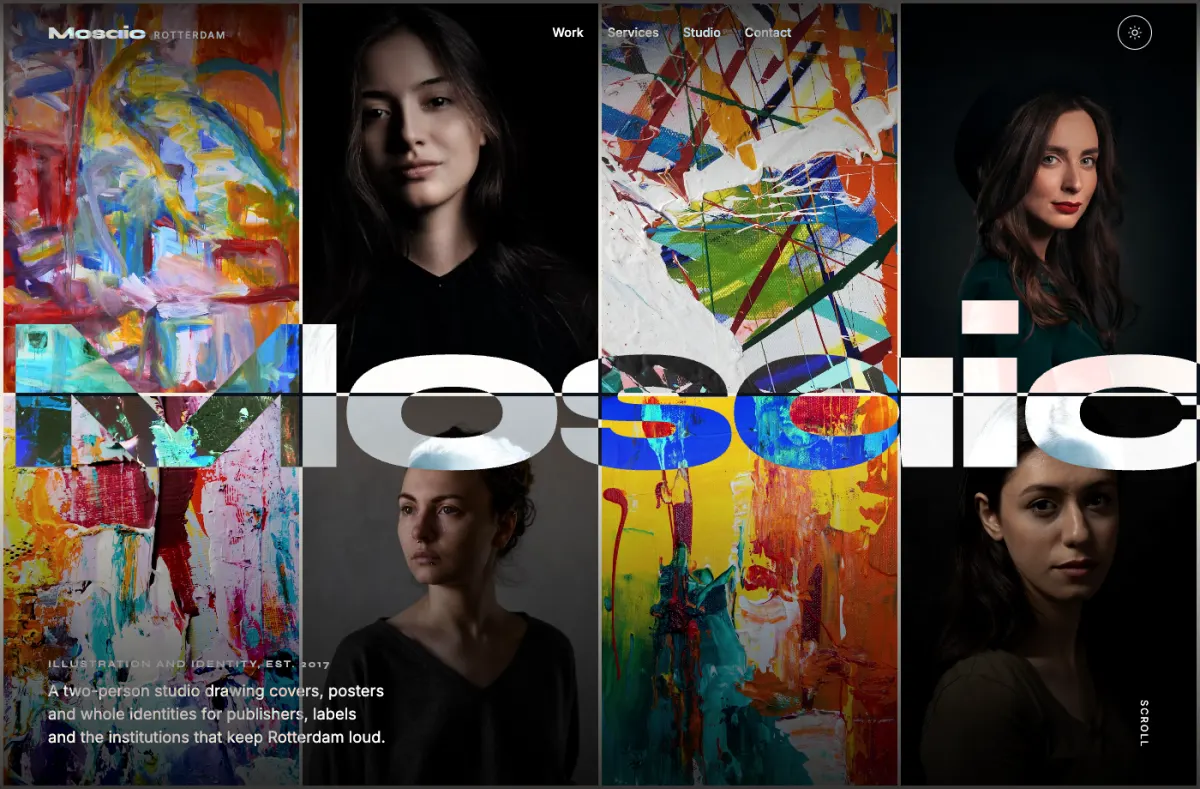
Mosaic
A portfolio that opens on a wall of eight images, with a project list that previews each piece as you move down it.
Preview and use it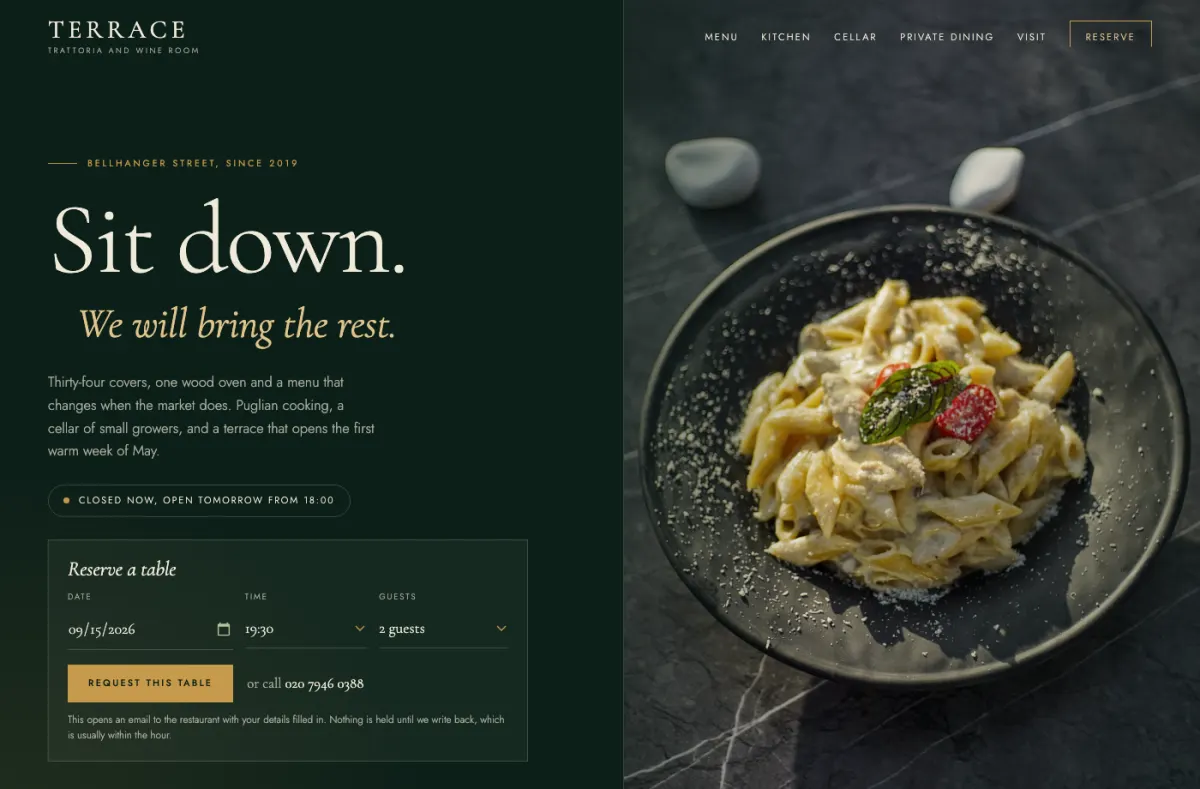
Terrace
A restaurant site with the menu set like a printed card, a line that says whether you are open tonight, and a reservation panel that writes the request email.
Preview and use it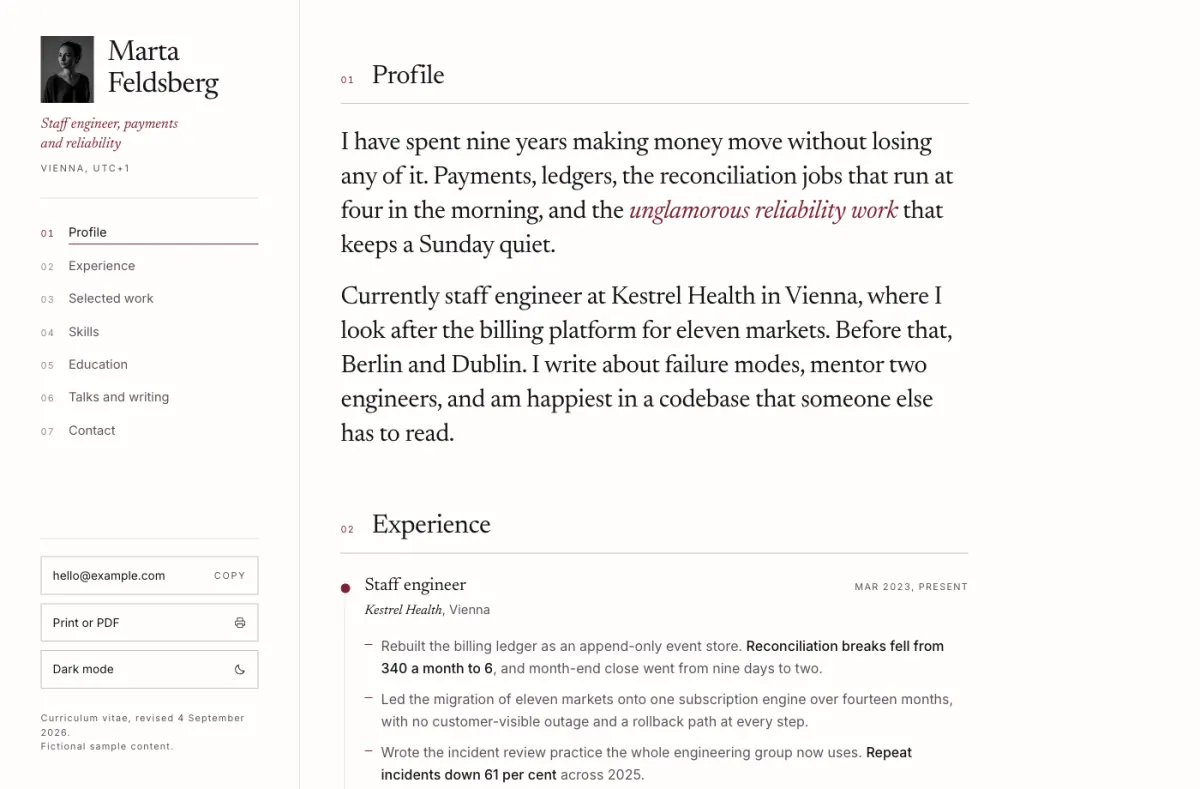
Dossier
A resume site that reads like a typeset CV, with a section list that follows you down the page, dark mode and a print layout.
Preview and use it
- Fabricate offers a free tier for building and deploying web applications
- Free projects run on Cloudflare's global network, with 1 app online for 30 days
- Upgrade to keep an app online past its 30 days, or when you need private apps, more credits, or advanced features
Everything you need to build
1 app online for 30 days
Put 1 app online for 30 days on Free, and go on building and changing your other projects in the studio.
No Credit Card
Start building immediately. No payment information required.
Free Hosting
Your websites are hosted free on fabricate.chat subdomains for 30 days.
Free SSL
HTTPS included on all sites. Your visitors are always secure.
Code Download on Paid Plans
Downloading the project or pushing it to GitHub is a Pro and Max feature. On Free you build, preview and publish from the platform.
AI Powered
Your first version is built with the same model as on the paid plans; later changes run on a smaller, faster one, from a smaller monthly credit allowance.
How it works
- 1
Describe Your Website
Type what the site is for, its pages and what visitors should be able to do, or pick one of the examples on this page.
- 2
Create a Free Account
When you press Build, sign up in a few seconds. No credit card. Your site starts building as soon as you are in.
- 3
Check It and Ask for Changes
In a few minutes the site appears next to the chat. Click around, then ask for changes in plain words.
- 4
Publish It Free
Publish to your own fabricate.chat address with one click and share the link. On Free it stays online for 30 days.
Free AI Website Builder with Real Deployment
Most free website builders impose artificial constraints: slow loading, limited pages, or features locked behind expensive plans. Fabricate's free plan runs your site on Cloudflare's global edge network, and free users get the same core generation workflow as paid users. Free sites show a small "Made with Fabricate" badge, which Pro and Max remove. A site you put online on the free plan is open to anyone with its link for 30 days, long enough to try it with real visitors. When you need it to stay online, or want a private live site, custom domains, or more generation capacity, paid tiers unlock those capabilities.
What Free Includes: a monthly credit allowance, Cloudflare Workers deployment, Durable Object SQLite storage, 1 app online for 30 days (open to anyone with the link), and unlimited page views.
Free Tier Limits: you can have 1 app online for 30 days, open to anyone with the link; after that it stays offline until a paid plan brings it back, with nothing in it lost. Credits reset monthly. Every new project starts private; keeping a live one private, custom domains, and code download or GitHub export all require a paid plan.
When to Upgrade: upgrade to keep a site online past its 30 days, and for private live sites, custom domains, code download and export, a larger credit allowance, and priority support. Current allowances and prices are on /pricing.
What you can build
- Small Business Sites - Try yours with real customers before you pay
- Online Orders - Customers order from your site and you see every order
- Bookings - Clients pick a time and you see the week in one list
- Job Requests - Customers send the job and the address, your team sees the list
- Personal Portfolios - Build yours free and share it for 30 days
- Side Projects - Test ideas without spending money
- Prototypes - Validate ideas before investing
Frequently Asked Questions
- Is the free tier really free?
- Yes. A monthly credit allowance and no credit card required, and the plan itself has no end date. On Free, a new app stays online for 30 days from when it first goes online; after that it stays offline until a paid plan brings it back, with nothing in it lost. See /pricing for the current allowance.
- Can I build a website for my small business for free?
- Yes. Describe the business, its services, its opening hours and how customers should get in touch, and Fabricate builds the site on the Free plan. It can include working parts, such as a booking request form or a menu with prices, and what customers enter is saved in the site's own database. On Free the site is public at a fabricate.chat address for 30 days; connecting your own domain needs Pro and Max.
- Can I build an app, not just a website, for free?
- Yes. The Free plan uses the same builder for web apps with sign-in and saved data, such as a booking page, a client list or an order tracker. It includes 60 credits a month: enough for about 1 new app or 10 changes.
- What are the limits of free?
- Free includes a monthly credit allowance, 1 app online for 30 days, AI generation, and hosting on fabricate.chat subdomains. Every new project starts private, and the one you put online is open to anyone with its link. When its 30 days end, it stays offline until a paid plan brings it back, with nothing in it lost. Free sites show a small "Made with Fabricate" badge, which Pro and Max remove. Paid plans keep apps online without the 30-day limit, and add private live sites, custom domains, code download and export, and a larger credit allowance.
- Can I upgrade later?
- Absolutely. Upgrade anytime to keep an app online past its 30 days, or to add custom domains, more features, and priority support. Your projects stay intact.
- Can I use my own domain on free?
- Custom domains require a paid plan. A Free site gets a fabricate.chat address made from its name and a short code, like yourname-k3f9.fabricate.chat; the name on its own comes with Pro and Max.
- Is the AI the same as paid plans?
- Partly. Every plan builds a site's first version with the same model. On Free, later changes and questions run on a smaller, faster model; paid plans keep the first one for every change. Paid plans can also ask it to work harder on a big build. Plans also differ on credit allowance and features.
- Can I download my code on free?
- No. Code download and GitHub export are Pro and Max features - the exporter refuses free accounts. You still own what you build, and upgrading unlocks the download; it is not a licensing restriction.
Related pages
Dashboard Software
Custom dashboard software built from a description: charts, KPI cards, filters and tables on your own data, with sign-in...
Read moreSEO-Optimized Websites
Build SEO-friendly sites with Fabricate AI. Generated apps ship real title, description, canonical and Open Graph tags, ...
Read moreUsing Supabase with Fabricate
Fabricate apps store data in built-in Durable Object SQLite and have no Supabase connector. The AI can write supabase-js...
Read moreCloudflare Workers
Build apps on Cloudflare Workers with AI. Edge computing, global deployment, instant cold starts - serverless made simpl...
Read moreAll Fabricate Features
AI code generation, databases, auth, payments and more.
Read moreAI App Builder
Describe your app and get a frontend, database, logins and a live URL in minutes.
Read moreRelated guides
No-Code App Builder Overview
Read guideAI Website Builder Features
Read guideAI App Builder for Small Businesses
Booking, client and order apps, each ready to open in the builder.
Read guideBuild a Booking App Without Code
What a booking app built from a description includes, and what it does not.
Read guideBuild an Online Ordering App
Customers order online and you see every order in one list.
Read guideBuild a Job Tracking App
Service requests, work orders and a job list for your team.
Read guideReady to start building?
Describe what you need and get a working application with sign-in, stored data and a live URL. No coding required. Start free.