AlternativesUpdated
The best Emergent alternatives in 2026
Emergent's agents build web and phone apps from one credit balance, and every published app pays a monthly fee from it. Here is who each alternative suits and how it bills a live app. Fabricate is ours, so we also say when it is not the right pick.
The short answer: for a live app that is not billed per app or by traffic, with its backend in its own code, Fabricate; for a free plan that puts apps online, Lovable or Bolt.new; to see and edit the code beside the agent, Replit. Every price below comes from the tool's own pricing page, dated beside it.
The Rebuild my site box from Fabricate's home page. It opens Fabricate with your rebuild written out, and nothing is built until you press Build there.
Key takeaways
- Emergent bills everything from one credit balance, and each published app pays a fixed monthly fee from it, from 50 to 1,100 credits by machine size.
- Emergent's free plan builds and tests but cannot publish; Lovable's and Bolt.new's free plans put apps online, each with its own limits.
- Fabricate writes the backend into the app's own code, and serving a published app is part of the plan rather than a fee per app. AI inside an app uses credits.
- Replit is the pick for seeing and editing the code beside the agent, and it builds phone apps for the App Store, as Emergent does.
- Every price here is the cheapest paid plan billed monthly, read on the tool's own page on October 22, 2026.
Why people look for an Emergent alternative
Two of these reasons come from how Emergent bills a live app: a monthly fee for each one, and no publishing on the free plan. Each reason names the tool that fits it.
Every live app pays a monthly fee
Each published Emergent app pays a fixed monthly fee in credits by the size of machine it runs on, from 50 to 1,100, out of the balance you build with. One app on the Launch size, at 125, uses more than Standard's 100 monthly credits.
Fits: FabricateThe free plan cannot go live
Emergent's free plan has 10 credits to build and test in the workspace; publishing and your own domain need a paid plan.
Fits: FabricateYou want to see the code as it is written
A workspace with the files, a terminal and the database open beside the agent lets you read and change anything it writes.
Fits: ReplitA team building on one plan
Lovable's $25 Pro covers unlimited users on one credit balance, with your own domain and built-in payments.
Fits: Lovable
Compare at a glance
Where each tool keeps the backend, how it bills a live app, and the cheapest paid plan, with Emergent in its own row.
- FabricateWe make this
- Best for
- Full apps, backend in the app's code
- Backend included
- Database, sign-in and server routes
- Running the live app
- In every plan; AI inside the app uses credits
- Code export
- Download or GitHub, on Pro and Max
- Paid plans from
- $25 a month
- EmergentThe tool you have now
- Best for
- Web and phone apps from agents
- Backend included
- Databases and APIs set up for you
- Running the live app
- A monthly fee in credits for each published app
- Code export
- GitHub on the paid plans
- Paid plans from
- $20 a month
- Lovable
- Best for
- Design-led web apps
- Backend included
- Lovable Cloud
- Running the live app
- From the same credits, after a monthly grant
- Code export
- GitHub sync on every plan; Cloud stays behind
- Paid plans from
- $25 a month
- Bolt.new
- Best for
- Quick prototypes
- Backend included
- Bolt Cloud: database, sign-in, storage
- Running the live app
- Hosting on the free plan stops at 10 GB or 333,333 requests a month
- Code export
- Download, or GitHub sync
- Paid plans from
- $25 a month
- Replit
- Best for
- Coding with AI in the browser
- Backend included
- A database, paid from monthly credits
- Running the live app
- From monthly credits, then billed by use
- Code export
- Git, and push to GitHub
- Paid plans from
- $20 a month
- Base44
- Best for
- Internal tools with rules on who sees what
- Backend included
- Database, sign-in and file storage
- Running the live app
- Integration credits pay for the live app's email, images and AI
- Code export
- GitHub sync from Builder; the code still runs on Base44
- Paid plans from
- $20 a month
- Cursor
- Best for
- Developers
- Backend included
- You build it
- Running the live app
- Your own hosting
- Code export
- It is your own code
- Paid plans from
- $8 a month, Cursor's own models
The cheapest paid plan billed monthly, read on each tool's own pricing page on October 22, 2026; most cost less billed yearly. Fabricate's figures come from our live plans.
Fabricate
We make thisBest for: Live apps without a fee for each one
Fabricate also builds the backend with the app, but a live app does not pay a fee of its own: serving a published app is part of the plan, with no fee per app and no traffic meter, and credits pay for building and, on Pro and Max, for AI inside the app. The server routes and database are written into the app's own code, and every app is opened in a real browser before it can be published. Its phone apps install from the browser rather than an app store.
What moves where
- Backend
- On Emergent
- Set up by Emergent
- On Fabricate
- Server routes in the app's own code
- Database
- On Emergent
- Emergent's, with heavy work billed in credits
- On Fabricate
- The app's own SQLite tables
- Live app
- On Emergent
- A monthly fee in credits for each app
- On Fabricate
- No per-app or traffic charge; AI inside the app uses credits
- AI in the app
- On Emergent
- Emergent's Universal LLM Key, from your credits
- On Fabricate
- Built in on Pro and Max, from your credits
- Phone apps
- On Emergent
- Built by its agents
- On Fabricate
- Installed from the browser, not an app store
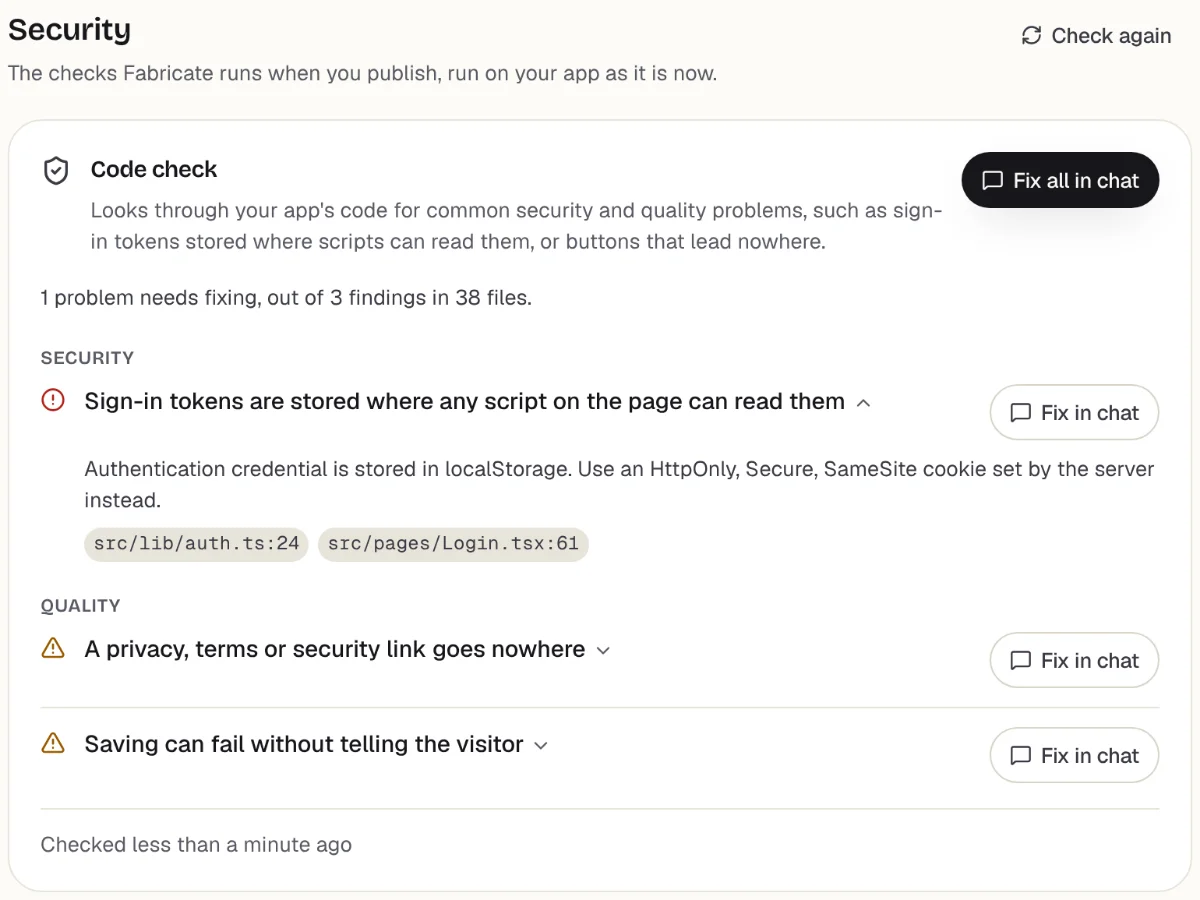
 Checks before you publish
What it does well
- No monthly fee for each live app
- The backend in the app's own code
- Checked in a real browser before it can be published
- Phone apps that install from the browser
- Paid plans from
- $25 a month
- 350 credits a month on Pro
- Free plan
- 60 credits
- A month, to build and publish
- A live app
- Every plan
- Publishing is on every plan
Moving an Emergent app in four steps
Rebuild the app from its address or a description, with the Emergent version open beside it as the reference.
- 1
Keep the reference
Note the published address, and on a paid plan send the code to GitHub so you keep a copy.
- 2
Rebuild it
Paste the published app's address into Rebuild my site at the top of this page, tick that it is yours, and say who signs in and what it saves. Or describe the app in plain words.
- 3
Test it beside the Emergent version
Keep the emergent.host version open next to the preview. Sign up, save and edit records, and check who can see what, before anyone else does.
- 4
Publish it, then move people over
One press of Publish gives it its own address, after the same browser check. Keep the Emergent app online until your records and your users have moved.
Chat

Your app

The other Emergent alternatives
What each one does well, and the kind of project it suits best.
- Number 2
Lovable
Best for: Web apps online from the free plan
Lovable builds web apps from a conversation and runs them on Lovable Cloud: a database, storage, sign-in, realtime and functions. Its free plan publishes to up to 5 lovable.app addresses, and Pro adds your own domain and built-in payments. Hosting, the backend and traffic draw on the same credits as building, after a monthly Cloud grant.
- Apps online on the free plan
- Hosting from credits, not a fee per app
- Payments built in on Pro
When to pick Lovable
Several people can build together on one $25 plan, which also includes your own domain and built-in payments.
From $25 a monthLovable alternativesSources: lovable.dev/pricing (opens in a new tab), checked ; Lovable docs: Lovable Cloud (opens in a new tab), checked ; Lovable docs: project usage and costs (opens in a new tab), checked ; Lovable docs: publishing (opens in a new tab), checked ; Lovable docs: payments (opens in a new tab), checked
- Number 3
Bolt.new
Best for: Quick prototypes
Bolt.new writes the app in your browser and runs it on Bolt Cloud, with a database, sign-in, file storage, server functions and Stripe. Hosting is billed by use rather than per app: the free plan stops at 10 GB and 333,333 requests a month and shows a Made in Bolt badge.
- Publishes on the free plan
- Bolt Cloud backend
- Download or GitHub sync
When to pick Bolt.new
You can download the project or sync it to GitHub at any time, and Bolt Cloud hosts it on a free bolt.host address.
From $25 a monthBolt.new alternativesSources: bolt.new/pricing (opens in a new tab), checked ; Bolt help: hosting plans (opens in a new tab), checked ; Bolt help: Bolt Cloud (opens in a new tab), checked ; Bolt help: project files (opens in a new tab), checked ; Bolt help: GitHub (opens in a new tab), checked
- Number 4
Replit
Best for: Reading and editing what the agent writes
Replit's Agent builds and runs the app in a browser workspace you can also code in: the files, a terminal and the database sit open beside it, so you can read and change anything it writes. Like Emergent, it builds phone apps too. On Core, monthly credits pay for the Agent, publishing, network traffic and database storage, and use beyond them is billed.
- Every file open beside the agent
- Phone apps as well as web
- Git and GitHub
When to pick Replit
Replit is a whole coding workspace: you can open any file and change it by hand next to the Agent, and it builds phone apps it can take to the App Store.
From $20 a monthReplit alternativesSources: replit.com/pricing (opens in a new tab), checked ; Replit docs: Replit Core (opens in a new tab), checked ; Replit docs: publishing costs (opens in a new tab), checked ; Replit docs: version control (opens in a new tab), checked ; Replit docs: build a mobile app (opens in a new tab), checked ; Replit docs: upload your app to App Store Connect (opens in a new tab), checked
- Number 5
Base44
Best for: Internal tools with rules on who sees what
Base44 builds apps from a conversation on its own backend: a database with rules for which records and which fields each person can see, sign-in and file storage. Building spends message credits, and the live app's email, images and AI spend integration credits. Wix has owned it since 2025.
- Rules per record and per field
- Publishes on the free plan
- Connectors from Builder
When to pick Base44
Its rules can hide a single field inside a record from some users, set as a rule rather than written as code, and its free plan puts up to 5 apps online, with a Base44 badge.
From $20 a monthBase44 alternativesSources: base44.com/pricing (opens in a new tab), checked ; Base44 docs: billing and plans (opens in a new tab), checked ; Base44 docs: credits (opens in a new tab), checked ; Base44 docs: data security rules (opens in a new tab), checked ; Globes: Wix acquires Base44 (June 18, 2025) (opens in a new tab), checked
- Number 6
Cursor
Best for: Developers keeping the code
Cursor is a code editor with an AI agent that edits files and runs terminal commands in your own project. Once a paid Emergent plan has sent the app's code to GitHub, Cursor can carry it on, hosted wherever you choose. Plus is $8 a month for Cursor's own models; Claude, GPT and Gemini need Premium at $30 a month and are charged at their API price.
- Works on the code from GitHub
- Agent mode in the editor
- Hosting you choose
When to pick Cursor
With the code in your own repository, Cursor works on it in any stack, and hosting it is between you and your host rather than a fee in credits.
From $8 a monthCursor alternativesSources: cursor.com/pricing (opens in a new tab), checked ; Cursor docs: models and pricing (opens in a new tab), checked ; Cursor docs: Agent (opens in a new tab), checked ; Cursor help: Tab completion (opens in a new tab), checked
Where Emergent fits, and where Fabricate differs
Emergent's agents design, code, test and deploy web and phone apps from a conversation, with databases, APIs and hosting set up for you. Standard, at $20 a month, adds publishing at an emergent.host address or your own domain, and GitHub; Pro, at $200, adds a 1M-token context window and custom agents.
One balance pays for all of it: writing code, the tests its agents run, publishing, scheduled jobs, heavy database work and AI calls the app makes through Emergent's Universal LLM Key. Publishing is a fixed monthly fee for each app, by machine size, so a second live app is a second fee, and at zero credits building and publishing pause.
Fabricate splits it differently. Credits pay for building and for AI that runs inside your apps; serving a published app is part of the plan, however many visitors it has. The backend is code: server routes in the app's Durable Object on Cloudflare and tables in its own SQLite database, written in the same pass as the screens, and every app is opened in a real browser before it can be published.
Where Emergent leads is phone apps. Fabricate's install from the browser and can send reminders, but if the app has to be in the App Store or Google Play, Emergent or Replit is the closer fit.
Where Fabricate and Emergent differ
How a live app is billed
Fabricate
Serving a published app is part of every plan, with no fee per app and no traffic meter; credits pay for building and for AI inside the app.
Emergent
Each published app pays a fixed monthly fee in credits by machine size, from 50 to 1,100, out of the same balance as building.
In short: Emergent bills each live app; Fabricate includes serving in the plan. For several small apps, that difference adds up.
Where the backend lives
Fabricate
Fabricate writes the backend into the app's own code: server routes in a Durable Object on Cloudflare Workers, the data in that Durable Object's SQLite database, and sign-in with PBKDF2 password hashing and HttpOnly cookie sessions. The live app's database work is part of serving it, not billed from credits.
Emergent
Emergent sets up databases, APIs and hosting for you, and bills heavy database work, scheduled jobs and AI calls from your credits.
In short: Both include a backend. Emergent runs it for you and meters it; Fabricate writes it into the app's own code.
Publishing and checks
Fabricate
Each published app runs as its own Cloudflare Worker, with no monthly fee of its own. Before it can be published it is opened in a real browser, and an app that crashes, never mounts or renders a blank page is blocked. Custom domains are on the paid plans.
Emergent
Standard and Pro publish to an emergent.host address or your own domain; the free plan cannot publish to production. Republishing and rolling back are free.
In short: Fabricate publishes on every plan, its free plan included; Emergent publishes only on its paid plans. Fabricate also opens every app in a real browser first and blocks one that is broken.
Emergent: what it does well, and what to watch for
What it does well
- Web and phone apps from one conversation
- Agents that write and run tests as they build
- Databases, APIs and hosting set up for you
- Republishing and rolling back are free
Watch out for
- Each published app pays a monthly fee in credits, from 50 to 1,100
- The free plan cannot publish to production
- At zero credits, building and publishing pause
- Plan credits do not roll over
Try it with one prompt
Fabricate answers this with one stack: tables for clients, projects and updates in the app's own database, server routes that show each client only their own projects, sign-in, and the agency's view of every client.
Build free. No card needed.
Frequently asked questions
- What is the best Emergent alternative?
- It depends on why you are leaving. For a live app that is not billed per app, with its backend in its own code, Fabricate, which we make. For a free plan that puts apps online, Lovable or Bolt.new. To see and edit the code as the agent writes it, Replit. For an internal tool with rules on who sees which fields, Base44.
- Emergent vs Lovable: which should I pick?
- Pick Emergent if you want phone apps as well as web apps from the same conversation; Standard is $20 a month for 100 credits, and each published app pays a monthly fee in credits. Pick Lovable if you want apps online on the free plan, at up to 5 lovable.app addresses, or your own domain and built-in payments on its $25 Pro. Lovable draws hosting, its backend and traffic from the same credits as building, after a monthly Cloud grant.
- Is Emergent free?
- Emergent's free plan has 10 credits to build and test, and cannot publish to production; paid plans start at $20 a month. Fabricate's Free plan gives 60 credits a month to build and publish, with no card needed.
- How much does it cost to keep an Emergent app online?
- Each published app pays a fixed monthly fee in credits by machine size: Starter 50, Launch 125, Grow 225, Scale 450 and Elite 1,100, from the balance you build with, and Emergent says Starter is not suitable for production apps under meaningful load. Credits pay for AI work, building the app and, on Pro and Max, the AI inside it; serving the published app is part of the plan.
- Can I move my Emergent app to Fabricate?
- Yes, by rebuilding it. Paste the published app's address into Rebuild my site at the top of this page, or describe the app in plain words; Emergent's paid plans connect to GitHub, so your code stays with you as a reference. To bring records across, ask for a screen that imports them from a CSV file.
- Which Emergent alternative builds phone apps?
- Replit builds phone apps it can take to the App Store. Fabricate's phone apps install from the browser and can send reminders, but they are not in the App Store or Google Play.
Sources
The pages this guide quotes, each with the day it was read.
- emergent.sh/pricing (opens in a new tab), checked
- Emergent help: how credits work (opens in a new tab), checked
- Emergent help: managing credit usage (opens in a new tab), checked
- Emergent help: plans and the free tier (opens in a new tab), checked
- Emergent help: publishing plan levels (opens in a new tab), checked
- Emergent help: FAQs (opens in a new tab), checked
- emergent.sh (opens in a new tab), checked
- lovable.dev/pricing (opens in a new tab), checked
- Lovable docs: Lovable Cloud (opens in a new tab), checked
- Lovable docs: project usage and costs (opens in a new tab), checked
- Lovable docs: publishing (opens in a new tab), checked
- Lovable docs: payments (opens in a new tab), checked
- bolt.new/pricing (opens in a new tab), checked
- Bolt help: hosting plans (opens in a new tab), checked
- Bolt help: Bolt Cloud (opens in a new tab), checked
- Bolt help: project files (opens in a new tab), checked
- Bolt help: GitHub (opens in a new tab), checked
- replit.com/pricing (opens in a new tab), checked
- Replit docs: Replit Core (opens in a new tab), checked
- Replit docs: publishing costs (opens in a new tab), checked
- Replit docs: version control (opens in a new tab), checked
- Replit docs: build a mobile app (opens in a new tab), checked
- Replit docs: upload your app to App Store Connect (opens in a new tab), checked
- base44.com/pricing (opens in a new tab), checked
- Base44 docs: billing and plans (opens in a new tab), checked
- Base44 docs: credits (opens in a new tab), checked
- Base44 docs: data security rules (opens in a new tab), checked
- Globes: Wix acquires Base44 (June 18, 2025) (opens in a new tab), checked
- cursor.com/pricing (opens in a new tab), checked
- Cursor docs: models and pricing (opens in a new tab), checked
- Cursor docs: Agent (opens in a new tab), checked
- Cursor help: Tab completion (opens in a new tab), checked
- fabricate.build/pricing, from our live plans
About this guide
Written by the Fabricate team. Fabricate is our product, so it is first on this page and marked "We make this". Where a reason to switch fits another tool better, the reason says which.
Each tool's card lists the pages we read about it and the day we read them. We compared the tools from their own pricing pages and documentation, not by signing up for them. Spotted something out of date? Write to info@fabricate.build.
Related guides
All alternatives- Emergent pricingEvery Emergent plan, what its credits pay for and the fee each live app pays.Pricing guide
- Lovable alternativesBefore you settle on Lovable: where people go when they leave it.Alternatives
- Replit alternativesBuilders and editors for people leaving Replit.Alternatives
- Base44 alternativesThe same question for Base44.Alternatives
- Emergent vs LovableThe two side by side: free plans, hosting costs, phone apps and GitHub.Compare
- Base44 vs EmergentEmergent against a builder whose free plan puts apps online.Compare
- Lovable pricingWhat Lovable credits pay for, from building to hosting.Pricing guide
Related pages
HeyBoss Alternatives
HeyBoss builds business sites and apps with hosting, a CRM and payments in one plan. Compare 7 alternatives on the backe...
Read moreDyad Alternatives
Dyad is a free, open-source AI app builder for your desktop. Compare 7 alternatives that build in the browser, on the ba...
Read moreBase44 vs Emergent
Compared side by side from each tool's own pages.
Read moreEmergent vs Lovable
Compared side by side from each tool's own pages.
Read moreTempo Labs Alternatives
Tempo Labs is now a desktop app that turns issues and requirements into pull requests. Compare 7 tools that build a whol...
Read moreAll AI App Builder Alternatives
Compare every alternative we have reviewed, side by side.
Read moreAI App Builder
Describe your app and get a frontend, database, logins and a live URL in minutes.
Read more