AlternativesUpdated
Claude Design alternatives for a working app
Claude Design makes mockups and flows to click through. When the design has to sign people in and save what they enter, these build the working app.
 Restaurant
Key takeaways
- Claude Design builds a visual from a description: a mockup, a one-pager or a flow to click through, shared as a link or downloaded as PowerPoint, PDF or HTML.
- It is included in every Claude plan. Its page describes no saved data, sign-in or payments, and a design can pass to Claude Code to be written as code.
- Fabricate builds the working app, from a description or from an image of your design, with a database and sign-in. Building and publishing start free.
- If you have a developer, Claude Code is the shortest path from the design. If the stack is Next.js on Vercel, look at v0.
Why people look past Claude Design
Claude Design is quick at showing what something could look like, on every Claude plan. The reasons below are all about the step after the picture.
A flow to click is not an app
Claude Design builds a visual and can make it a flow you click through. Its page says nothing of saving what people enter, signing them in or taking a payment.
Fits: FabricateIt leaves as a link or a file
A design is shared as a link, or downloaded as PowerPoint, PDF or HTML. A page that takes reservations needs somewhere to run and a place to keep them.
Fits: FabricateYou have a developer for the next step
Designs move between Claude Design and Claude Code. If someone on your side can run a codebase, that is Anthropic's own route from the picture to real files.
Fits: Claude CodeYou want the interface as React
If the design is headed for a Next.js project on Vercel, a builder that writes the interface in that stack and deploys it there saves a translation step.
Fits: v0 by Vercel
Compare at a glance
Fabricate beside Claude Design, feature by feature.
- What you get
- Fabricate
- A working app
- Claude Design
- A visual: a mockup, a one-pager or a flow to click
- Saves what people enter
- Fabricate
- Yes, in the app's own database
- Claude Design
- Not described on its page
- Sign-in
- Fabricate
- Accounts for your own users
- Claude Design
- Not described on its page
- How it leaves
- Fabricate
- Its own address
- Claude Design
- A link, or PowerPoint, PDF or HTML
- Changing the look
- Fabricate
- Ask in chat, or point at the preview
- Claude Design
- Refine it in Claude Design
- The step to make it real
- Fabricate
- None: it is the app
- Claude Design
- Hand it to Claude Code
- Free plan
- Fabricate
- 60 credits a month, no card
- Claude Design
- Included in Claude Free
- Paid plans from
- Fabricate
- $25 a month
- Claude Design
- $20 a month, for Claude Pro
Fabricate
We make thisBest for: A design that has to work
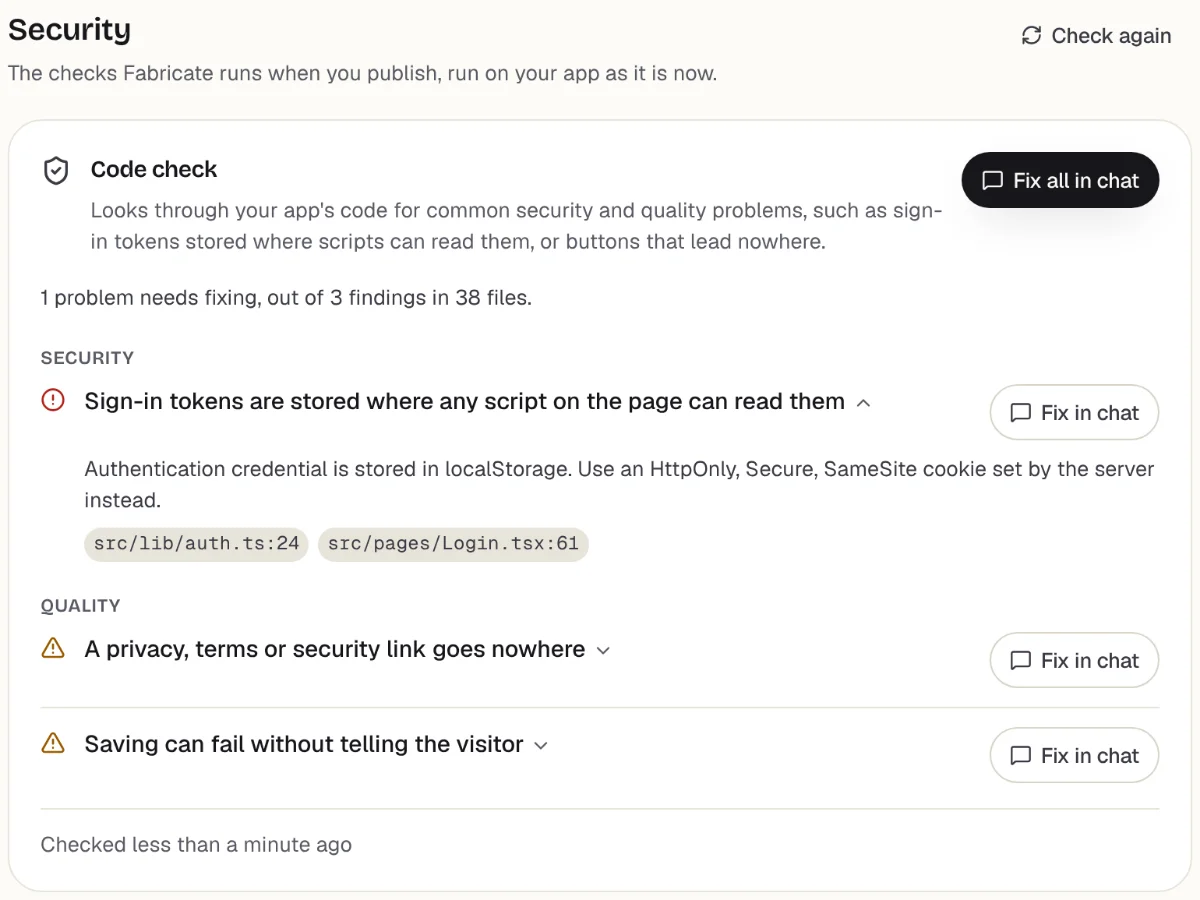
Claude Design shows what it could look like; Fabricate builds the thing itself. Describe the screens, or attach an image of your design and say what each part should do, and Fabricate writes the app with a database and sign-in, checks it in a real browser and hosts it. The picture sets the layout, and your words set what is saved and who signs in. Building and publishing start free.
Checks before you publish
What it does well
- Builds from an image of your design
- Saves what people enter
- Sign-in for staff and customers
- Hosted when it is built
- Paid plans from
- $25 a month
- 350 credits a month on Pro
- Free plan
- 60 credits
- A month, to build and publish
- A live app
- Every plan
- Publishing is on every plan
The other Claude Design alternatives
What each one does well, and the kind of project it suits best.
- Number 2
Lovable
Best for: A designed web app with a managed backend
Lovable builds the app from a conversation and puts its database, sign-in and storage on Lovable Cloud, so a design described to it comes back as something people can use. The code is kept in a GitHub repository, and Pro is $25 a month for any number of users.
- From a description to a working app
- Backend on Lovable Cloud
- Code on GitHub for a developer later
When to pick Lovable
If a designer and a founder will shape the app together, Lovable Pro lets the whole team build on one plan and keeps the code in GitHub.
From $25 a monthLovable alternativesSources: lovable.dev/pricing (opens in a new tab), checked ; Lovable docs: Lovable Cloud (opens in a new tab), checked ; Lovable docs: GitHub (opens in a new tab), checked
- Number 3
v0 by Vercel
Best for: Designs headed for a Next.js project
v0 writes the interface as React and Next.js and deploys it to Vercel, with data from services such as Neon or Supabase that you connect. It is the natural next step when the mockup is going into a Next.js codebase. On the free plan you can deploy to Vercel, with a daily message limit, and Plus is $30 a user a month.
- The interface as React and Next.js
- Deploys to Vercel
- Deploys to Vercel on its free plan too
When to pick v0 by Vercel
If your developers work in Next.js on Vercel, v0 hands them the design as components in their own stack, ready to change.
From $30 a monthv0 alternativesSources: v0.app/pricing (opens in a new tab), checked ; v0 docs: databases (opens in a new tab), checked ; v0 docs: deployments (opens in a new tab), checked
- Number 4
Bolt.new
Best for: A quick working version to show people
Bolt.new builds the design as a full-stack app in the browser on Bolt Cloud, with a database, sign-in and server functions, and hosts it. On its free plan a site goes online with Bolt branding, so a working version can be up the same day. Pro is $25 a month.
- A working version the same day
- Database and sign-in on Bolt Cloud
- Hosted on the free plan, with Bolt branding
When to pick Bolt.new
If the point of the mockup was to show a client something, Bolt gets a working version to a public address on its free plan.
From $25 a monthBolt.new alternativesSources: bolt.new/pricing (opens in a new tab), checked ; Bolt help: Bolt Cloud (opens in a new tab), checked
- Number 5
Replit
Best for: Fine-tuning the build by hand
Replit's Agent builds the app in a browser workspace and publishes it, with the files and the database open beside it. It suits a design whose details you want to adjust by hand in the code once the Agent has the first version up. Core is $20 a month.
- Adjust the details in the code
- Database beside the files
- Publishing built in
When to pick Replit
If you care about exact spacing and behaviour and are willing to open the files to get them, Replit gives you the code and the running app side by side.
From $20 a monthReplit alternativesSources: replit.com/pricing (opens in a new tab), checked ; Replit docs: Replit Core (opens in a new tab), checked
- Number 6
Claude Code
Best for: Teams with a developer
Anthropic's route from a design to real files: designs move between Claude Design and Claude Code, which writes the code in a repository, runs commands and opens pull requests. It comes with Claude Pro at $20 a month and expects someone who can run a codebase and arrange hosting.
- Takes the design straight from Claude Design
- Real files in your own repository
- On the Claude plan you have
When to pick Claude Code
If you have a developer, staying inside Claude is the shortest path: the design passes to Claude Code with nothing to describe again.
From $20 a monthClaude Code alternativesSources: claude.com/product/design (opens in a new tab), checked ; Claude Code docs: overview (opens in a new tab), checked ; claude.com/pricing (opens in a new tab), checked
From the picture to the product
A design tool answers one question well: what should this look like. Claude Design answers it in a minute, and for a pitch, a one-pager or a first conversation with a client that is the whole job.
The second question is what happens when someone uses it. A reservation has to be saved somewhere, the owner has to sign in to see it, and the page needs an address. A mockup has none of that, and adding it is a different kind of work from drawing the screen.
There are two honest ways across. With a developer, hand the design to Claude Code and build it as a project, with a host and a database of your choosing. Without one, give the design to a builder. Fabricate takes an image of the screen with a description of what it should do, and returns the app with the database, sign-in and hosting in place. Every app is opened in a real browser and checked before it can be published.
Keep Claude Design in the loop either way. It is still the quickest place to try a new look before you ask for it in the app.
Make the design take a real booking
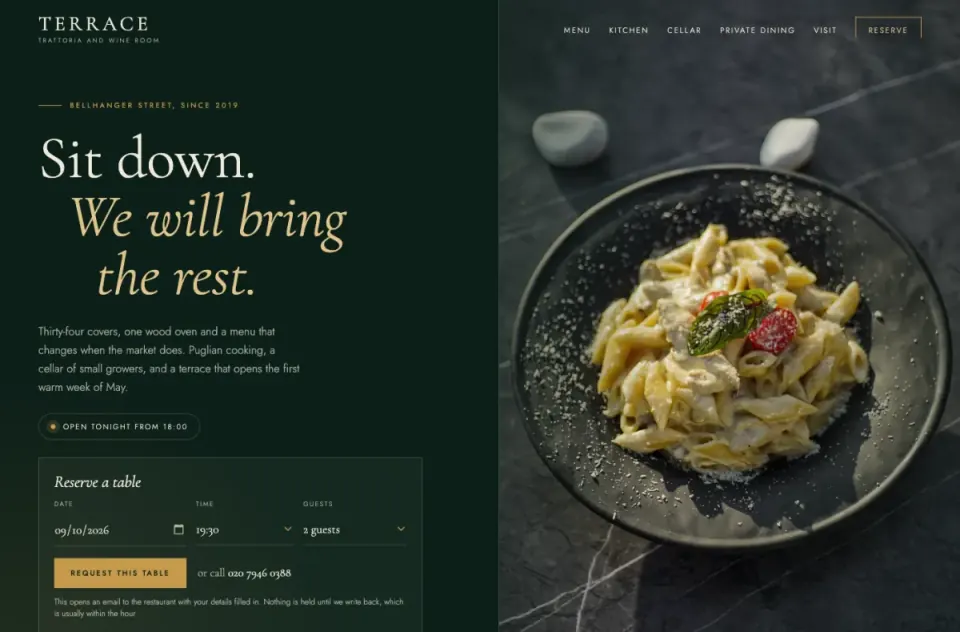
A mockup can show a reservation form. This opens Fabricate with a build in which the form saves each reservation and staff sign in to confirm it; change any word, or attach your own design.
Build free. No card needed.
Frequently asked questions
- What is Claude Design?
- Claude Design is the part of Claude that builds a visual from a description: an asset, a one-pager, a mockup or a flow you can click through. Every design gets a link, private until you share it, and downloads as PowerPoint, PDF or HTML. It is included in every Claude plan, the free one too.
- Can Claude Design build a working app or website?
- It builds the look and a flow to click through. Its page does not describe saving data, signing users in or taking payments, and a design can pass to Claude Code to be written as code. For a site that has to work without a developer, use a builder that writes the database and sign-in with the screens.
- What is the best Claude Design alternative?
- It depends on what the design is for. To make it a working app with no developer, Fabricate, which we make, builds and hosts it. Lovable does the same on its own backend, v0 suits a Next.js project, Bolt.new gets a quick version online, and Claude Code is the route if you have a developer. If you only need the picture, Claude Design is already the right tool.
- How do I turn a Claude Design mockup into a Fabricate app?
- Save the design as an image, attach it to your first message in Fabricate, and describe what each part should do: what is saved, who signs in, what happens on each button. The image sets the layout and your description sets the behaviour. Colours and spacing are estimated from the picture, so paste exact values as text if they matter.
- Is Claude Design free?
- Yes, Claude Design is included in Claude's free plan, with limited use. Making the design work is the part that costs: Claude Code needs Pro at $20 a month, and Fabricate's Free plan gives 60 credits a month with no card. Building and publishing start free.
Sources
The pages this guide quotes, each with the day it was read.
- claude.com/product/design (opens in a new tab), checked
- claude.com/pricing (opens in a new tab), checked
- Claude help: what artifacts are (opens in a new tab), checked
- lovable.dev/pricing (opens in a new tab), checked
- Lovable docs: Lovable Cloud (opens in a new tab), checked
- Lovable docs: GitHub (opens in a new tab), checked
- v0.app/pricing (opens in a new tab), checked
- v0 docs: databases (opens in a new tab), checked
- v0 docs: deployments (opens in a new tab), checked
- bolt.new/pricing (opens in a new tab), checked
- Bolt help: Bolt Cloud (opens in a new tab), checked
- replit.com/pricing (opens in a new tab), checked
- Replit docs: Replit Core (opens in a new tab), checked
- Claude Code docs: overview (opens in a new tab), checked
- fabricate.build/pricing, from our live plans
About this guide
Written by the Fabricate team. Fabricate is our product, so it is first on this page and marked "We make this". Where a reason to switch fits another tool better, the reason says which.
Each tool's card lists the pages we read about it and the day we read them. We compared the tools from their own pricing pages and documentation, not by signing up for them. Spotted something out of date? Write to info@fabricate.build.
Related guides
All alternatives- Screenshot to CodeHow Fabricate builds from an image of a screen, a mockup or a sketch.Guide
- Visual EditsPoint at a part of the preview and say what to change.Feature
- Claude AlternativesFor anything built in Claude that has to become a real app.Alternatives
- Claude Artifacts AlternativesWhat to use when an artifact needs its own address, sign-in and database.Alternatives
- Figma Make AlternativesThe same question for a design made in Figma.Alternatives
- v0 AlternativesBuilders compared with v0, for designs headed to React.Alternatives
Related pages
Claude Alternatives
Claude builds an artifact on a Claude link. Compare six alternatives that build the whole app, with its own address, cus...
Read moreChatGPT Alternatives
ChatGPT now hosts sites, with Sign in with ChatGPT built in. Compare six alternatives for an app with accounts of its ow...
Read moreAll AI App Builder Alternatives
Compare every alternative we have reviewed, side by side.
Read moreAI App Builder
Describe your app and get a frontend, database, logins and a live URL in minutes.
Read more