Buyer's guideUpdated
Best Client Portal Software
Five tools compared on what a client portal needs: what each client sees and sends you, invoices and payments, who you pay for, and the price.
Fabricate is ours, so every other pick says where it beats Fabricate, and each tool's price comes with the page we read it on.
 Client portal
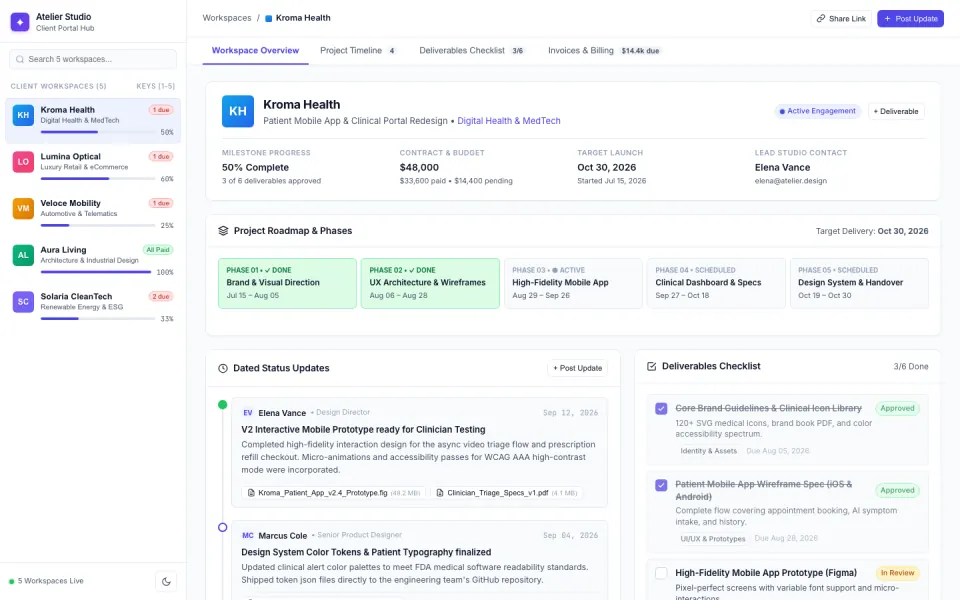 Made with FabricateA new app usually takes about 20 to 35 credits.
The short answer
Also good: Dubsado for a yearly price, Softr for a portal on Airtable or Google Sheets.
- Top pick · we make this
Fabricate
Best for a portal built around you
Describe your service in plain words. Fabricate builds the portal, its records and the client sign-in, and you change it by asking.
From $25 a monthThe details on Fabricate - All-in-one
SuiteDash
Best for one price with everything in
An all-in-one business platform with a client portal, contracts and e-signatures, client onboarding, projects and white label, sold at one price rather than per user.
From $19 a monthThe details on SuiteDash - Client management
HoneyBook
Best for proposals to payment
Client management for service businesses: proposals, contracts, invoices and payments, scheduling and a client portal, with unlimited clients.
From $29 a month, billed yearlyThe details on HoneyBook
Key takeaways
- Fabricate builds a client portal around your own service, where each client sees only their own, and it does not count the clients who sign in. Building and previewing are free; publishing is on Pro and Max.
- SuiteDash sells a portal with contracts, onboarding and projects at one price for unlimited users, from $19 a month.
- HoneyBook runs proposals, contracts, invoices and a client portal, from $29 a month billed yearly.
- Dubsado is billed by the year, from $335, with unlimited clients and client portals.
- Softr builds portals on data you keep in Airtable or Google Sheets, with app users capped by plan.
Compare at a glance
How each portal is shaped, who you pay for, and the cheapest paid plan.
- FabricateWe make this
- Shaped around
- Your own service, from your description
- Invoices and payments
- Stripe Checkout into your own account, on Pro and Max
- Who you pay for
- Clients not counted
- Paid plans from
- $25 a month
- SuiteDashAll-in-one
- Shaped around
- Its own toolkits, switched on
- Invoices and payments
- Invoicing and billing
- Who you pay for
- One price, unlimited users
- Paid plans from
- $19 a month
- HoneyBookClient management
- Shaped around
- Proposal to contract to invoice
- Invoices and payments
- Invoices and payments
- Who you pay for
- Unlimited clients; team members capped
- Paid plans from
- $29 a month, billed yearly
- DubsadoClient management
- Shaped around
- Forms, contracts and workflows
- Invoices and payments
- Invoices and payments
- Who you pay for
- Unlimited clients
- Paid plans from
- $335 a year
- SoftrNo code
- Shaped around
- Your Airtable or Google Sheets data
- Invoices and payments
- Not part of what we read
- Who you pay for
- App users capped by plan
- Paid plans from
- $25 a month
Each tool's cheapest paid plan as its own pricing page showed it on October 26, 2026: billed monthly where the page offers it, otherwise as the page bills it. Fabricate's figures come from our live plans.
How we compared
We compared the five tools on what a client portal needs: whether each client sees only their own, whether it fits how you work, invoices and payments, who you pay for and the price. For the other four we read their pricing pages and documentation on October 26, 2026, and each one's section lists the pages we read. We did not sign up for them for this guide.
Fabricate is ours. It comes first here because it builds the portal around the business's own service, and where another tool is the better pick, its section says so.
What we looked for
Each client sees their own
Does a signed-in client see only their own work, files and invoices?
Fits how you work
Is the portal shaped around your service, or around the tool?
Invoices and payments
Can clients see what they owe and pay it?
Who you pay for
Does the price grow with every client or staff member who signs in?
Price
What does the cheapest paid plan cost, and how is it billed?
Top picks for 2026
Fabricate
Top pickWe make thisBest for: A portal shaped around your service
Describe your service and what each client needs to see and send you, and Fabricate builds the portal: updates and milestones, approvals, uploads, and invoices with a pay button, behind a sign-in where each client sees only their own. Clients join with an invite code you give them, and the people who sign in to a published portal are not counted as seats. Building and previewing are free; publishing is on Pro and Max.
Client portal
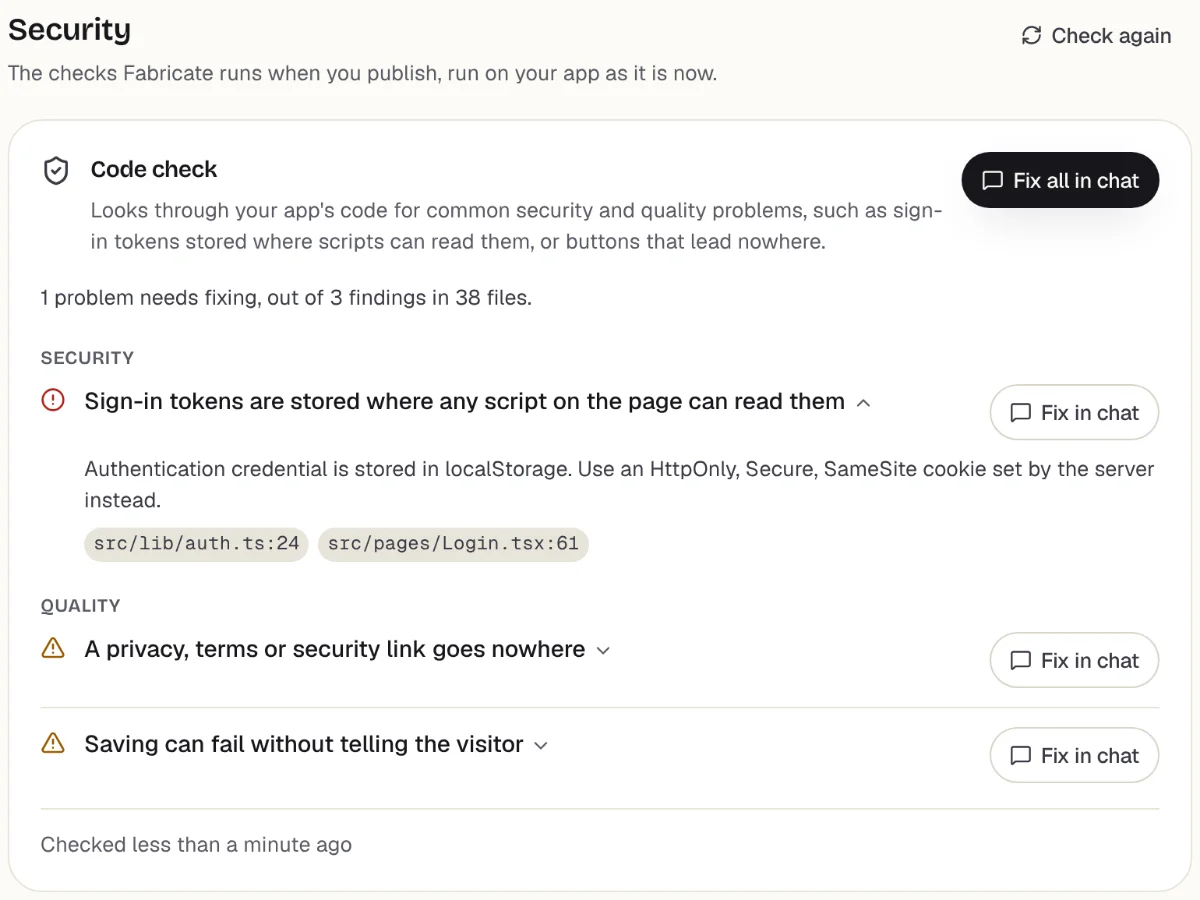
Checks
What it does well
- Built around your own service
- Each client sees only their own
- No price per client who signs in
Watch out for
- Emails to clients about updates are not built in
- Documents for clients to download are not built in
- Paid plans from
- $25 a month
- 350 credits a month on Pro
- Free plan
- 60 credits
- A month, to build and preview
- A live app
- Pro and Max
- Publishing is on paid plans
SuiteDash
All-in-oneBest for: Everything for a service business in one place
An all-in-one business platform with a client portal, contracts and e-signatures, client onboarding, projects and white label, sold at one price rather than per user. START is $19 a month, THRIVE $49 and PINNACLE $99, after a 14-day free trial.
What it does well
- One price, not per user
- Contracts, onboarding and projects too
- White label
Watch out for
- A lot of tools to set up
- Shaped around its own toolkits
Where SuiteDash beats Fabricate
If you want a portal, contracts, onboarding and projects from one company at one flat price, SuiteDash has them ready to switch on.
Source: suitedash.com/pricing (opens in a new tab), checked
HoneyBook
Client managementBest for: Freelancers and creative services
Client management for service businesses: proposals, contracts, invoices and payments, scheduling and a client portal, with unlimited clients. Starter is $29 a month billed yearly; Essentials is $59 billed monthly, or $49 yearly, for up to 2 team members.
What it does well
- Proposals, contracts and invoices
- Client portal on every plan
- Unlimited clients
Watch out for
- Starter is shown billed yearly only
- Team members are capped below Premium
Where HoneyBook beats Fabricate
If your work runs from proposal to contract to invoice, HoneyBook does that path out of the box, with a client portal on every plan.
Source: honeybook.com/pricing (opens in a new tab), checked
Dubsado
Client managementBest for: Service businesses that bill by the project
Invoices, payments, contracts, proposals, forms, scheduling and client portals for service businesses, billed by the year: Starter is $335 a year and Premier $525, both with unlimited clients, after a 21-day free trial of Premier.
What it does well
- Unlimited clients
- Workflows on Premier
- A 21-day free trial
Watch out for
- Priced by the year
- One lead capture form on Starter
Where Dubsado beats Fabricate
If you would rather pay once a year for client management with portals included, Dubsado starts at $335 a year with unlimited clients.
Source: dubsado.com/pricing (opens in a new tab), checked
Softr
No codeBest for: A portal on data you already keep
Builds client portals and internal tools from a description with its AI Co-Builder, on Softr's own databases or on data you keep in Airtable or Google Sheets. Its Free plan covers up to 3 builders and 5 app users; Basic is $25 a month, and each plan caps the app users who sign in.
What it does well
- Client portals on your own data
- Sits on Airtable or Google Sheets
- Builds from a description
Watch out for
- App users are counted against the plan
- Softr branding stays until Pro, at $119 a month
Where Softr beats Fabricate
If your client records already live in Airtable or Google Sheets, a Softr portal can sit on them directly.
Sources: softr.io/pricing (opens in a new tab), checked ; Softr docs: AI Co-Builder (opens in a new tab), checked Fabricate vs Softr
What a client portal built with Fabricate looks like
From this one description Fabricate builds the client sign-in, each client's own projects and invoices, and your page of every client, in an app with its own database; publishing it is on Pro and Max.
Build free. No card needed.
Our verdict
For a small business that wants a portal shaped around its own service, where each client signs in to see their own updates, approvals and invoices, Fabricate is our pick, and we make it. You describe the portal in plain words, and nobody who signs in counts toward the price. Putting the portal online is on Pro and Max.
SuiteDash comes second for everything in one place at one flat price. HoneyBook and Dubsado suit service businesses whose work runs from proposal to invoice, and Softr suits a portal on records you already keep in Airtable or Google Sheets.
Frequently asked questions
- What is the best client portal software for a small business?
- It depends on how you work. For a portal shaped around your own service, with no price per client, Fabricate, which we make. For a portal, contracts and projects at one flat price, SuiteDash. For proposals, contracts and invoices in one path, HoneyBook or Dubsado. For a portal on records you keep in Airtable or Google Sheets, Softr.
- Can I build my own client portal?
- Yes. Describe your service, what each client needs to see and send you, and who signs in, and Fabricate builds the client portal and shows it working in a preview. To change something, you ask in the chat. There is no code to write or read.
- Do clients only see their own information?
- In a portal built with Fabricate, yes. Each record is tied to the client it belongs to, and the portal shows a signed-in client only their own. Ask for invite codes so that only the clients you choose can create an account, and sign in as two test clients to check.
- Can clients pay invoices in the portal?
- On Pro and Max, the app can take card payments through Stripe Checkout, paid into your own Stripe account, which you connect under More > Payments. Ask for a pay button on each invoice; once Stripe confirms the payment, the invoice is marked paid. Fabricate takes no share of what you are paid; Stripe charges its own card fees.
- Do I pay for every client who signs in?
- Not on SuiteDash, HoneyBook or Dubsado, which have unlimited clients, or on Fabricate, which does not count the people who sign in to a published portal. Softr caps the app users on each plan.
- Does a portal built with Fabricate email clients when something changes?
- No. Emails and notifications about updates are not built in, so clients see what is new when they sign in. On Pro and Max, the live portal sends the emails that confirm an address and reset a password.
Sources
The pages this guide quotes, each with the day it was read.
- suitedash.com/pricing (opens in a new tab), checked
- honeybook.com/pricing (opens in a new tab), checked
- dubsado.com/pricing (opens in a new tab), checked
- softr.io/pricing (opens in a new tab), checked
- Softr docs: AI Co-Builder (opens in a new tab), checked
- fabricate.build/pricing, from our live plans
About this guide
Written by the Fabricate team. Fabricate is our product, so the guide marks it, and each pick, ours or not, says who it suits best.
Each tool's section lists the pages we read about it and the day we read them. We compared the tools from their own pricing pages and documentation, not by signing up for them. Spotted something out of date? Write to info@fabricate.build.
Related guides
All best lists- Build a Client PortalUpdates, approvals and invoices each client signs in to see.Build it
- Build a Customer PortalOrders, invoices and support requests behind a sign-in.Build it
- Best AI App Builders for Small BusinessFive tools compared for apps your customers use.Best list
- Apps for AccountantsClient documents, deadlines and enquiries for a practice.For you
Related pages
Best AI App Builders for Small Business
Five AI and no-code app builders compared for small businesses: bookings, orders and customer sign-in, who you pay for, ...
Read moreBest AI App Builders for Startups
Find the best AI app builder for your startup. Compare top tools for building MVPs, SaaS products, and startup apps, wit...
Read moreBest AI App Builders for Non-Coders
Build apps without coding knowledge. Compare the best AI app builders for non-technical users and create sites and apps ...
Read moreBest AI Builders for MVP Development
Compare AI MVP builders on how fast they get a working product live: database, auth, payments and hosting included. Ship...
Read moreBest AI App Builders
Buyer's guides for every kind of project and budget.
Read moreAI App Builder
Describe your app and get a frontend, database, logins and a live URL in minutes.
Read more