Buyer's guideUpdated
Best Field Service Management Software
Five tools compared on what a trade or home service business needs: requests in, jobs out to the crew, who you pay for and the price.
Fabricate is ours, so every other pick says where it beats Fabricate, and each tool's price comes with the page we read it on.
 Dispatch desk
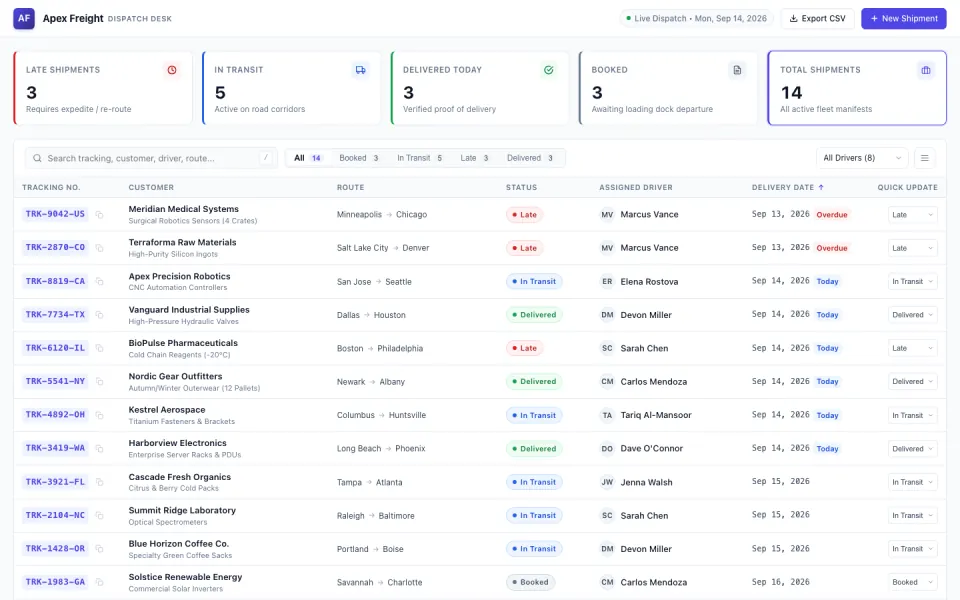 Made with FabricateA new app usually takes about 20 to 35 credits.
The short answer
Also good: ServiceM8 for a solo trade, ServiceTitan for a large trade business.
- Top pick · we make this
Fabricate
Best for a job tracker built around your trade
Describe your jobs and crew in plain words. Fabricate builds the job tracker, its records and the crew sign-in, and you change it by asking.
From $25 a monthThe details on Fabricate - Field service
Jobber
Best ready-made system for home services
Software for home service businesses, priced by plan and user.
From $49 a monthThe details on Jobber - Field service
Housecall Pro
Best for quotes, dispatch and invoices
Field service software with online booking, scheduling and dispatching, quotes, invoices and payments on every plan.
From $79 a monthThe details on Housecall Pro
Key takeaways
- Fabricate builds a job tracker around your own jobs and crew, with no price per person who signs in; quotes, invoices, texts and route planning are not built in. Building and previewing are free; publishing is on Pro and Max.
- Jobber Core is $49 a month for 1 user, with extra users at $29 a month each.
- Housecall Pro Basic is $79 a month billed monthly for 1 user, with quotes, invoices and payments.
- ServiceM8 is free for 1 user and 30 jobs a month; Starter is $29 a month for 50 jobs.
- ServiceTitan prices every plan on request.
Compare at a glance
What each one is built around, its free plan, who you pay for and the cheapest paid plan.
- FabricateWe make this
- Built around
- Your own jobs and stages
- Free plan
- Build and preview
- Who you pay for
- Not the people who sign in
- Paid plans from
- $25 a month
- JobberField service
- Built around
- Home service businesses
- Free plan
- None; a 14-day trial
- Who you pay for
- Plan, then each extra user
- Paid plans from
- $49 a month for 1 user
- Housecall ProField service
- Built around
- Quotes, dispatch and invoices
- Free plan
- None
- Who you pay for
- Plan, by number of users
- Paid plans from
- $79 a month for 1 user
- ServiceM8Job management
- Built around
- Jobs for trades
- Free plan
- 1 user, 30 jobs a month
- Who you pay for
- Jobs a month, not users
- Paid plans from
- $29 a month for 50 jobs
- ServiceTitanField service
- Built around
- Larger trade businesses
- Free plan
- None
- Who you pay for
- Priced on request
- Paid plans from
- Priced on request
Each tool's cheapest paid plan as its own pricing page showed it on October 28, 2026: billed monthly where the page offers it, otherwise as the page bills it. Fabricate's figures come from our live plans.
How we compared
We compared the five tools on what a trade or home service business needs: requests and jobs, the crew on their phones, who you pay for, quotes and invoices, and the price. For the other four we read their pricing pages on October 28, 2026, and each one's section lists the pages we read. We did not sign up for them for this guide.
Fabricate is ours. It comes first here because it builds the job tracker around the way a crew already works, and where another tool is the better pick, its section says so.
What we looked for
Requests and jobs
Can customers send a request, and can you turn it into a job for someone on the crew?
The crew on their phones
Can each person see their own jobs for the day?
Who you pay for
Is the price per user, per job or for the business?
Quotes, invoices and payments
Does it send quotes and invoices and take payment?
Price
What does the cheapest paid plan cost?
Top picks for 2026
Fabricate
Top pickWe make thisBest for: A job tracker for a small crew
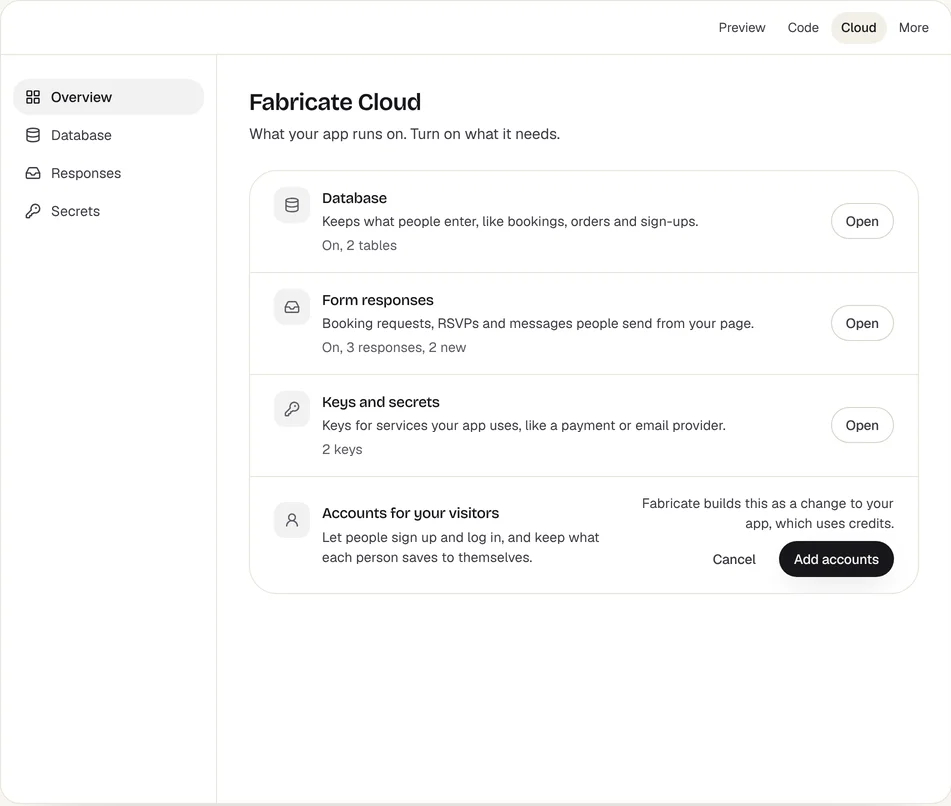
Describe your jobs and your crew, and Fabricate builds a job tracking app: customers send a service request without an account, you turn each request into a job with a date and the person assigned, and each person on your crew signs in with an invite code to see their jobs for the day in a phone's browser. The people who sign in to a published app are not counted as seats. Route planning, live locations, sending invoices and text messages are not built in. Building and previewing are free; publishing is on Pro and Max.
Fabricate Cloud
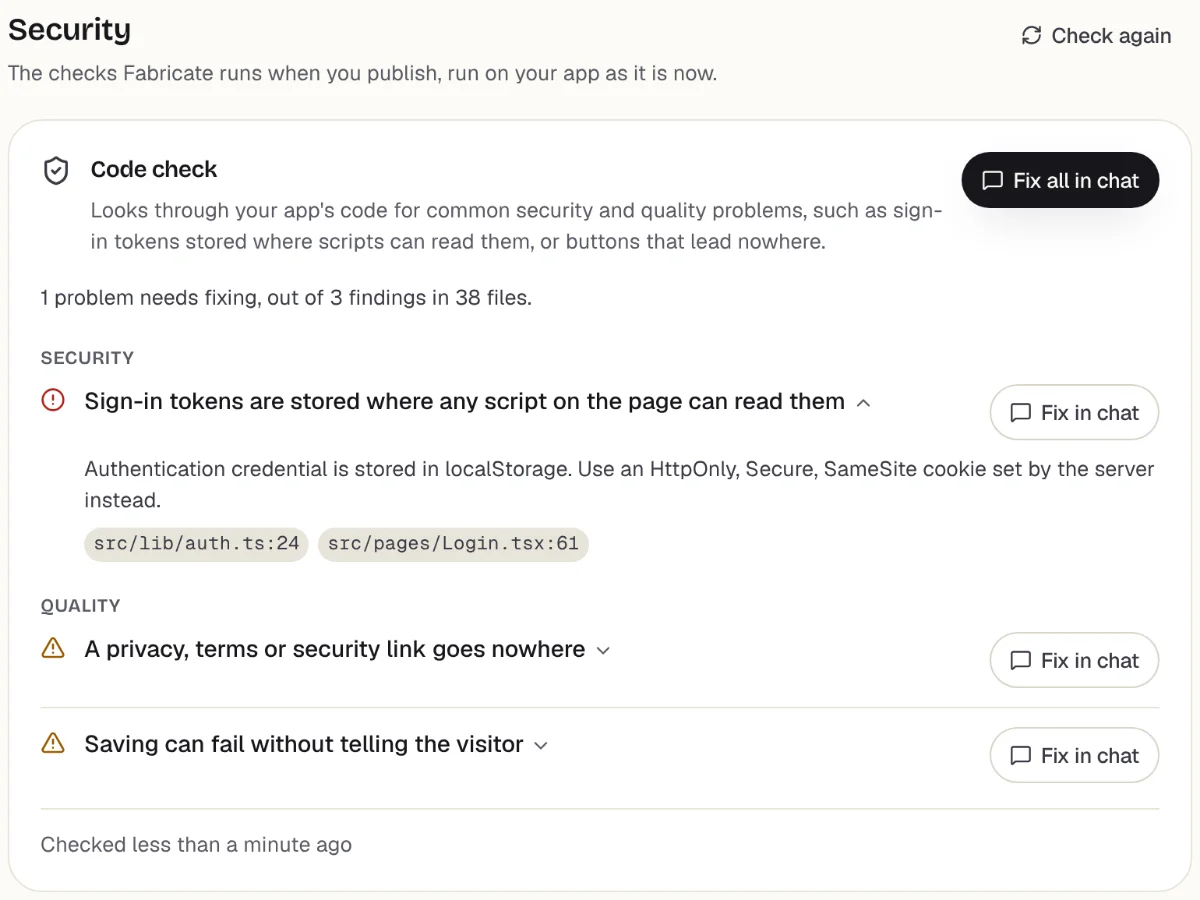
Checks
What it does well
- Requests without an account
- Each person sees their own jobs
- No price per person who signs in
Watch out for
- Sending quotes, invoices and texts is not built in
- Route planning and live locations are not built in
- Paid plans from
- $25 a month
- 350 credits a month on Pro
- Free plan
- 60 credits
- A month, to build and preview
- A live app
- Pro and Max
- Publishing is on paid plans
Jobber
Field serviceBest for: Home service businesses that want it ready-made
Software for home service businesses, priced by plan and user. Core is $49 a month for 1 user, Connect $139 and Grow $199, with extra users at $29 a month each, after a 14-day free trial.
What it does well
- Made for home service businesses
- No commitment on monthly billing
- A 14-day free trial
Watch out for
- No free plan
- Extra users cost $29 a month each
Where Jobber beats Fabricate
If you want field service software that is ready the day you sign up, with plans to grow into as your crew grows, Jobber is built for that.
Source: getjobber.com/pricing (opens in a new tab), checked Jobber alternatives
Housecall Pro
Field serviceBest for: Trades that quote, dispatch and invoice
Field service software with online booking, scheduling and dispatching, quotes, invoices and payments on every plan. Basic is $79 a month billed monthly, or $59 billed yearly, for 1 user; Essentials is $189 for up to 5 users.
What it does well
- Online booking and dispatching
- Quotes, invoices and payments
- QuickBooks from Essentials
Watch out for
- No free plan
- Basic covers 1 user
Where Housecall Pro beats Fabricate
If you want quotes, dispatching, invoices and payments ready on day one, and QuickBooks connected from Essentials, Housecall Pro does all of it.
Source: housecallpro.com/pricing (opens in a new tab), checked Housecall Pro alternatives
ServiceM8
Job managementBest for: Solo trades and small crews
Job management for trades, priced by jobs a month with unlimited users on paid plans. Free covers 1 user and 30 jobs a month; Starter is $29 a month for 50 jobs and Growing $79 for 150, after a 14-day free trial.
What it does well
- Free for one person, 30 jobs a month
- Unlimited users on paid plans
- Quotes and invoices
Watch out for
- Priced by jobs a month
- Free covers 1 user
Where ServiceM8 beats Fabricate
If you work alone, ServiceM8 is free for up to 30 jobs a month, with quotes and invoices, and paid plans do not charge per user.
Source: servicem8.com/us/pricing (opens in a new tab), checked
ServiceTitan
Field serviceBest for: Larger trade businesses
Field service software for larger trade businesses, sold in three plans, Starter, Essentials and The Works. Every plan is priced on request.
What it does well
- Built for larger trade businesses
- Three plans to grow into
Watch out for
- Every plan priced on request
Where ServiceTitan beats Fabricate
If your trade business runs many crews and wants one large system for all of it, ServiceTitan is built for that size.
Source: servicetitan.com/pricing (opens in a new tab), checked ServiceTitan alternatives
What a job tracker built with Fabricate looks like
From this one description Fabricate builds the request form, the jobs, the crew sign-in and each person's day, in an app with its own database; publishing it is on Pro and Max.
Build free. No card needed.
Our verdict
For a small crew that wants requests, jobs and each person's day in one app, with nothing it does not use, Fabricate is our pick, and we make it. You describe your jobs and your crew in plain words, and nobody who signs in counts toward the price. Putting the app online is on Pro and Max.
Jobber comes second for a ready-made system for home services, and Housecall Pro for quotes, dispatching and invoices from day one. ServiceM8 suits a solo trade on its free plan, and ServiceTitan a large trade business.
Frequently asked questions
- What is the best field service management software for a small business?
- It depends on what you need on day one. For a job tracker built around your own trade, with no price per person who signs in, Fabricate, which we make. For a ready-made system for home services, Jobber. For quotes, dispatching and invoices, Housecall Pro. For a solo trade, ServiceM8 is free for up to 30 jobs a month. For a large trade business, ServiceTitan.
- Is there free field service software?
- ServiceM8 is free for 1 user and up to 30 jobs a month. Jobber, Housecall Pro and ServiceTitan have no free plan. Building and previewing are free; publishing is on Pro and Max.
- Can I build my own job tracking app?
- Yes. Describe the jobs you take, your crew and what you record on each visit, and Fabricate builds the job tracking app and shows it working in a preview. To change something, you ask in the chat. There is no code to write or read.
- Can an app built with Fabricate send invoices or take payment?
- It does not send invoices or text messages to your customers, and it does not connect to accounting software. On Pro and Max, the app can take card payments through Stripe Checkout, paid into your own Stripe account, which you connect under More > Payments. Fabricate takes no share of what you are paid; Stripe charges its own card fees.
- Does it plan routes or track where my crew is?
- No. The app does not work out routes or show live locations. It can list each person's jobs for the day in the order you set, with each address, so the day's plan is in one place.
Sources
The pages this guide quotes, each with the day it was read.
- getjobber.com/pricing (opens in a new tab), checked
- housecallpro.com/pricing (opens in a new tab), checked
- servicem8.com/us/pricing (opens in a new tab), checked
- servicetitan.com/pricing (opens in a new tab), checked
- fabricate.build/pricing, from our live plans
About this guide
Written by the Fabricate team. Fabricate is our product, so the guide marks it, and each pick, ours or not, says who it suits best.
Each tool's section lists the pages we read about it and the day we read them. We compared the tools from their own pricing pages and documentation, not by signing up for them. Spotted something out of date? Write to info@fabricate.build.
Related guides
All best lists- Build a Job Tracking AppJobs moving through stages, with a sign-in for your team.Build it
- Jobber AlternativesField service tools compared with Jobber on price and users.Alternatives
- ServiceTitan AlternativesField service tools for a smaller trade business.Alternatives
- Best CRM for Small BusinessFive CRMs compared on free plans and price per user.Best list
Related pages
Best Employee Scheduling Apps
Five employee scheduling apps compared for small businesses on free plans, price per user and minimums, from each tool's...
Read moreBest Inventory Management Software for Small Business
Three inventory management tools compared for small businesses on free plans, item and order limits and price, from each...
Read moreBest Form Builders in 2026
Five online form builders compared on free plans, submission limits and price, from each tool's own pricing page.
Read moreBest Project Management Software for Small Business
Five project management tools compared for small teams on free plans, price per user and what each suits, from each tool...
Read moreBest AI App Builders
Buyer's guides for every kind of project and budget.
Read moreAI App Builder
Describe your app and get a frontend, database, logins and a live URL in minutes.
Read more