Create an invoice app for your business
You can create an invoice app without writing code: describe your clients, what goes on an invoice and how you get paid, and Fabricate builds a working web app with clients, numbered invoices with line items and tax, paid, pending and overdue totals and a printable page for each invoice, and on Pro and Max a pay button that takes the amount through Stripe Checkout into your own Stripe account.
Invoices are saved in the app's own database, in your layout and your currency. Try it with a test client first, then ask for changes in the same chat.
- Free plan: 60 credits a month
- No card needed
- Live link included
From one message to an invoice app
Then try it yourself and ask for changes in the same chat until it fits.
You write: An invoice app for my freelance design work. Only I can sign in. I keep a list of clients with their company, address and email. Invoices are numbered in order and have line items with a description, hours, a rate and an amount, plus tax at 20% and a due date 30 days after the invoice date. The home page shows paid, pending and overdue totals and a list of invoices with their status. Each invoice has a page laid out for printing. Make it easy to use on a phone.
 Fabricate
I built your invoice app: a client list, numbered invoices with line items, hours, rates and 20% tax, due dates 30 days out, paid, pending and overdue totals on the home page, and a printable page for each invoice. Add a test client and an invoice in the preview.
Then ask for changes, such as
- Add a pay button through Stripe
- Add my logo to invoices
- Add a download for my accountant
A whole new app usually takes about 20 to 35 credits.
Invoice tracker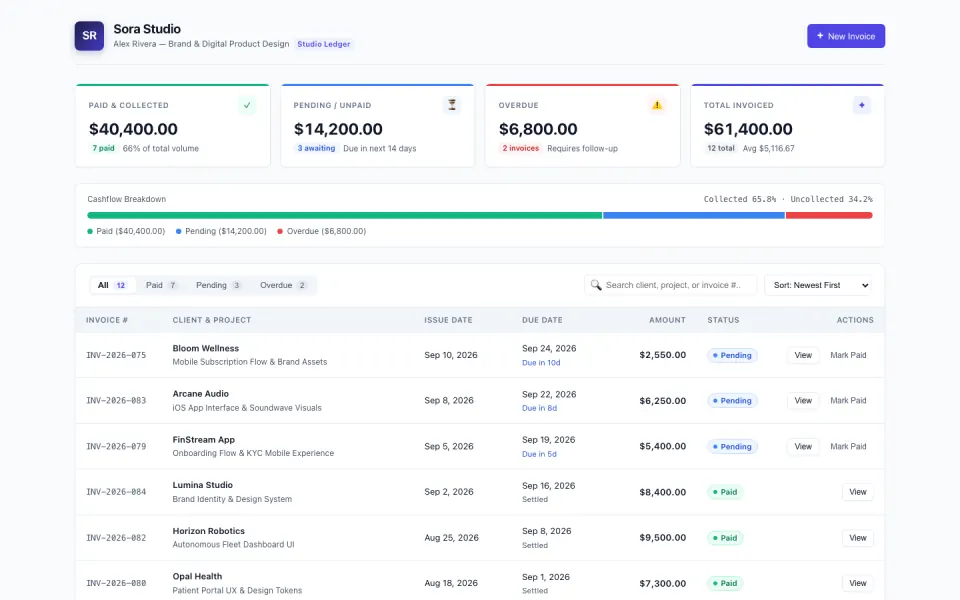
Who builds an invoice app
Freelancers
Invoices in your own layout, numbered in order, with what each client owes.
Trades and service businesses
Quotes that become invoices once the job is done.
Agencies and studios
Invoices per client and project, and what is overdue across all of them.
Small businesses
One place for invoices, payments received and what is still owed.
What your invoice app comes with
Clients
Each client with their details, their invoices and what they owe.
Invoices with line items
Numbered invoices with items, quantities, prices, tax and a total, in your currency.
Paid, pending and overdue
Totals at the top and a status on each invoice, worked out from its due date.
A printable invoice
An invoice page laid out for printing, which you or your client can save as a PDF from the browser.
Card payments
On Pro and Max, a pay button that takes the amount through Stripe Checkout into your own Stripe account.
Quotes
Quotes with the same line items, turned into an invoice once accepted.
In short
- An invoice app with clients, numbered invoices, line items, tax and paid, pending and overdue totals can be built from a plain-English description
- On Pro and Max, clients can pay an invoice by card through Stripe Checkout into your own Stripe account
- It does not email invoices or send them on a schedule; invoices print or save as a PDF from the browser
What goes into an invoice app built with Fabricate
Invoicing tools are built for every business at once, and the cheaper ones put their own name on your invoices. An invoice app built with Fabricate starts from your description: what you bill for, what an invoice shows, how you number them and how clients pay.
Clients and invoices: keep each client's details, and create numbered invoices with line items, quantities, prices, tax and a due date, in your currency and your layout. The app works out what is paid, pending and overdue, and totals them at the top. Ask for quotes that turn into invoices once accepted.
Getting paid: On Pro and Max, the app can take card payments through Stripe Checkout, paid into your own Stripe account, which you connect under More > Payments. With a pay button on each invoice, the client pays on Stripe's own checkout page and the invoice is marked paid once Stripe confirms it. Each invoice page is laid out for printing, so it saves as a PDF from the browser.
What is not built in: emailing invoices or reminders to clients, invoices sent on a schedule, connections to QuickBooks, Xero or a bank, and tax filing. Ask for a download of your invoices as a CSV file for your accountant.
Invoice apps you can start from
Choose one and the builder opens with its description filled in. Change any word before you build.
How to build an invoice app
Four steps, all in one chat.
- 1Describe how you bill
What goes on an invoice, how you number them and how clients pay.
- 2Make a test invoice
Add a test client and an invoice, then mark it paid and check the totals.
- 3Ask for changes
Add a page, a field or a colour by asking in the same chat.
- 4Publish it
The live app starts with a fresh database, so your test entries stay behind.
Chat

Your app

- Free60 credits a monthBuild, preview and publish. No card needed.
- A new app20 to 35 creditsA small change is about 3 to 10 credits.
- Pro350 credits a monthA live link and your own domain. Prices are on the pricing page.
Questions about invoice apps
- Can I build an invoice app without coding?
- Yes. Describe your clients, what goes on an invoice and how you number them, and Fabricate builds the invoice app and shows it working in a preview. To change something, you ask in the chat. There is no code to write or read.
- Can clients pay an invoice online?
- On Pro and Max, the app can take card payments through Stripe Checkout, paid into your own Stripe account, which you connect under More > Payments. Ask for a pay button on each invoice; once Stripe confirms the payment, the invoice is marked paid.
- Can I send invoices as PDFs?
- Yes, from your browser: each invoice has a page laid out for printing, so you can save it as a PDF and attach it to your own email. The app does not email invoices to your clients. Ask for a client sign-in if you want each client to see their own invoices in the app.
- Does it send recurring invoices and reminders?
- Not by itself: the app does not email invoices, so it does not send them on a schedule or chase late ones. Ask for a button that copies last month's invoice, and an overdue list that shows who to chase.
- Does it connect to QuickBooks, Xero or my bank?
- No. Accounting and bank connections are not built in. Ask for a download of your invoices as a CSV file for your accountant.
- Who can see the invoices?
- Only the people you choose, if you ask for that when you describe the app: say that only you can sign in, or that staff join with an invite code you give them. A sign-in that anyone can register for does not keep invoices and client details private. On Free, anyone with the link can open the app itself, so keep those details behind that owner or invite-only sign-in. On Pro and Max you can make the whole app private.
- Will it work on phones?
- Yes. It is a web app: it opens from its link in any phone or computer browser, and anyone can add it to their home screen from the browser. It is not an App Store or Google Play app. Published as a phone app on Pro and Max, it can remind each person on their own phone at a time they set; notifications about new activity, such as a new message, are not built in.
- What does it cost?
- You can start on Free, which includes 60 credits a month and needs no card. A whole new app usually takes about 20 to 35 credits and a small change about 3 to 10 credits. Current plans are on the pricing page.
Keep reading
Every Build page- Build a CRMContacts, companies and a deal pipeline in your own stages.Build it
- Build a Client PortalA sign-in for clients to see their own updates, files and invoices.Build it
- Build a Fintech AppCalculators, trackers and client portals for financial services.Build it
- Apps for AccountantsClient documents, deadlines and enquiries for a practice.For you
- Apps for ContractorsQuotes, jobs and customer requests for a building business.For you
- PaymentsCard payments in your app through your own Stripe account.Feature
Start your invoice app
Describe how you bill in your own words. Try it with a test invoice, then send your first one.
Build free. No card needed.
Related pages
Build a directory website
Describe your listings and Fabricate builds a directory website: categories, search, listing pages and listing requests....
Read moreBuild an ecommerce website for your shop
Describe what you sell and Fabricate builds an ecommerce website: product pages, a cart and an order list. Free to start...
Read moreBuild a landing page that collects leads
Describe your offer and Fabricate builds a landing page: your pitch, a lead form and every lead in one list. Free to sta...
Read moreBuild a client portal for your service business
Describe your service and Fabricate builds client portal software: client sign-in, updates, files and requests. Free to ...
Read moreEverything You Can Build
Explore use cases, from MVPs to marketplaces.
Read moreAI App Builder
Describe your app and get a frontend, database, logins and a live URL in minutes.
Read more