AlternativesUpdated
Best Vercel Alternatives in 2026
Vercel is great for deploying apps, and its v0 builder makes them from a prompt. Teams look elsewhere for hosting that is not billed by use, a backend inside the app rather than separate services, or a host that is not Vercel.
 Fabricate CloudFabricate
Key takeaways
- Vercel hosts and deploys apps, with v0 as its separate builder; Fabricate builds the app and hosts it in one place.
- Vercel Pro includes $20 of usage a month and bills the rest as you go. Credits pay for AI work, building the app and, on Pro and Max, the AI inside it; serving the published app is part of the plan.
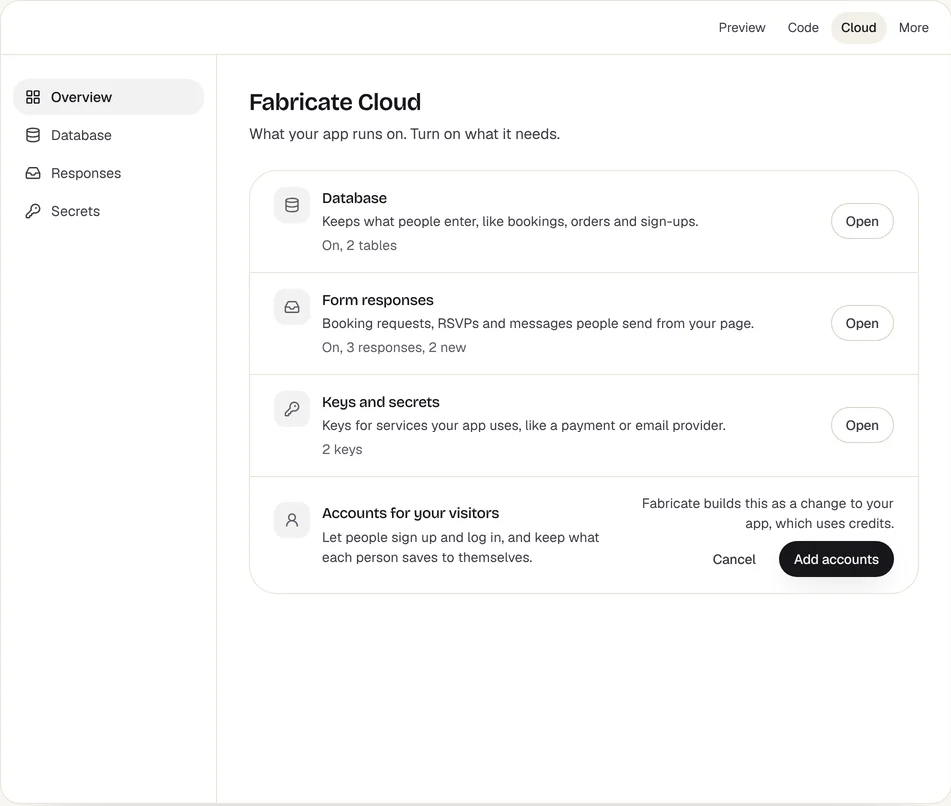
- Fabricate generates full-stack applications from descriptions, with the database and sign-in in the app's own code.
- Where an app on Vercel usually means Vercel, a frontend framework and a database service, Fabricate keeps all three in one project.
- Vercel excels for teams with existing codebases; Fabricate excels for building new applications from scratch.
Why Seek Vercel Alternatives?
Building Is a Separate Product
Vercel hosts what you deploy. Building from a prompt is v0, its own product, from $30 per user a month.
Billed by Use
Pro is $20 a month per developer with $20 of usage credit; use beyond it is billed as you go, and a spend budget can pause projects when it is reached.
Data Lives Elsewhere
Vercel runs your functions, and data comes from separate services: v0 adds a database through integrations with Neon, Supabase, Upstash or Vercel Blob, each opening an account on that service.
Moving Hosts Takes Work
Some Vercel features are built around its own platform, so moving a project to another host can take changes.
Compare at a glance
Fabricate beside Vercel, feature by feature.
- Builds Apps From a Prompt
- Fabricate
- Yes
- Vercel
- With v0, from $30 per user a month
- Database
- Fabricate
- The app's own SQLite tables
- Vercel
- Integrations such as Neon or Supabase
- Where It Runs
- Fabricate
- Cloudflare Workers
- Vercel
- Vercel's network
- Server Code
- Fabricate
- Server routes in the app
- Vercel
- Functions
- Free Plan
- Fabricate
- Build and publish; 1 app online for 30 days
- Vercel
- Hobby, for personal, non-commercial use
- Paid Plans From
- Fabricate
- $25 a month
- Vercel
- $20 a month per developer, plus usage
- How Hosting Is Billed
- Fabricate
- Part of every plan; AI inside the app uses credits
- Vercel
- $20 of usage included, then pay as you go
Fabricate
We make thisBest for: Complete app building
AI that builds complete applications, with a database and sign-in, and hosts each one as its own Cloudflare Worker. Building and publishing start free.
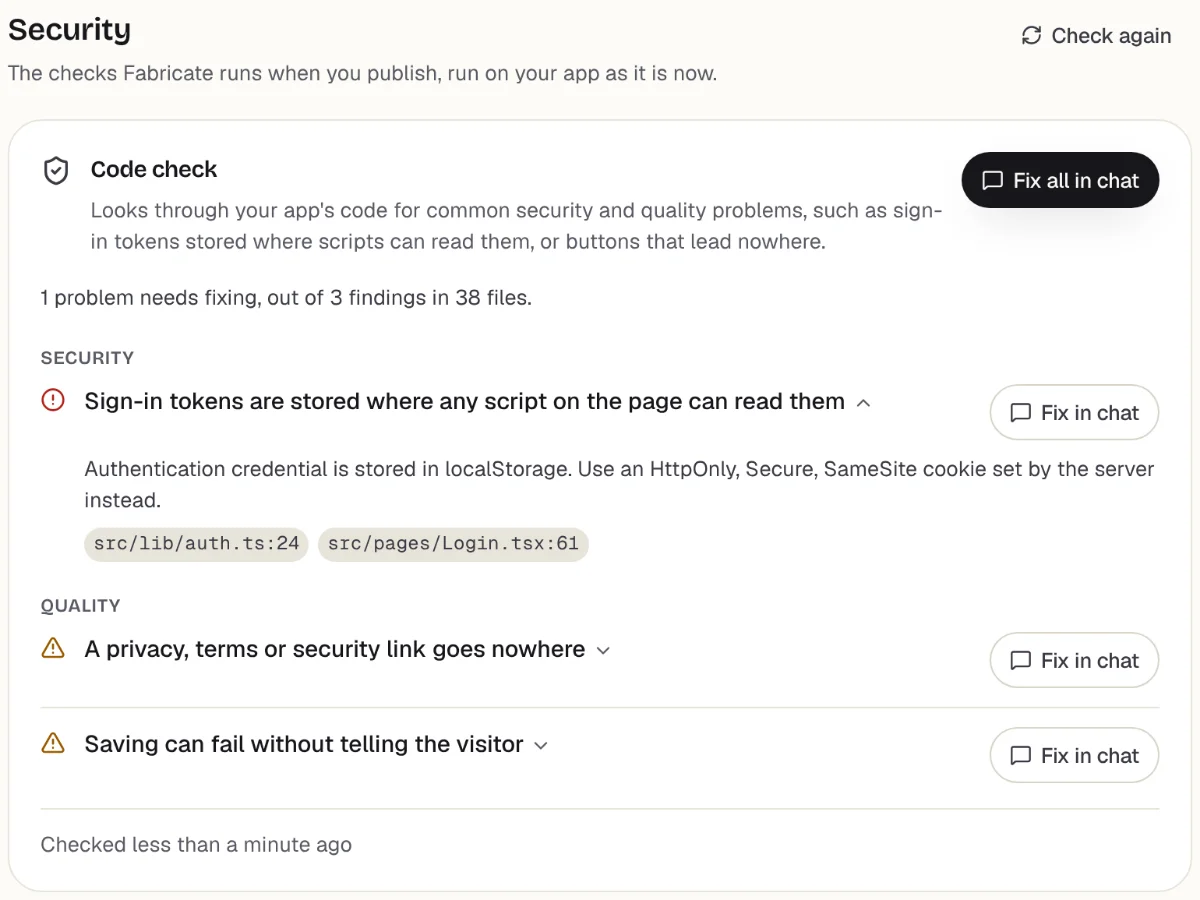
Checks before you publish
What it does well
- Build and host in one place
- AI-powered
- Full-stack
- Database included
- Paid plans from
- $25 a month
- 350 credits a month on Pro
- Free plan
- 60 credits
- A month, to build and publish
- A live app
- Every plan
- Publishing is on every plan
The other Vercel alternatives
What each one does well, and the kind of project it suits best.
- Number 2
Netlify
Best for: Static sites
A host much like Vercel, with strong JAMstack support.
- JAMstack
- Forms
- Free plan
- Number 3
Railway
Best for: Full-stack apps
A platform for deploying apps, databases and services from a repository or a Docker image.
- Databases alongside apps
- Deploys from GitHub
- Docker images
- Number 4
Render
Best for: General hosting
A cloud platform for web services, background workers, static sites and managed Postgres.
- Web services and workers
- Managed Postgres
- Static sites
- Number 5
Fly.io
Best for: Global apps
Deploy apps close to users globally.
- Regions worldwide
- Global
- VMs
- Number 6
Cloudflare Workers
Best for: Developers on Cloudflare
Cloudflare's platform for sites and apps on its global network, with static assets, server code and storage such as D1 and Durable Objects. It is also where every Fabricate app runs.
- Global network
- Free plan
- Static assets and server code
- Number 7
AWS Amplify
Best for: AWS users
Hosting and backend tools from AWS, for teams already on it.
- AWS ecosystem
- Hosting and backend
- Git-based deploys
Vercel and Fabricate: hosting, building and how each is billed
Vercel is known for modern web deployment, particularly for Next.js, which it created. Its network, automatic preview deployments and git-connected workflow make it a strong home for teams that already have a codebase: push code and it deploys.
Hosting is one part of an app. Before deploying, someone chooses a framework, writes the code, sets up a database and adds sign-in. Vercel's answer to that part is v0, a separate builder from $30 per user a month that writes React and Next.js and connects data through services such as Neon or Supabase.
Fabricate puts the building and the hosting in one place. Describe an application and it generates the screens, the server routes, the database and sign-in, opens the app in a real browser to check it, and publishes it as its own Cloudflare Worker. Building and publishing start free.
Pricing is the other difference. Vercel Pro is $20 a month per developer with $20 of usage credit; functions, data transfer and requests beyond it are billed as you go, and a spend budget can pause projects when it is reached. Credits pay for AI work, building the app and, on Pro and Max, the AI inside it; serving the published app is part of the plan.
Build and Deploy in One Step
Instead of building a Next.js app, configuring a database and deploying to Vercel separately, Fabricate generates the blog platform from one description and publishes it with one press.
Build free. No card needed.
Frequently asked questions
- Is Vercel free?
- Vercel's Hobby plan is free for personal, non-commercial use, with capped usage that cannot be topped up; Pro is $20 a month per developer. Either way you bring the app, or build it with v0. Fabricate builds the app and hosts it. Building and publishing start free.
- Can I use Fabricate instead of Vercel?
- For an app Fabricate builds, yes: publishing puts it online as its own Cloudflare Worker, after a check in a real browser, with no separate hosting to set up. For a codebase you already have, Vercel or another host is the fit, since Fabricate hosts the apps it builds.
- Which is better for Next.js?
- Vercel created Next.js, so its support is excellent. Fabricate does not build Next.js apps: it generates React and TypeScript apps that run on Cloudflare Workers.
- What about Vercel's edge functions?
- A published Fabricate app runs as its own Cloudflare Worker on Cloudflare's global network, with its server routes in a Durable Object.
- Is Fabricate pricing more predictable?
- Fabricate's plan is a monthly price with a monthly credit allowance. Credits pay for AI work, building the app and, on Pro and Max, the AI inside it; serving the published app is part of the plan, not billed by traffic. Vercel Pro includes $20 of usage credit a month; beyond it, functions, data transfer and requests are billed as you go, and a spend budget, $200 by default for new teams, can pause projects when it is reached.
Sources
The pages this guide quotes, each with the day it was read.
- vercel.com/pricing (opens in a new tab), checked
- v0.app/pricing (opens in a new tab), checked
- v0 docs: databases (opens in a new tab), checked
- fabricate.build/pricing, from our live plans
About this guide
Written by the Fabricate team. Fabricate is our product, so it is first on this page and marked "We make this". Each tool, ours or not, says who it suits best.
Each tool's card lists the pages we read about it and the day we read them. We compared the tools from their own pricing pages and documentation, not by signing up for them. Spotted something out of date? Write to info@fabricate.build.
Related guides
All alternatives- Deployment on CloudflareHow a generated app ships as its own Cloudflare Worker, database and all.Feature
- AI Website GeneratorHow AI generators create and deploy complete web applications.Guide
- Text to WebsiteTurn text descriptions into deployed websites with AI.Guide
- Best AI Website BuildersTop-ranked AI platforms for building and deploying web applications.Best list
Related pages
Supabase Alternatives
Looking for Supabase alternatives with frontend included? Compare platforms that provide complete app building, not just...
Read moreAll AI App Builder Alternatives
Compare every alternative we have reviewed, side by side.
Read moreAI App Builder
Describe your app and get a frontend, database, logins and a live URL in minutes.
Read more