AlternativesUpdated
Best HeyBoss Alternatives in 2026
HeyBoss calls itself an all-in-one AI website and marketing agency for small businesses: it builds the site or app from a prompt, hosts it, and adds SEO pages, a CRM, email and payments, with the build paid in AI credits and a plan from $25 to $99 a month. If you need an app with its backend in its own code, here is how seven alternatives compare.
The Rebuild my site box from Fabricate's home page. It opens Fabricate with your rebuild written out, and nothing is built until you press Build there.
Key takeaways
- HeyBoss is an all-in-one AI website and marketing agency for small and medium-sized businesses, with hosting, SEO pages, a CRM and email in one plan.
- It builds sites, stores, booking systems, portals and apps from prompts, with a built-in database and payments with no Stripe setup.
- HeyBoss estimates the build at $50 to $200 in AI credits for a simple site, and the plan at $25 to $99 a month.
- Fabricate builds web apps with the backend written into the app's own code. Building and publishing start free.
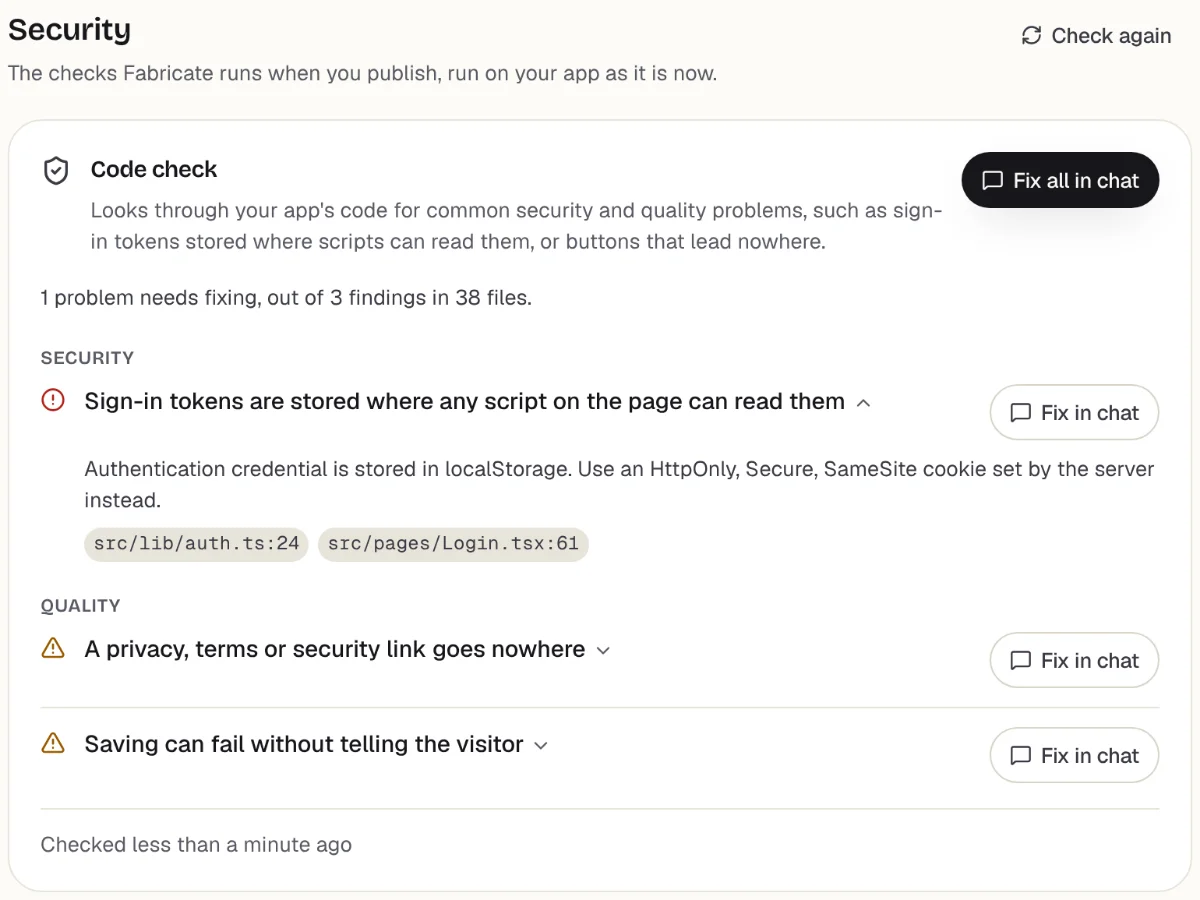
- Every app is opened in a real browser and checked before it can be published.
Why Are Users Exploring HeyBoss Alternatives?
The Build Is Paid in Credits
HeyBoss estimates the one-time build at $50 to $200 in AI credits for a simple site and $500 to $800 for a complex site or store; the monthly plan, $25 to $99, covers hosting, updates and marketing.
Marketing Bundled In
The plan bundles AI SEO and GEO pages, a CRM and email marketing with the site. If you only need the app, compare what you would pay for the parts you use.
Where the Backend Lives
HeyBoss includes a built-in database and takes payments with no Stripe setup. The backend is written into the app's own code: server routes in a Durable Object on Cloudflare Workers, with its own SQLite database.
Compare at a glance
Fabricate beside HeyBoss, feature by feature.
- Builds From a Prompt
- Fabricate
- Yes
- HeyBoss
- Or from an existing site's URL
- Built For
- Fabricate
- Web apps
- HeyBoss
- Small business sites, stores and apps
- Database
- Fabricate
- The app's own SQLite tables
- HeyBoss
- Built in
- Payments
- Fabricate
- Stripe Checkout on Pro and Max, with one-click test account setup or your existing keys; live payments require account verification and a live key
- HeyBoss
- One-time and subscriptions, no Stripe setup
- CRM and Email Marketing
- Fabricate
- No
- HeyBoss
- In the plan
- Hosting
- Fabricate
- Included
- HeyBoss
- Included, fully managed
- Paid Plans From
- Fabricate
- $25 a month
- HeyBoss
- $25 a month, plus build credits
Fabricate
We make thisBest for: Apps with their backend in their own code
Builds web apps from a description, with server routes, the app's own SQLite database and sign-in written as code. Building and publishing start free.
 Checks before you publish
What it does well
- The backend in the app's own code
- Checked in a real browser before publishing
- The same models on every plan
- Paid plans from
- $25 a month
- 350 credits a month on Pro
- Free plan
- 60 credits
- A month, to build and publish
- A live app
- Every plan
- Publishing is on every plan
Switching from HeyBoss to Fabricate
- 1
Note What Your Site Does
List the pages, forms, bookings, payments and customer records your HeyBoss site or app uses, and keep a copy of the content and data you need.
- 2
Start in Fabricate
Paste your site's address into Rebuild my site at the top of this page, or describe the app in plain words.
- 3
Port Your Custom Logic
Use Fabricate's chat to describe the custom features, and Fabricate writes them in TypeScript, wired to the app's database and sign-in where needed.
- 4
Add Backend Services
Describe the tables you need, ask for accounts and login, and have Fabricate write Stripe payments on Pro and Max, starting with a test account in one click or existing keys.
- 5
Test it in the preview
Sign up, save and edit data, and check who can see what, before anyone else does.
- 6
Put it online
One press of Publish gives it its own address, after the same browser check.
Chat

Your app

The other HeyBoss alternatives
What each one does well, and the kind of project it suits best.
- Number 2
Bolt.new
Best for: Quick full-stack builds
Builds full-stack apps in the browser on Bolt Cloud, with a database, sign-in, storage and Stripe.
- Bolt Cloud backend
- Publishes on the free plan
- GitHub sync
- Number 3
Lovable
Best for: Design-led apps
Design-first AI builder with database, auth and storage via Lovable Cloud.
- Design
- Managed backend
- Two-way GitHub sync
- Number 4
v0 by Vercel
Best for: React apps on Vercel
Builds React and Next.js apps from a prompt and deploys them to Vercel, with data from services such as Neon or Supabase.
- React and Next.js
- Deploys to Vercel
- GitHub sync
- Number 5
Cursor
Best for: Developers
An AI code editor for people who write code, with an agent that works across the codebase.
- An agent in your editor
- Tab completion
- Any codebase
- Number 6
Replit Agent
Best for: Coding with AI in the browser
Replit's Agent builds and changes apps in a browser workspace with the code, a terminal and a database, and publishes them.
- Code in the browser
- Publishing built in
- Git and GitHub
- Number 7
Webflow
Best for: Marketing websites
A visual site builder with hosting and a CMS, for marketing sites.
- Visual design
- A CMS
- Hosting in the site plan
HeyBoss vs Fabricate: A Business in a Box, or an App as Code
HeyBoss sells itself as an AI agency for small businesses. You describe the business, or clone an existing site from its URL, and it builds the site in minutes; the plan then covers hosting, updates, AI SEO and GEO pages, a CRM and email marketing. Beyond websites, it builds stores, booking systems, portals, membership platforms, dashboards and small SaaS products, with a built-in database and payments.
Its pricing has two parts. HeyBoss estimates the one-time build in AI credits, $50 to $200 for a simple site and $500 to $800 for a complex site or store, and the all-in-one monthly plan at $25 to $99.
Fabricate is narrower: it builds web apps. The backend is written into the app's own code: server routes in a Durable Object on Cloudflare Workers, with its own SQLite database. Stripe Checkout on Pro and Max, with one-click test account setup or your existing keys; live payments require account verification and a live key.
Publishing: Each published app deploys as its own Cloudflare Worker. Before an app can be published it is opened in a real browser, and one that crashes, never mounts or renders a blank page is blocked from publishing. Custom domains are on the paid plans.
Where Fabricate and HeyBoss differ
What It Builds
Fabricate
Fabricate builds web apps from a description: React 19 and TypeScript screens, server routes and a database in one project, changed by asking.
HeyBoss
HeyBoss builds business websites, stores, booking systems, portals, membership platforms, dashboards and apps from prompts, or from an existing site's URL, and adds SEO pages, a CRM and email marketing.
In short: For a small business that wants the site, the marketing and the CRM in one plan, HeyBoss bundles them. For an app with its backend in its own code, Fabricate.
Backend and Payments
Fabricate
Fabricate generates the backend as code in your project: server routes in a Durable Object on Cloudflare Workers, with the app's data in that Durable Object's built-in SQLite database. When the app needs accounts, sign-in is built in, with PBKDF2 password hashing and opaque HttpOnly cookie sessions. Stripe Checkout on Pro and Max, with one-click test account setup or your existing keys; live payments require account verification and a live key.
HeyBoss
HeyBoss includes a built-in database, and accepts one-time payments or subscriptions with no Stripe configuration.
In short: Both include a database and payments. HeyBoss sets payments up for you; Fabricate makes a Stripe test account for the app in one click, or uses your own keys.
Hosting and Cost
Fabricate
Each published app deploys as its own Cloudflare Worker. Before an app can be published it is opened in a real browser, and one that crashes, never mounts or renders a blank page is blocked from publishing. Custom domains are on the paid plans. Credits pay for AI work, building the app and, on Pro and Max, the AI inside it; serving the published app is part of the plan.
HeyBoss
Hosting is fully managed and included. HeyBoss estimates the build at $50 to $200 in AI credits for a simple site and $500 to $800 for a complex one, and the monthly plan at $25 to $99, with credits for hosting, maintenance and marketing.
In short: HeyBoss prices a business site and its marketing together; Fabricate prices the app by plan and credits.
HeyBoss: what it does well, and what to watch for
What it does well
- Builds a business site, store or app from a prompt, or from an existing site's URL
- Hosting, AI SEO pages, a CRM and email marketing in one plan
- Payments, one-time or subscriptions, with no Stripe configuration
- Connect or buy a domain inside HeyBoss
Watch out for
- The build is paid in AI credits, estimated at $50 to $200 for a simple site and $500 to $800 for a complex site or store
- The monthly plan, $25 to $99, comes on top of the build credits
Full-Stack Booking Platform with Fabricate
Fabricate builds this from the one prompt: available time slots, bookings with a confirmation, sign-in, and a dashboard where providers manage their availability, with the schedule in the app's own SQLite database.
Build free. No card needed.
Frequently asked questions
- What is HeyBoss?
- HeyBoss (heyboss.ai) is an all-in-one AI website and business builder for small and medium-sized businesses. From simple prompts it builds a website, store, booking site or app, hosts it, and adds SEO pages, a CRM, email tools and payments.
- What does HeyBoss cost?
- HeyBoss estimates the one-time build at $50 to $200 in AI credits for a simple site and $500 to $800 for a complex site or store, and its all-in-one plan at $25 to $99 a month, covering hosting, updates and marketing.
- How does Fabricate compare to HeyBoss?
- HeyBoss bundles a business site or app with hosting, SEO pages, a CRM, email and payments in one plan. Fabricate focuses on the app. The backend is written into the app's own code: server routes in a Durable Object on Cloudflare Workers, with its own SQLite database. Every app is opened in a real browser and checked before it can be published.
- Can HeyBoss take payments?
- Yes. HeyBoss says it accepts one-time payments or subscriptions with simple setup and no Stripe configuration. Stripe Checkout on Pro and Max, with one-click test account setup or your existing keys; live payments require account verification and a live key.
- Can I move my HeyBoss site to Fabricate?
- Paste its address into Rebuild my site at the top of this page and tick that it is your business's site: Fabricate keeps your name, logo, words and photos in a new design, which you keep changing by asking. Building and publishing start free.
Sources
The pages this guide quotes, each with the day it was read.
- heyboss.ai (opens in a new tab), checked
- bolt.new/pricing (opens in a new tab), checked
- Bolt help: Bolt Cloud (opens in a new tab), checked
- Lovable docs: Lovable Cloud (opens in a new tab), checked
- Lovable docs: GitHub (opens in a new tab), checked
- v0 docs: deployments (opens in a new tab), checked
- v0 docs: databases (opens in a new tab), checked
- Cursor docs: Agent (opens in a new tab), checked
- replit.com/pricing (opens in a new tab), checked
- webflow.com/pricing (opens in a new tab), checked
- fabricate.build/pricing, from our live plans
About this guide
Written by the Fabricate team. Fabricate is our product, so it is first on this page and marked "We make this". Each tool, ours or not, says who it suits best.
Each tool's card lists the pages we read about it and the day we read them. We compared the tools from their own pricing pages and documentation, not by signing up for them. Spotted something out of date? Write to info@fabricate.build.
Related guides
All alternatives- AI App Builder Comparison 2026Fabricate, Bolt.new, Lovable, v0, Replit and Cursor on architecture and pricing.Blog
- Best Vibe Coding ToolsLovable, Bolt.new, v0, Replit, Cursor, Base44 and others compared by what each is genuinely best at.Blog
- Bolt.new AlternativesWhere Bolt.new fits, and what the alternatives do differently.Alternatives
Related pages
Dyad Alternatives
Dyad is a free, open-source AI app builder for your desktop. Compare 7 alternatives that build in the browser, on the ba...
Read moreManus Alternatives
Manus builds web apps among many agent jobs. Compare 7 alternatives on the backend, publishing, the code and price, from...
Read moreSame.dev Alternatives
How Same.dev (same.new) compares to seven AI code builders on pricing, free usage and what each one deploys: database, a...
Read moreAll AI App Builder Alternatives
Compare every alternative we have reviewed, side by side.
Read moreAI App Builder
Describe your app and get a frontend, database, logins and a live URL in minutes.
Read more