AlternativesUpdated
Best Meku Alternatives in 2026
Meku builds React apps with Vite and Tailwind from a prompt, a website address or a Figma frame, with sign-in and a database through Supabase, and publishes them to a meku.app address or your own domain. Its free plan has 100 credits a month and public projects only. Here is how six alternatives compare.
The Rebuild my site box from Fabricate's home page. It opens Fabricate with your rebuild written out, and nothing is built until you press Build there.
Key takeaways
- Meku builds React apps with Vite and Tailwind from a prompt, a website address or a Figma frame, and connects Supabase for sign-in and the database.
- Meku's free plan has 100 credits a month, at most 50 a day, and 3 public projects; Supabase, GitHub and exports start on Starter.
- Fabricate writes the database and sign-in into the app on every plan and publishes each app as its own Cloudflare Worker. Building and publishing start free.
- Fabricate's Import a project page takes a React and Vite project, such as a Meku export, from a .zip or GitHub.
Why Explore Meku Alternatives?
Meku writes React you can export on its paid plans, so most reasons to look elsewhere are about what its free plan leaves out and where the backend lives. Some name the alternative that fits them.
A Backend Needs Starter
Connecting Supabase, which is where a Meku app gets sign-in and a database, is not on the free plan; it starts on Starter, with GitHub and exporting the code.
Fits: FabricatePublic Projects on Free
Free projects are always public, and there are 3 of them. Starter allows up to 5 private projects and Pro up to 20.
A Daily Credit Cap
The free plan has 100 credits a month and spends at most 50 in a day. Starter raises that to 800 a month and 200 a day, and Pro has no daily cap.
React You Can Take Elsewhere
Paid plans export a project as a ZIP or push it to GitHub, so a developer can carry on in an AI code editor.
Fits: Cursor
Compare at a glance
Fabricate beside Meku, feature by feature.
- Sign-in and a Database
- Fabricate
- Written into the app, on Free too
- Meku
- Through Supabase, from Starter
- Where Sign-in and Data Live
- Fabricate
- In a Durable Object with its own SQLite database
- Meku
- A Supabase project you connect
- What It Writes
- Fabricate
- TypeScript and React 19, served by Cloudflare Workers
- Meku
- React, Vite and Tailwind
- Publishing
- Fabricate
- Every plan, at its own address
- Meku
- A meku.app address or your own domain
- Taking the Code
- Fabricate
- See, edit and download it, on Pro and Max
- Meku
- ZIP or GitHub, from Starter
- What Free Includes
- Fabricate
- 60 credits a month; 1 app online for 30 days
- Meku
- 100 credits a month, at most 50 a day
Fabricate
We make thisBest for: Apps that need sign-in from the start
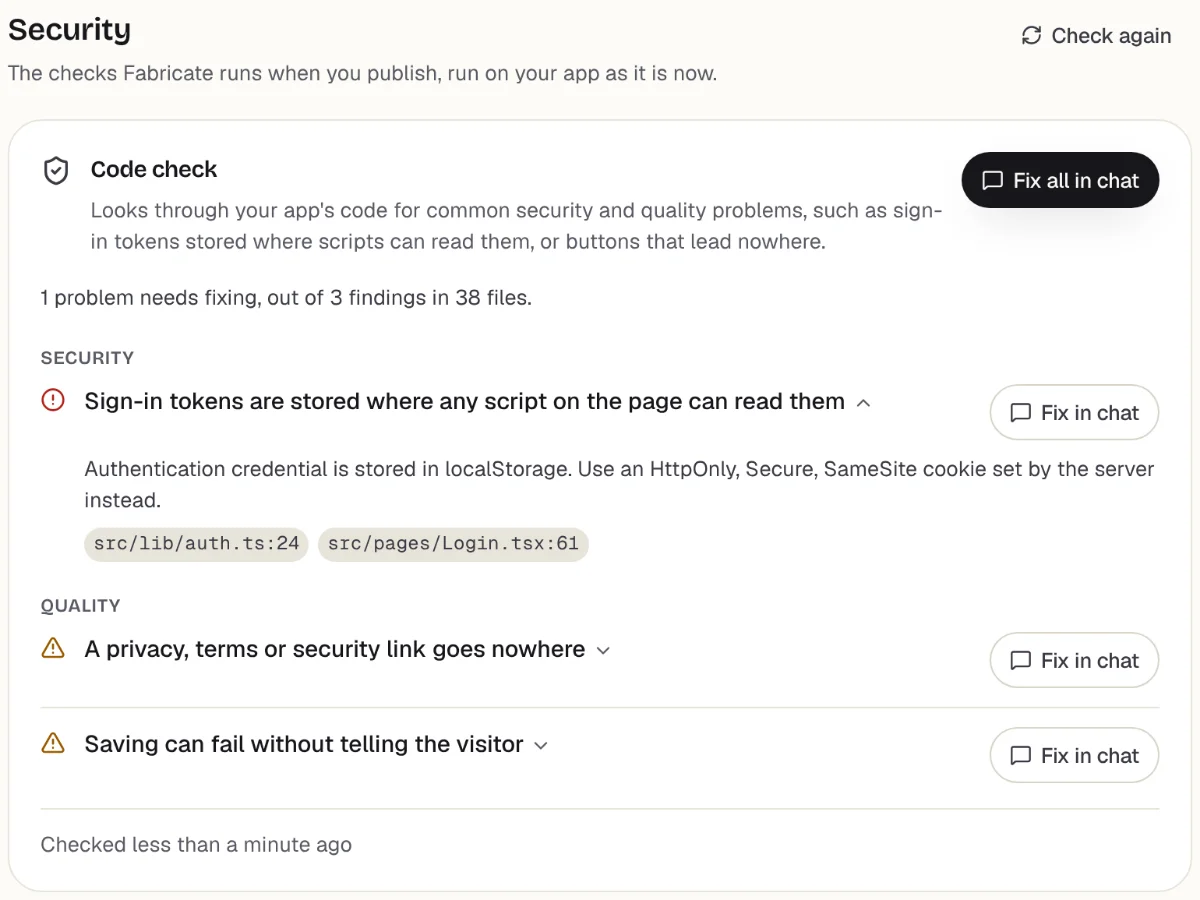
Meku's free plan leaves out connecting Supabase, which is where its apps get sign-in and a database. Fabricate writes both into the app's own code, with server routes, on its Free plan too, and serves each app as its own Cloudflare Worker after opening it in a real browser. It can also import a React and Vite project, such as a Meku export. Building and publishing start free.
 Checks before you publish
What it does well
- Sign-in and a database on Free
- No Supabase project to connect
- Imports a React and Vite project
- Opened in a browser before it goes live
- Paid plans from
- $25 a month
- 350 credits a month on Pro
- Free plan
- 60 credits
- A month, to build and publish
- A live app
- Every plan
- Publishing is on every plan
How to Move a Meku App to Fabricate
- 1
Export the project
On a paid Meku plan, download the project as a ZIP or push it to GitHub.
- 2
Import the React project
Upload the .zip, or paste the repository's address if it is public, on Fabricate's Import a project page. The check is free.
- 3
Run the first build
The first build uses credits to get the pages running as they are, and a project that uses Supabase keeps using it. Add back the secret keys it lists by name.
- 4
On the free plan, rebuild it
A free Meku project cannot be exported, so paste its meku.app address into Rebuild my site at the top of this page, or describe the app.
- 5
Put it live
Press Publish; after the browser check the app is live, and on Pro and Max you can point your own domain at it.
Chat

Your app

The other Meku alternatives
What each one does well, and the kind of project it suits best.
- Number 2
Bolt.new
Best for: Full-stack apps with the backend included
Bolt.new builds full-stack apps from a prompt or a Figma frame, as Meku can, with Bolt Cloud supplying the database, sign-in, storage and server functions instead of a Supabase project you connect. It hosts the app at a bolt.host address, and the code can be downloaded or synced with GitHub.
- Figma frames as a starting point
- Bolt Cloud, with no Supabase to connect
- Expo for App Store apps
When to pick Bolt.new
If you want the backend included rather than connected, Bolt Cloud gives each project its database, sign-in and storage, and Expo can take the app to the App Store and Play Store.
From $25 a monthSources: bolt.new/pricing (opens in a new tab), checked ; Bolt help: Bolt Cloud (opens in a new tab), checked ; Bolt help: Figma (opens in a new tab), checked ; Bolt help: Expo for mobile apps (opens in a new tab), checked
- Number 3
Lovable
Best for: Web apps with a managed backend
Lovable builds web apps from a conversation or a Figma design, and runs the backend for you on Lovable Cloud, with a database, storage, sign-in and functions, rather than leaving it to a Supabase project you connect. It publishes to a lovable.app address, and Pro is $25 a month.
- Lovable Cloud runs the backend
- A Figma design as the start
- GitHub sync both ways, on all plans
When to pick Lovable
If you like building from a conversation but want the backend run for you instead of connected, Lovable Cloud includes it, and every plan syncs the code both ways with GitHub.
From $25 a monthSources: lovable.dev/pricing (opens in a new tab), checked ; Lovable docs: Lovable Cloud (opens in a new tab), checked ; Lovable docs: bring Figma designs into Lovable (opens in a new tab), checked ; Lovable docs: GitHub (opens in a new tab), checked
- Number 4
v0 by Vercel
Best for: Teams moving to Next.js on Vercel
v0 builds React and Next.js apps from a prompt and deploys them to Vercel. Like Meku it leaves the database to another service, here one-click integrations with Neon, Supabase or Upstash, each an account on that service.
- Next.js as well as React
- Supabase among its databases
- Hosting on Vercel
When to pick v0 by Vercel
If your Meku app already uses Supabase and you want Next.js on Vercel, v0 connects Supabase in one click and deploys to Vercel.
From $30 per user a monthSources: v0.app/pricing (opens in a new tab), checked ; v0 docs: deployments (opens in a new tab), checked ; v0 docs: databases (opens in a new tab), checked
- Number 5
Cursor
Best for: Developers who want the React code
Meku's paid plans export a project as a ZIP or push it to GitHub, and Cursor is where a developer can take it next: a code editor with an AI agent that edits files and runs terminal commands in your own project. Meku itself can be used from inside Cursor through MCP. Plus is $8 a month for Cursor's own models.
- Works on a Meku export
- Meku can run inside it through MCP
- Any stack, on any host
When to pick Cursor
If you will keep working on the code yourself, Cursor opens the React project Meku exports, and you host it wherever you like.
From $8 a monthSources: cursor.com/pricing (opens in a new tab), checked ; Cursor docs: models and pricing (opens in a new tab), checked ; Cursor docs: Agent (opens in a new tab), checked
- Number 6
Replit Agent
Best for: Keeping the code open while the agent works
Replit's Agent builds the app in a browser workspace with a database and Replit Auth built in, so sign-in and data need no Supabase project, and publishes it from there. It can import a project from GitHub, such as one Meku has pushed. On Core, at $20 a month, monthly credits pay for the Agent, publishing, traffic and storage.
- A database built into the workspace
- Replit Auth for sign-in
- Imports a project from GitHub
When to pick Replit Agent
If you want the backend built in and every file open beside the agent, Replit's workspace has a database and sign-in of its own.
From $20 a monthSources: replit.com/pricing (opens in a new tab), checked ; Replit docs: Replit Core (opens in a new tab), checked ; Replit docs: Auth (opens in a new tab), checked ; Replit docs: import from a provider (opens in a new tab), checked
Meku vs Fabricate: Supabase Behind the App or a Backend Inside It
Meku builds full-stack web apps and sites from a prompt, as React with Vite and Tailwind, with sign-in, a database, APIs and edge functions from Supabase. Fabricate writes the backend into the app itself: server routes in a Durable Object on Cloudflare Workers, with the app's own SQLite database.
Publishing: Meku publishes to a meku.app address or your own domain, with hosting and SSL included. Each published app deploys as its own Cloudflare Worker. Before an app can be published it is opened in a real browser, and one that crashes, never mounts or renders a blank page is blocked from publishing. Custom domains are on the paid plans.
Integrations: Fabricate builds in authentication and a SQLite database with no plugins or setup. Stripe Checkout on Pro and Max, with one-click test account setup or your existing keys; live payments require account verification and a live key.
Code: Meku says everything it generates is yours, and its paid plans export it as a ZIP or push it to GitHub. On Pro and Max, see, edit and download the code, or send it to GitHub.
Frequently asked questions
- How does Meku compare to Fabricate?
- Both build full-stack web apps from a prompt. Meku writes React with Vite and Tailwind and connects Supabase for sign-in and the database, from its Starter plan. Fabricate writes the backend into the app's own code, in a Durable Object with its own SQLite database, on its Free plan too, and opens every app in a real browser before it can be published.
- What does Meku's free plan include?
- 100 credits a month, at most 50 of them a day, 3 projects that are always public, one workspace and 1 custom domain. Private projects, exporting, GitHub, Figma import and connecting Supabase start on Starter.
- Can I bring a Meku project to Fabricate?
- Yes, from a paid Meku plan, which exports a project as a ZIP or pushes it to GitHub. Meku writes React with Vite, which Fabricate's Import a project page takes: upload the .zip, or paste the GitHub address if the repository is public. The check is free, the first build uses credits to get it running as it is, and a project that uses Supabase keeps using it. From the free plan, paste the published address into Rebuild my site at the top of this page instead.
- Which alternative is closest to Meku?
- Lovable also builds from a conversation or a Figma design, with Lovable Cloud in place of a Supabase project you connect, and Bolt.new starts from a Figma frame too. v0 keeps Supabase as one of its database options. Fabricate writes the backend into the app itself.
Sources
The pages this guide quotes, each with the day it was read.
- meku.dev (opens in a new tab), checked
- meku.dev/pricing (opens in a new tab), checked
- bolt.new/pricing (opens in a new tab), checked
- Bolt help: Bolt Cloud (opens in a new tab), checked
- Bolt help: Figma (opens in a new tab), checked
- Bolt help: Expo for mobile apps (opens in a new tab), checked
- lovable.dev/pricing (opens in a new tab), checked
- Lovable docs: Lovable Cloud (opens in a new tab), checked
- Lovable docs: bring Figma designs into Lovable (opens in a new tab), checked
- Lovable docs: GitHub (opens in a new tab), checked
- v0.app/pricing (opens in a new tab), checked
- v0 docs: deployments (opens in a new tab), checked
- v0 docs: databases (opens in a new tab), checked
- cursor.com/pricing (opens in a new tab), checked
- Cursor docs: models and pricing (opens in a new tab), checked
- Cursor docs: Agent (opens in a new tab), checked
- replit.com/pricing (opens in a new tab), checked
- Replit docs: Replit Core (opens in a new tab), checked
- Replit docs: Auth (opens in a new tab), checked
- Replit docs: import from a provider (opens in a new tab), checked
- fabricate.build/pricing, from our live plans
About this guide
Written by the Fabricate team. Fabricate is our product, so it is first on this page and marked "We make this". Where a reason to switch fits another tool better, the reason says which.
Each tool's card lists the pages we read about it and the day we read them. We compared the tools from their own pricing pages and documentation, not by signing up for them. Spotted something out of date? Write to info@fabricate.build.
Related guides
All alternatives- Lovable AlternativesBuilders that run the backend for you, and how they compare.Alternatives
- Sign-in in Fabricate AppsHow sign-in is written into a Fabricate app, with no Supabase to connect.Feature
- Build with CloudflareThe Workers and SQLite database a Fabricate app runs on instead of Supabase.Feature
- SaaS Dashboard BuilderOne of the things Meku is used for, with accounts and data included.Build it
Related pages
Figma Make Alternatives
Explore top Figma Make alternatives for AI app building. Compare features, pricing, and full-stack capabilities across l...
Read moreClaude Artifacts Alternatives
Love Claude Artifacts but need an app at its own address, with its own sign-in and database? Compare alternatives that b...
Read moreLovable Alternatives
Seven Lovable alternatives compared from their own pricing pages and docs on October 21, 2026: who each one suits, what ...
Read moreAll AI App Builder Alternatives
Compare every alternative we have reviewed, side by side.
Read moreAI App Builder
Describe your app and get a frontend, database, logins and a live URL in minutes.
Read more