AlternativesUpdated
Best Wix AI Alternatives in 2026
Wix's AI website builder, part of Wix Harmony, builds a Wix site from a prompt: you describe the business to Aria, its AI agent, then keep changing the site by prompting or by hand. The site runs on Wix's servers. That suits a business site; an application with its own accounts, database and API is a different job. Here are the alternatives that generate a codebase instead.
The Rebuild my site box from Fabricate's home page. It opens Fabricate with your rebuild written out, and nothing is built until you press Build there.
Key takeaways
- Wix's AI website builder generates a Wix site from a prompt, and a Wix site must run on Wix's servers.
- Fabricate generates a codebase instead: React 19 and TypeScript on the front, a Cloudflare Worker and a Durable Object behind it.
- Generated apps keep their data in the Durable Object's built-in SQLite database, with accounts and login built in when the app needs them.
- A Wix site stays on Wix; Fabricate offers source download and GitHub export on the paid plans.
Why Look for a Wix AI Alternative?
Wix AI Output Is a Wix Site
Wix's AI builds pages in the Wix editor, and Wix's help center says a Wix site must run on Wix's servers, so what you have at the end is a site on Wix rather than code you can run elsewhere.
Apps, Not Pages
Wix's AI builder is aimed at sites: stores, booking sites, blogs, event sites and portfolios. An app with its own schema and its own API endpoints is a different job.
Code Ownership
A Wix site cannot move to another host. AI app builders generate a codebase instead: Fabricate produces React 19 and TypeScript on the front and a Cloudflare Worker with a Durable Object behind it, with the code yours to download on Pro and Max.
Two Separate Wix Products
Wix bought the AI app builder Base44 in 2025, and Base44 runs as its own product, separate from the Wix website builder. That is where the boundary sits.
Compare at a glance
Fabricate beside Wix, feature by feature.
- Generates From a Description
- Fabricate
- Yes
- Wix
- Yes
- Output Is Source Code
- Fabricate
- React and TypeScript
- Wix
- Wix site
- Code Export
- Fabricate
- Paid plans
- Wix
- Not available
- Built-in Database
- Fabricate
- Durable Object SQLite
- Wix
- Wix collections
- Custom Backend Code
- Fabricate
- Generated in your code
- Wix
- Velo, in JavaScript
- Runs Off the Platform
- Fabricate
- Yes
- Wix
- No
- Hosting
- Fabricate
- Its own Cloudflare Worker
- Wix
- Wix's servers
Fabricate
We make thisBest for: Applications, not sites
Describe the app and get one integrated Cloudflare stack: React 19 frontend, server routes in a Durable Object, built-in SQLite. Building and publishing start free.
 Checks before you publish
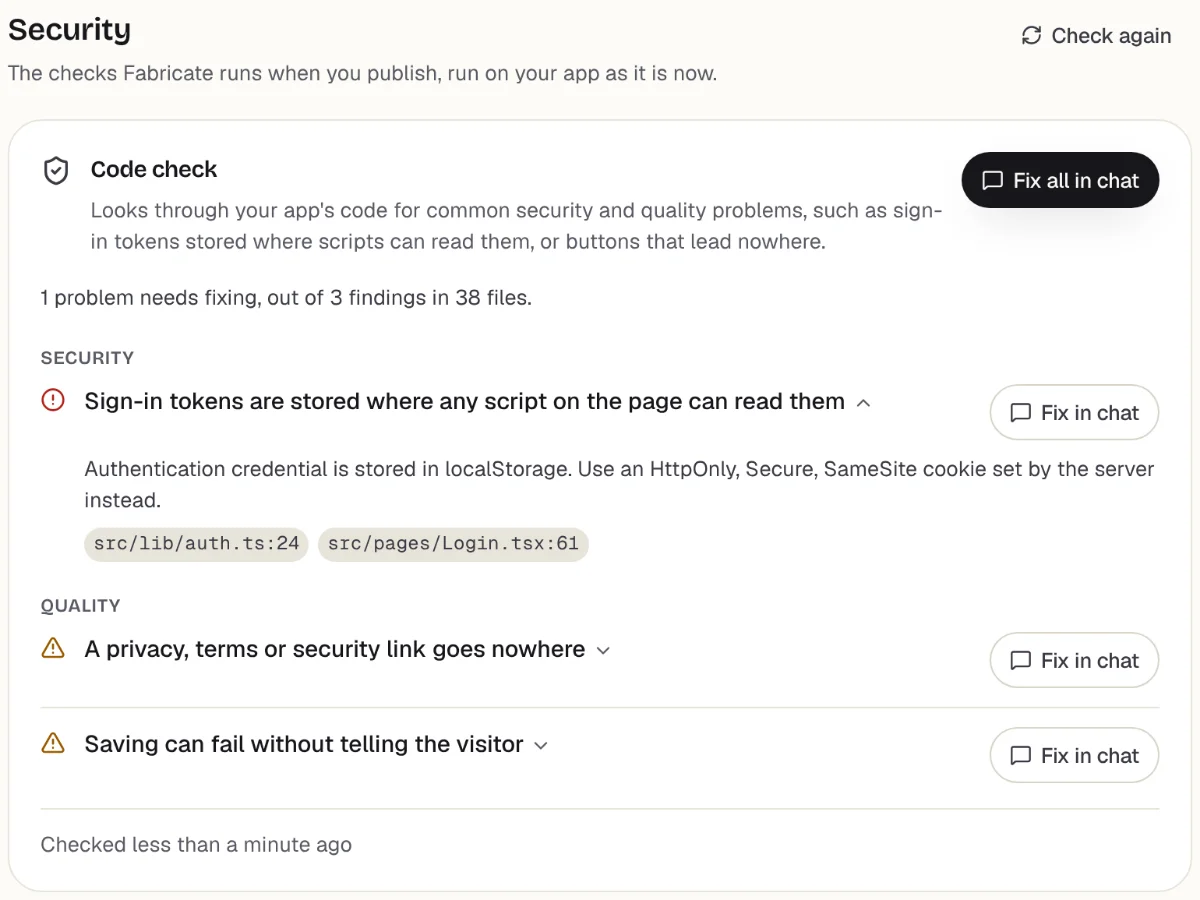
What it does well
- Generates a codebase
- Built-in SQLite per app
- Browser-verified before publishing
- Deploys as its own Worker
- Paid plans from
- $25 a month
- 350 credits a month on Pro
- Free plan
- 60 credits
- A month, to build and publish
- A live app
- Every plan
- Publishing is on every plan
The other Wix alternatives
What each one does well, and the kind of project it suits best.
- Number 2
Bolt.new
Best for: Quick full-stack builds
Builds full-stack apps in the browser on Bolt Cloud, with a database, sign-in, storage and Stripe.
- Bolt Cloud backend
- Publishes on the free plan
- GitHub sync
- Number 3
Webflow
Best for: Marketing sites
Visual web design with CMS.
- Design control
- CMS
- Animations
- Number 4
Framer
Best for: Landing pages
A visual website builder for designers, with animations and a CMS.
- Design
- Animation
- Publishing
- Number 5
Squarespace
Best for: Portfolios, small business
Website builder with designer templates, an AI site builder and online stores.
- Design quality
- E-commerce
- Domains
- Number 6
WordPress
Best for: Content sites
Open-source CMS with a large plugin library.
- Flexibility
- Plugins
- Community
Wix AI vs Fabricate: Site Generation vs App Generation
Wix's AI website builder takes a prompt and generates a complete site: pages, sections, copy and visuals, which you keep shaping with Aria or by hand in the editor. For a business site or a small store that is a quick way to start. What it produces is a Wix site, which is why the useful comparison is not Wix against a page builder but Wix's AI against a tool that generates an application.
Sites and apps are the dividing line. Wix's AI builder is aimed at stores, booking sites, blogs, event sites and portfolios. Fabricate is aimed at applications where users sign in, records belong to them, and the interface changes according to what is in the database.
Backend: Fabricate generates server routes in a Durable Object on Cloudflare Workers, with the app's data in that Durable Object's built-in SQLite database. Wix offers backend code through Velo, its development platform for Wix sites, written in JavaScript and run with the site on Wix.
Ownership: a Wix site stays on Wix's servers. Fabricate generates plain TypeScript with no proprietary format, and each published app deploys as its own Cloudflare Worker into a Workers for Platforms dispatch namespace rather than to Cloudflare Pages. Downloading the source or pushing it to GitHub is available on the paid plans.
Frequently asked questions
- What is the Wix AI site builder?
- Wix's AI website builder is part of Wix Harmony. You describe what you want to Aria, Wix's built-in AI agent, and it generates a complete site with pages, copy and visuals, which you keep changing by prompting or by editing by hand. The output is a Wix site that runs on Wix's servers, rather than a codebase.
- What is the Wix AI counterpart that generates code?
- Fabricate takes the same kind of description and generates a React 19 and TypeScript app with hand-written CSS, backed by a Durable Object that stores its data in a built-in SQLite database. Each published app deploys as its own Cloudflare Worker.
- Can I export a site built with Wix AI?
- No. Wix's help center says a Wix site must run on Wix's servers, whether or not AI built it. Fabricate generates plain TypeScript with no proprietary format; downloading the source archive or pushing it to GitHub is available on the paid plans.
- Is Wix AI good for apps?
- It is built for sites: stores, booking sites, blogs, event sites and portfolios. If the product needs its own tables and its own API endpoints, that is app generation rather than site generation. Wix also owns Base44, an AI app builder that runs as a separate product from the Wix website builder.
- How does pricing compare?
- Compare on what each plan actually includes for your build. Fabricate has a free tier; the paid plans add code download, GitHub export and custom domains.
Sources
The pages this guide quotes, each with the day it was read.
- wix.com/ai-website-builder (opens in a new tab), checked
- Wix help: exporting or embedding your Wix site elsewhere (opens in a new tab), checked
- Wix developers: about Velo (opens in a new tab), checked
- Wix developers: Velo data (opens in a new tab), checked
- base44.com (opens in a new tab), checked
- Globes: Wix acquires Base44 (June 18, 2025) (opens in a new tab), checked
- bolt.new/pricing (opens in a new tab), checked
- Bolt help: Bolt Cloud (opens in a new tab), checked
- webflow.com/pricing (opens in a new tab), checked
- framer.com/pricing (opens in a new tab), checked
- squarespace.com: AI website builder (opens in a new tab), checked
- fabricate.build/pricing, from our live plans
About this guide
Written by the Fabricate team. Fabricate is our product, so it is first on this page and marked "We make this". Each tool, ours or not, says who it suits best.
Each tool's card lists the pages we read about it and the day we read them. We compared the tools from their own pricing pages and documentation, not by signing up for them. Spotted something out of date? Write to info@fabricate.build.
Related guides
All alternatives- Free Website Builder with AIWhat the free plan covers: a monthly credit allowance and 1 app online for 30 days.Feature
- Build a Membership SiteGated content, subscriptions and community features, generated.Build it
- AI Landing Page BuilderLanding pages that capture leads into a database you control.Build it
- Wix vs SquarespaceWix against Squarespace, compared on plans, fees and AI.Compare
- Best Website Builder for Small BusinessNine site builders compared on bookings, payments, your own domain and price.Best list
- Squarespace AlternativesAnother site builder that sells, and the tools people weigh against it.Alternatives
- Best AI Website BuildersAI website builders for business and content sites, compared.Best list
Related pages
Squarespace Alternatives
Looking for Squarespace alternatives with AI? Compare modern AI builders that create custom applications beyond template...
Read moreHostinger Horizons Alternatives
Hostinger Horizons is now part of Hostinger AI Builder. Compare 6 alternatives on the backend, code export and what the ...
Read moreWix vs Squarespace
Compared side by side from each tool's own pages.
Read moreAll AI App Builder Alternatives
Compare every alternative we have reviewed, side by side.
Read moreAI App Builder
Describe your app and get a frontend, database, logins and a live URL in minutes.
Read more